
KPXOS OSU3X Custom Gaming Keyboard
3.4Editor score
Adjustable Trigger Distance
Visual Feedback Display
Plug and Play Setup
Discover the top keyboards for Geometry Dash ranked by speed and precision. This guide compares ten models featuring magnetic switches and rapid trigger tech
Finding the perfect keyboard for Geometry Dash requires precision timing and rapid response capabilities. Players need devices that can handle fast-paced rhythm inputs without lag or missed clicks during intense gameplay sessions.
We compared ten top-rated models focusing on magnetic switches and rapid trigger technology. Each product was evaluated for responsiveness, build quality, and specialized features that enhance rhythm game performance effectively.
Each pick showcases unique strengths tailored to different player needs and budgets. Prices may fluctuate over time so please check current listings before making your final purchasing decision today.
3.4Editor score
4.7Editor score

4.5Editor score
This side by side comparison highlights key differences across all ten models. We analyze switch types, polling rates, and unique features to help you find the ideal match for your setup.





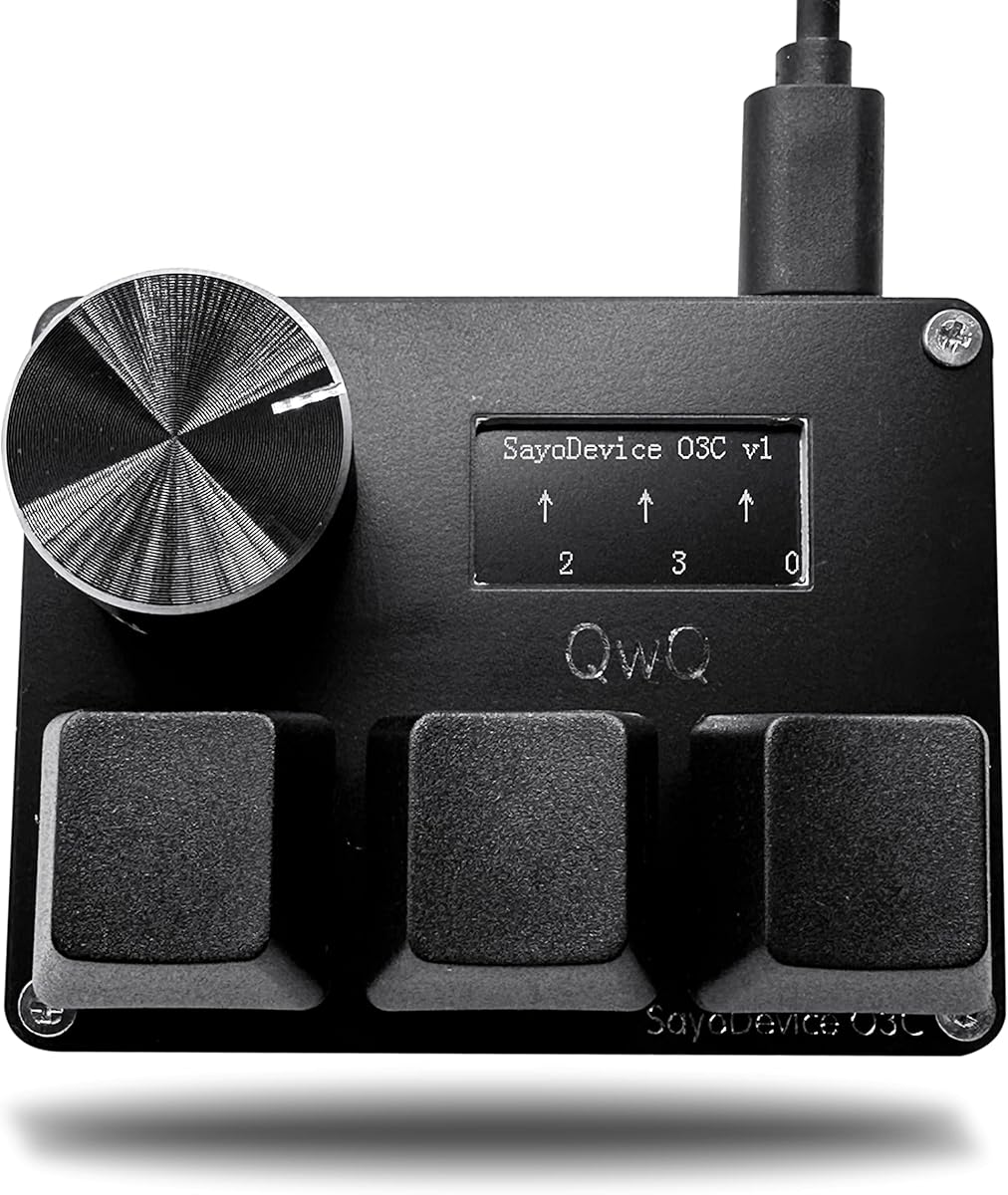
The BTXETUEL SayoDevice O3C stands out as a top contender for rhythm gaming. With a strong 4.7 rating, users praise its rapid trigger Hall switches that eliminate ghosting and provide precise actuation crucial for Geometry Dash speed runs.
We may earn a commission when you buy through this link, at no additional cost to you.
Key strengths include its 8000Hz polling rate which ensures every keystroke registers instantly. The IPS color screen allows real-time tracking of key presses and custom text, while the rotary knob adds versatility for navigating song lists without breaking focus.
Trade-offs involve a calibration step needed before initial use which may confuse new users. The mini keypad form factor is compact but requires adjustment for players used to full layouts. These are acceptable given the performance benefits offered.
Ideal for competitive players seeking precision and customization. This keyboard balances advanced features with affordability making it the Editor's Choice for Geometry Dash enthusiasts who demand reliable performance during intense gameplay sessions.
Rapid trigger resets keys based on movement not fixed points allowing faster repeated inputs essential for tight rhythm patterns.
The IPS screen displays key counts and custom text giving players real-time data to track performance metrics during sessions.
We may earn a commission when you buy through this link, at no additional cost to you.
The KPXOS OSU3X offers an accessible entry into magnetic switch gaming. With a 3.4 rating it provides solid basics for budget conscious players. Its magnetic switches support adjustable trigger distances ideal for learning rapid inputs in Geometry Dash.
We may earn a commission when you buy through this link, at no additional cost to you.
Features include a visual feedback display showing key counts in real time. The minimalist design keeps desk space clear while supporting high frequency polling for smooth inputs. It is easy to set up without complex software installations.
Trade-offs include a lower user rating suggesting potential durability or software quirks. Customization options are limited compared to higher end models. These are acceptable for beginners prioritizing cost over advanced tuning capabilities.
Best for new players testing magnetic technology. This keyboard delivers essential rapid trigger performance without breaking the bank making it a reliable Best Budget option for casual Geometry Dash practice.
Independent calibration allows each key to have unique trigger points matching individual finger pressure preferences.
Plug and play design means minimal configuration time so users can start gaming immediately after connection.
We may earn a commission when you buy through this link, at no additional cost to you.
This variant of the SayoDevice O3C maintains the high quality features users expect. Its 4.7 rating reflects consistent performance in rapid trigger accuracy. The mini keypad form factor is perfect for those wanting a dedicated game controller.
We may earn a commission when you buy through this link, at no additional cost to you.
Key strengths are its 8000Hz polling rate and hotswap capability allowing switch changes without soldering. The knob facilitates easy song list navigation. Screen customization lets users display personal IDs or stats during play.
Trade-offs involve a limited key count requiring adaptation for non game tasks. Calibration steps may be repetitive after firmware upgrades. These are acceptable since the device focuses purely on optimized rhythm gameplay.
Recommended for players wanting a dedicated game keypad. This keyboard offers specialized tools for Geometry Dash without excess keys making it efficient for focused training sessions.
Users can replace switches easily to tweak feel or fix issues without needing soldering tools.
Specialized knobs and macro keys streamline navigation and shortcuts for rhythm game environments.
We may earn a commission when you buy through this link, at no additional cost to you.
The O3C Rapid Trigger Keyboard builds on proven technology with added animation support. A 4.6 rating indicates high reliability. Its professional magnetic switches ensure consistent actuation critical for high speed Geometry Dash levels.
We may earn a commission when you buy through this link, at no additional cost to you.
Features like custom trigger release and screen animations add personalization. Hot-swappable switches allow future upgrades easily. The design supports macro combinations for copy paste tasks simplifying external tasks.
Trade-offs include calibration requirements and minimal standard keys. These are acceptable given the specialized gaming focus. Users prioritizing performance will find these minor limitations negligible.
Suitable for advanced users wanting visual flair. This keyboard merges performance with customizability making it a strong choice for personalized Geometry Dash setups.
Custom animations on screen provide dynamic feedback enhancing user engagement during gameplay.
Adjustable trigger release allows fine tuning of when keys reset for optimal speed.
We may earn a commission when you buy through this link, at no additional cost to you.
The Aula WIN60 HE is a premium full-size gaming keyboard adapted for rhythm games. Its 4.5 rating highlights quality magnetic switches that ensure durability and precise actuation. The 60 percent layout frees desk space for mouse movement.
We may earn a commission when you buy through this link, at no additional cost to you.
Key strengths include a lightweight web-based driver accessible from any device. High polling rates reduce latency significantly. RGB lighting adds visual appeal without distracting from gameplay. Rapid trigger mode supports fast key resets.
Trade-offs include lack of macOS support in the driver. Compact layout requires function key combos for standard inputs. These are acceptable for users prioritizing speed and clean desk setups.
Ideal for competitive gamers valuing space. This keyboard delivers premium features like rapid trigger and hot-swap compatibility at a solid price point.
Driver runs in browser removing need for local installation and ensuring easy updates.
8000Hz polling and rapid trigger ensure inputs register instantly for tight timing.
We may earn a commission when you buy through this link, at no additional cost to you.
The RedThunder K95 offers versatility with multi-device connectivity. Its 4.2 rating suggests reliability across modes. While designed broadly it supports Geometry Dash well via hot-swap switches and rapid response options.
We may earn a commission when you buy through this link, at no additional cost to you.
Features like TFT screen and rotary knob enhance usability. Gasket structure cushions keystrokes reducing fatigue. Triple mode connection allows switching between PC and mobile easily. RGB lighting syncs with rhythm for immersion.
Trade-offs include higher cost and side-printed caps that obscure characters. These are acceptable for users needing wireless freedom and aesthetic customization. The build quality justifies the expense.
Best for users wanting wireless flexibility. This keyboard combines comfort and features making it suitable for extended Geometry Dash sessions.
Triple mode support enables seamless switching between devices for diverse workflows.
Gasket construction dampens vibration improving typing feel and reducing hand strain.
We may earn a commission when you buy through this link, at no additional cost to you.
The WIN68 HE targets competitive gamers with advanced features. A 4.7 rating confirms high reliability. Its rapid trigger and DKS support allow nuanced control useful for precise Geometry Dash movements.
We may earn a commission when you buy through this link, at no additional cost to you.
Key strengths include 0.01mm adjustable actuation and SOCD handling. Gasket structure and pre-lubed switches ensure smooth travel. PBT keycaps resist wear over time. Web driver enables customization without installs.
Trade-offs include wired-only design and compact layout. These are acceptable for desk-bound players prioritizing speed. The feature set outperforms many peers in the category.
Ideal for users seeking control depth. This keyboard provides granular tuning for rapid inputs making it a powerful tool for serious Geometry Dash players.
0.01mm steps allow exact tuning of when keys activate for personal preference.
DKS and SOCD handling resolve conflicting inputs for smoother gameplay control.
We may earn a commission when you buy through this link, at no additional cost to you.
The AULA WIN68 HE merges performance with visual flair. Its 4.5 rating reflects balanced features. Hall switches ensure consistent actuation while web driver simplifies customization for Geometry Dash key bindings.
We may earn a commission when you buy through this link, at no additional cost to you.
Features include 16.8 million RGB colors for ambiance. Adjustable actuation points help match finger habits. High polling rate reduces input delay. Compact design saves space for mouse sweeps.
Trade-offs include lack of macOS support. Compact layout reduces navigation keys. These are acceptable for users focused on visual style and performance metrics.
Recommended for style-conscious gamers. This keyboard delivers solid speed and vibrant customization making it a strong pick for personalized Geometry Dash setups.
Wide color range allows custom effects matching gaming environment or rhythm tempo.
Browser driver simplifies setup and avoids clutter from heavy desktop software.
We may earn a commission when you buy through this link, at no additional cost to you.
The KPXOS OSU3X White offers visual clarity for inputs. A 3.0 rating suggests room for improvement. Its visual feedback display helps users track presses which aids learning Geometry Dash patterns.
We may earn a commission when you buy through this link, at no additional cost to you.
Features include precise magnetic calibration for consistency. Plug and play setup minimizes technical steps. RGB adds color to the setup. Design focuses on essentials without bulk.
Trade-offs include lower reliability scores. Basic features limit advanced tuning. These are acceptable for beginners needing simple visual aids for timing practice.
Best for learners valuing clarity. This keyboard provides direct feedback helping users adjust inputs during Geometry Dash training.
Real-time display of keystrokes aids users in verifying timing accuracy during practice.
Minimal setup reduces barriers to entry allowing players to start using quickly.
We may earn a commission when you buy through this link, at no additional cost to you.
The KPXOS OSU4X provides a focused keypad for rhythm input. A 3.1 rating indicates functional performance. It supports rapid trigger essential for Geometry Dash with individual calibration for each button.
We may earn a commission when you buy through this link, at no additional cost to you.
Features include customizable screen text for ID or stats. High-speed polling reduces lag. Plug and play design simplifies use. Compact size fits tight desks easily.
Trade-offs involve limited keys and lower feedback. These are acceptable for users needing a dedicated rhythm pad without full keyboard complexity.
Recommended for focused rhythm practice. This keypad offers essential speed and customization for Geometry Dash without unnecessary extras.
Minimalist design reduces distraction allowing players to concentrate on timing and rhythm.
USB 2.0 high-speed polling ensures quick data transmission for responsive inputs.
We may earn a commission when you buy through this link, at no additional cost to you.
Selecting the right keyboard involves balancing speed customization and budget. We examine key factors to help you choose the optimal tool for your Geometry Dash setup.
Rapid trigger allows keys to reset immediately upon release instead of waiting for a fixed reset point. This is crucial for Geometry Dash where rapid repeated clicks are needed to jump and navigate obstacles at high speeds. Without rapid trigger players may experience missed inputs due to mechanical limitations.
Prioritize keyboards with rapid trigger enabled if you aim for competitive play. This feature directly impacts how fast you can execute repeated inputs without delay.
Polling rate determines how often the keyboard reports inputs to the computer. Higher rates like 8000Hz minimize delay ensuring every click registers instantly. For rhythm games this reduces lag between your physical action and in-game response.
Choose models offering at least 1000Hz polling with 8000Hz preferred for precision. Lower latency improves accuracy during fast-paced segments.
Magnetic switches use Hall effect sensors to detect key presses which offers smooth consistent actuation without physical contact. Hot-swappable boards allow you to change switches easily. Adjustable actuation lets you set how deep a key must travel before triggering.
Select magnetic switches with adjustable actuation points between 0.01mm and 4mm. This flexibility helps match your finger pressure habits for consistent performance.
Compact layouts like 60 percent or mini keypads free desk space for mouse movement. Full-size boards offer more keys but occupy more space. Consider whether you need navigation keys or can use function layers instead.
Opt for 60 percent or smaller layouts if mouse clearance is a priority. Compact designs enhance comfort during long gaming sessions.
Some keyboards include screens or indicators showing keystrokes or stats. Customizable software allows macros and lighting adjustments. Visual cues help you track performance and personalize your setup for better focus.
Look for models with optional screens or software support if you value tracking progress. Customization options help adapt the device to your playstyle.
Durable construction ensures the keyboard lasts under intense use. Materials like PBT keycaps resist wear better than ABS. Gasket mounts reduce vibration and improve comfort. Look for warranties or customer support options.
Prioritize sturdy materials and reliable support to avoid frequent replacements. Quality build reduces fatigue and enhances longevity.
Wired connections offer stable low-latency performance while wireless adds flexibility. Ensure the interface matches your system requirements. Plug-and-play setups simplify use without driver installations.
Choose wired for competitive reliability or wireless if mobility is needed. Confirm driver compatibility with your operating system.
Prices vary significantly across models. Higher cost often brings better software and build. Entry-level options may suffice for casual use but lack advanced features. Weigh features against your specific needs.
Set a budget that covers essential features like rapid trigger and polling. Balance cost with expected performance gains for your goals.
Begin by calibrating magnetic switches before use. Follow on-screen or software prompts to set trigger distances. This ensures keys reset accurately and prevents double-click issues during fast inputs.
Customize key mappings to fit your playstyle. Assign macros for common actions or adjust RGB lighting. Use software tools to tailor the layout for efficient gameplay flow.
Maintain cleanliness by gently wiping keys with soft cloth. Avoid liquid cleaners. Check cables periodically for wear. Store in dry area to prolong life and performance.
Rapid trigger technology resets keys immediately upon release instead of waiting for a fixed point. This allows faster repeated inputs without delay. For Geometry Dash it prevents missed clicks during rapid jumps or obstacles improving reaction times significantly.
Yes magnetic switches use Hall effect sensors for contactless detection ensuring smooth consistent actuation. They offer adjustable actuation points and longer lifespan. These traits reduce latency and fatigue essential for rhythm game precision and speed.
Calibration usually involves following on-screen prompts or software steps to set key travel distances. Most models require a simple button press or software menu selection. This ensures consistent reset points for accurate input tracking.
Compact layouts like 60 percent work well since they free desk space for mouse movement. You can use function keys for navigation. This setup reduces clutter while maintaining essential speed and responsiveness for gameplay.
A polling rate of 1000Hz minimum is acceptable but 8000Hz is preferred for reduced latency. Higher rates ensure every keystroke registers instantly. This minimizes lag helping you react to fast-paced in-game events accurately.
Many models support hot-swapping allowing you to change switches without soldering. This enables testing different feels or fixing issues easily. Check product details to confirm compatibility with your desired switch type.
Our top picks highlight models balancing speed customization and budget. The BTXETUEL SayoDevice O3C leads for overall value while the Aula WIN60 HE offers premium compact features for serious players.
Prioritize rapid trigger and high polling rates to ensure responsive inputs. Choose layouts that fit your desk and playstyle. Consider visual feedback tools to track progress effectively.
Prices and availability may change so verify current listings before purchase. Use this guide to find the model matching your needs and enhance your Geometry Dash experience.