
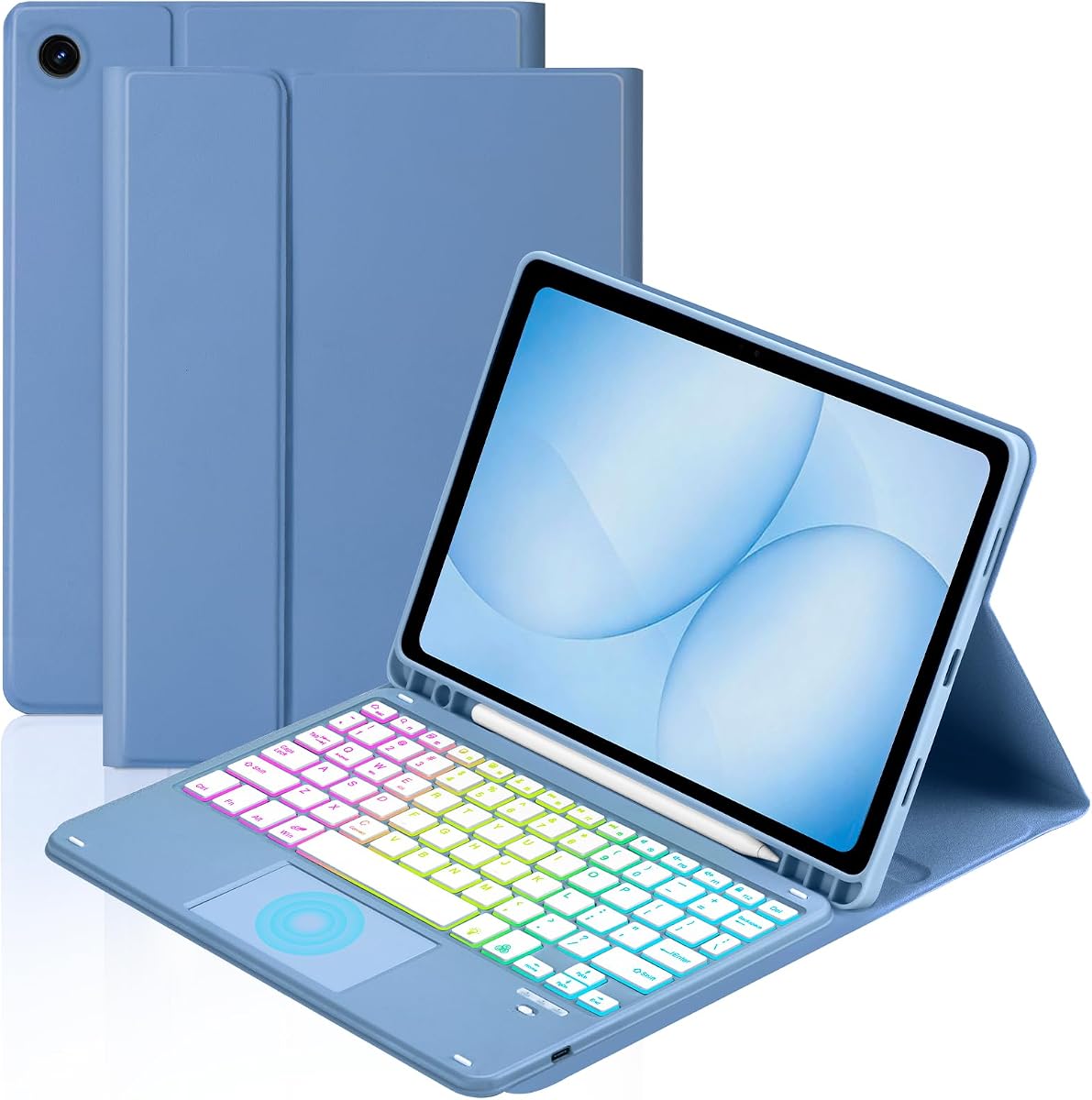
YBING Keyboard Case
4.5Editor score
7-Color Rainbow Backlight
360 Rotatable Magnetic Adsorption
Built-in Pencil Holder
Discover the top 10 keyboards for Samsung A11 tablets comparing features like trackpads, battery life, and protection to boost your productivity instantly.
Finding the right keyboard for your Samsung A11 tablet can transform your device into a portable workstation. The best options offer durable protection, responsive typing, and seamless connectivity for everyday tasks.
We evaluated ten highly rated keyboard cases based on compatibility, build quality, and user feedback. Each product was assessed for its unique features, battery performance, and overall value for Samsung users.
Every pick highlights key strengths and potential trade-offs to help you decide quickly. Prices and availability may change, so check the current listings before making your final purchase decision.
4.5Editor score

4.3Editor score

4.3Editor score
This comparison table highlights key specifications and features across all ten top-rated keyboard cases to help you find the perfect match for your Samsung A11 tablet.



The Dexnor keyboard case is a top-tier option for turning your Samsung A11 tablet into a functional laptop. With a rating of 4.3 stars, it offers a robust set of features including a trackpad and lightweight design.
We may earn a commission when you buy through this link, at no additional cost to you.
Its standout quality is the built-in multi-touch trackpad, which allows for laptop-like navigation without touching the screen. The strong magnets ensure the tablet stays securely in place on your desk or lap.
While it lacks a floating cantilever design, the 120-degree viewing angle provides comfort for extended work sessions. Users should note that the keyboard cannot be folded to the back for compact storage.
This choice is ideal for professionals seeking a reliable all-in-one solution for productivity. If you value navigation and support over ultra-compact folding, this case is highly recommended.
The included trackpad supports multi-finger gestures for efficient browsing and document editing.
Weighing only 1.36 pounds, it is easy to carry for travel and daily commutes.
We may earn a commission when you buy through this link, at no additional cost to you.
The TUNKARMOR case provides a versatile setup for the Samsung A11 and A9 Plus tablets. Rated 4.3 stars, it features a detachable keyboard that can be moved or removed based on your needs.
We may earn a commission when you buy through this link, at no additional cost to you.
Key strengths include the honeycomb grid pattern inside the case, which helps protect the device from overheating and physical bumps. The auto sleep/wake function also helps save battery life effectively.
A trade-off is that neither the tablet nor the pen is included, so you must ensure compatibility with your existing devices. However, the protection and flexibility make up for these missing components.
This product is perfect for users who want a modular approach to their tablet setup. If you need a case that adapts to different work environments, TUNKARMOR delivers strong performance.
The detachable design allows you to use the tablet as a standalone device when typing isn't needed.
Full edge coverage and anti-slip slots ensure the tablet stays safe from drops and scratches.
We may earn a commission when you buy through this link, at no additional cost to you.
This keyboard case stands out because it includes a rechargeable Bluetooth mouse along with a built-in smart trackpad. With a 4.4 rating, it offers excellent value for users who need precise cursor control.
We may earn a commission when you buy through this link, at no additional cost to you.
The vibrant rainbow backlight options add a fun aesthetic to typing, while the trackpad supports multi-finger gestures for better navigation. It works across iOS, Windows, and Android systems seamlessly.
Some users may need to check their model number carefully before purchasing to ensure a fit. Additionally, you will need to provide your own charging head for the cable provided.
If you prefer a complete package with mouse and keyboard, this is a strong contender. It is great for office work or creative tasks where a mouse might be more ergonomic than a touchpad.
The included mouse allows for detailed editing tasks without relying on the trackpad.
Rainbow lighting modes make typing enjoyable even in low-light environments.
We may earn a commission when you buy through this link, at no additional cost to you.
The Soke keyboard case boasts an impressive 4.6 rating from users, signaling high satisfaction with its design and functionality. It is specifically built for the 2025 release of the Samsung Tab A11 Plus.
We may earn a commission when you buy through this link, at no additional cost to you.
Its ability to support iOS, Android, and Windows systems makes it a versatile tool for travelers or multi-device users. The 7-color backlight ensures you can type comfortably in dimly lit places.
However, it only offers two viewing angles compared to three in other models. Also, there is no pen holder, so stylus users will need to find another storage solution for their accessories.
This case is highly recommended for those who switch between operating systems frequently. If you want reliable typing and broad compatibility, Soke offers excellent quality for the price.
Switching between operating systems is quick and easy with built-in shortcut keys.
The auto sleep/wake feature helps extend your tablet's battery life significantly.
We may earn a commission when you buy through this link, at no additional cost to you.
YBING delivers an affordable yet feature-rich keyboard case for the Samsung A11 and A9 Plus tablets. With a 4.5 rating, it combines essential functions like rotation and backlighting at a budget-friendly price.
We may earn a commission when you buy through this link, at no additional cost to you.
The 360-degree rotating cover is a highlight, allowing you to switch between portrait and landscape modes easily. The 16 powerful magnets ensure the keyboard stays firmly attached during typing.
A trade-off is that the backlight consumes battery life, reducing active usage time to about 5 hours when on. Additionally, it lacks a trackpad, which might limit navigation options for some users.
This case is perfect for students or casual users who want style and utility without breaking the bank. If you prioritize rotation and protection, YBING is a great starting point.
Rotate the back cover to find the perfect angle for watching videos or typing.
It offers high-end features like RGB lighting at an entry-level price.
We may earn a commission when you buy through this link, at no additional cost to you.
Harvopu enhances your tablet experience by including a 3-level DPI wireless mouse alongside the detachable keyboard. Rated 4.3 stars, it is designed for users who need desktop-grade precision on the go.
We may earn a commission when you buy through this link, at no additional cost to you.
The case material is tough and stain-resistant, making it easy to wipe clean after coffee spills or daily use. Battery life is a major plus, with up to 180 hours of continuous use per charge.
While the keyboard itself does not have a trackpad, the included mouse compensates for this. However, you will need to charge both the keyboard and the mouse separately for optimal performance.
This package is ideal for office workers or designers who need cursor control. If you want a complete workstation setup with durable protection, Harvopu offers significant value.
Adjustable DPI settings let you switch between precise editing and fast browsing.
Stain-resistant surfaces keep your case looking new even after regular use.
We may earn a commission when you buy through this link, at no additional cost to you.
The TiMOVO keyboard case is built for the 2026 release of the Samsung Galaxy Tab A11 Plus. With a 4.4 rating, it emphasizes portability and long battery life for everyday use.
We may earn a commission when you buy through this link, at no additional cost to you.
It features a detachable design so you can store the keyboard away when not needed. The 420mAh battery supports over 90 hours of work on a single charge, which is quite efficient.
One noted issue is that the keyboard may disconnect if left idle for 10 minutes, requiring a key press to reconnect. Also, there is no built-in holder for your stylus pen.
This model is suitable for users who prioritize battery efficiency and portability. If you want a lightweight case that stays powered for long periods, TiMOVO is a solid choice.
The hibernation mode helps conserve battery when you step away from the device.
Adjustable angles ensure comfort whether you are typing or watching videos.
We may earn a commission when you buy through this link, at no additional cost to you.
This MePadKey model combines a keyboard with a smart touchpad that supports multi-finger gestures. Rated 4.2 stars, it provides a familiar laptop-like experience for navigating your tablet.
We may earn a commission when you buy through this link, at no additional cost to you.
You can use two-finger swipes to scroll or zoom, and three-finger swipes to switch apps. The rainbow backlight adds visual flair, and the magnetic adsorption keeps the keyboard secure.
While it is a good option for navigation, the rating is slightly lower than competitors. Also, specific battery capacity details are not provided, so you may need to test usage times.
This case works well for those who rely heavily on touchpad gestures. If you want a more traditional laptop feel without needing an external mouse, consider this model.
Supports up to four-finger gestures for advanced multitasking capabilities.
Strong magnets prevent the keyboard from sliding around during typing sessions.
We may earn a commission when you buy through this link, at no additional cost to you.
This variant of the MePadKey case is recognized for its 360-degree rotating cover and integrated touchpad. With a 4.3 rating, it offers a robust set of features for versatile use.
We may earn a commission when you buy through this link, at no additional cost to you.
The rotating design allows you to flip the cover entirely, providing protection even when the tablet is used in different orientations. It also includes a dedicated spot for your pen.
One downside is that it does not mention a specific release year, so checking compatibility is essential. There is also no included screen protector, so you may want to purchase one separately.
This is a great choice for users who need both rotation and a touchpad. If you want a versatile case that covers both typing and navigation, MePadKey is a strong pick.
Rotate the case fully to find the best orientation for reading or typing.
The integrated pen holder keeps your stylus secure and ready for note-taking.
We may earn a commission when you buy through this link, at no additional cost to you.
Supveco offers a high-quality case with a flexible silicone back and TPU cover for added shock protection. Rated 4.6 stars, it is designed for the 2026 release of the Samsung Tab A11.
We may earn a commission when you buy through this link, at no additional cost to you.
The honeycomb grid pattern inside the case helps prevent overheating, which can extend the lifespan of your tablet. The detachable magnetic keyboard ensures you can carry the device easily.
There is no pen holder included, and you will need to provide your own charging head. These are minor inconveniences given the overall high quality of the materials and build.
This case is excellent for users concerned about physical protection and heat. If you want a durable cover that still offers typing functionality, Supveco is a reliable option.
The internal honeycomb pattern helps regulate temperature during heavy use.
Flexible silicone and TPU materials absorb shocks to protect your device.
We may earn a commission when you buy through this link, at no additional cost to you.
Choosing the right keyboard case requires considering factors like compatibility, typing experience, and additional features that match your daily needs.
Ensure the case lists your specific model number like SM-X230 or SM-X210 before purchasing to avoid fit issues.
Compatibility is critical since even similar-looking models may have different button placements or dimensions.
Decide between a fixed keyboard case or a detachable one depending on whether you want to remove the keyboard.
Detachable keyboards offer more flexibility for handheld use while fixed ones provide a more laptop-like stability.
Look for rechargeable keyboards with long standby times so you do not have to charge them constantly.
Some models offer over 100 hours of use, which is vital for travel or long workdays.
A backlit keyboard is useful for typing in low-light conditions and adds to the overall usability of the device.
Choose a model with adjustable brightness or color modes to suit your visual preferences.
Some cases include a trackpad or a wireless mouse, which helps for navigating files without touching the screen.
This feature is especially important if you use productivity apps that require precise cursor control.
The case should cover the front and back of the tablet to guard against scratches, bumps, and daily wear.
Features like anti-slip grooves or soft interior linings add extra safety for your investment.
Adjustable stand angles allow you to find a comfortable position for typing or watching content.
Multiple angles are useful if you frequently change your working position or share your device.
Premium materials like PU leather or TPU ensure durability and a better feel while using the device.
High-quality materials also often provide better heat dissipation and resistance to daily scratches.
To start using your keyboard case, simply align the magnetic edges to attach the keyboard to the tablet securely.
If your keyboard requires Bluetooth pairing, navigate to your tablet settings and select the keyboard name to connect.
Keep the case clean by wiping it with a dry cloth to remove dust and maintain the longevity of the buttons.
Yes, most models include a rechargeable battery that needs to be charged via a USB cable. This ensures the keyboard stays powered without draining your tablet.
Many models come with a built-in pen holder to store your stylus, but the pen is usually not included. Check the product details to confirm if a pen is part of the package.
For detachable models, you can remove the keyboard to use the tablet as a standalone device. This flexibility allows for reading or viewing without the weight of the keyboard.
Most cases are not waterproof but are made of materials that can be wiped clean. It is recommended to avoid exposing the keyboard to liquid spills directly.
Some models support multiple operating systems including iOS, Android, and Windows. However, macOS support is less common and should be verified before purchasing.
Battery life varies by model and usage, but many offer several hours of active typing on a single charge. Standby times can extend up to hundreds of hours depending on usage.
We have explored ten top-rated keyboards ranging from budget-friendly options to premium picks with advanced features like trackpads and wireless mice.
Consider your specific needs such as battery life, compatibility, and extra accessories to narrow down the list to the most suitable choice.
Always check current availability and pricing before finalizing your purchase to ensure you get the best value for your Samsung A11 tablet.