
YUNZII X98
4.7Editor score
QMK VIA firmware support
Hot swappable switch sockets
Rotary knob control included
Discover the top 10 keyboards with acrylic chassis for gaming and work. We compare design, connectivity, and features to help you find the perfect clear
Modern mechanical keyboards have evolved beyond simple input devices into stunning centerpieces of any desk setup. A keyboard with acrylic chassis offers a unique blend of durability and transparency that showcases internal components beautifully.
This guide compares ten standout models featuring translucent or clear frames. We evaluated build quality, connectivity options, customization potential, and typing experience to highlight the most impressive options available today.
Each pick highlights specific strengths like wireless performance, gasket mounting, or vibrant RGB lighting. Note that product availability and pricing can fluctuate, so check current listings before making your final decision.
4.7Editor score

4.7Editor score
5.0Editor score
The following table provides a side-by-side overview of all ten models evaluated in this guide. Use this quick reference to compare key specifications and features at a glance.


The GravaStar Mercury K1 Lite stands out as a top contender in the clear keyboard space. It combines a unique Crystal Aurora design with reliable performance features that appeal to both gamers and typists.
We may earn a commission when you buy through this link, at no additional cost to you.
Its open-frame construction allows RGB light to spill beautifully across the desk. The five-layer gasket mount system ensures a soft, responsive keystroke that feels premium to the touch.
While the price is higher than average entry-level models, the build quality justifies the cost. The battery life supports weeks of use, making it practical for daily work or extended gaming sessions.
This keyboard is ideal for users who prioritize aesthetics without sacrificing functionality. If you want a statement piece that performs well in various tasks, the K1 Lite is a strong recommendation.
The Crystal Aurora colorway blends soft lavender and icy mint accents for a dreamy glow that enhances any workspace setup.
Tri-mode support allows seamless switching between devices, ensuring versatility for multitasking across laptops and desktops.
We may earn a commission when you buy through this link, at no additional cost to you.
The YUNZII X98 offers an incredible value for those seeking a clear keyboard without breaking the bank. It delivers premium features like gasket mounting and hot-swappable sockets at a budget-friendly price.
We may earn a commission when you buy through this link, at no additional cost to you.
Users can enjoy a creamy typing experience right out of the box thanks to pre-lubed switches. The rotary knob adds convenience for volume control, making media tasks effortless during work or play.
Some may find the ABS keycaps prone to shine over time, but this is common at this price point. The overall performance and aesthetic appeal make it a top choice for beginners and enthusiasts alike.
If you need a versatile keyboard that supports customization and looks great on your desk, this model is highly recommended. It balances cost and quality better than many competitors in its class.
QMK and VIA firmware support allows you to remap keys and create macros tailored to your specific workflow needs.
Connect up to five devices and switch between them instantly, perfect for users managing multiple systems simultaneously.
We may earn a commission when you buy through this link, at no additional cost to you.
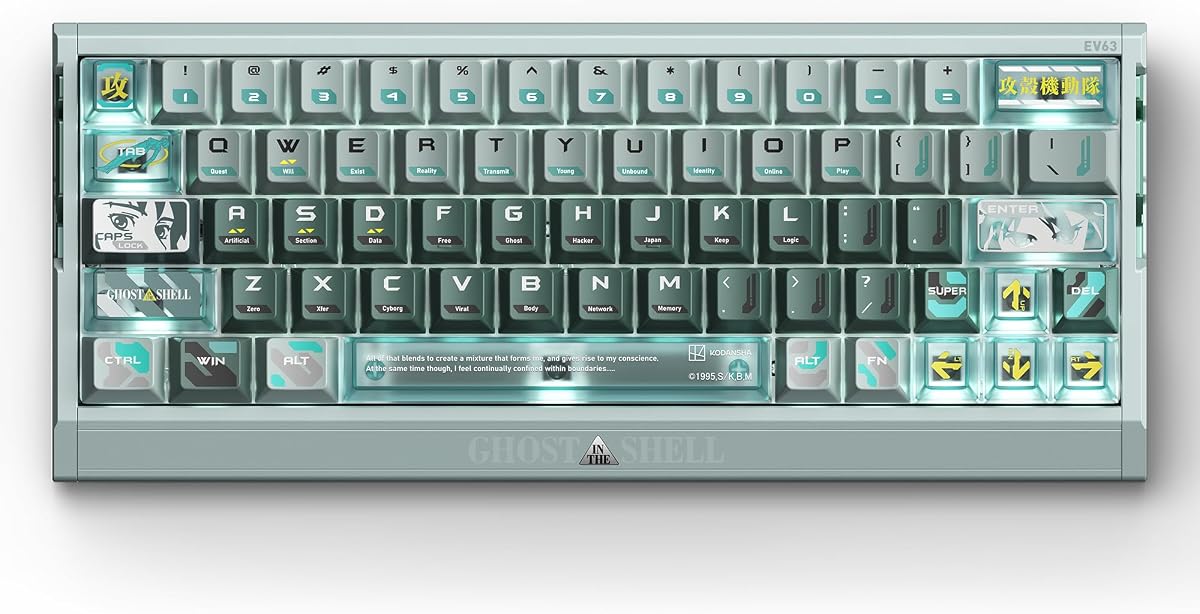
The IQUNIX EV63 Ghost is a masterpiece for fans of high-end gaming peripherals. Its CNC aluminum case and magnetic switches deliver precision and durability that rivals the most expensive options available.
We may earn a commission when you buy through this link, at no additional cost to you.
Hall Effect technology provides adjustable actuation and rapid trigger support, which are crucial for competitive FPS gaming. The Ghost in the Shell theme adds a unique cyberpunk aesthetic to any setup.
While the compact 60% layout may not suit everyone, those who prefer efficiency will appreciate the space-saving design. The cost is steep, but the performance and materials justify the investment for serious gamers.
This keyboard is best suited for users who demand top-tier performance and unique visuals. If you want a premium control terminal that stands out, the EV63 Ghost is unmatched in its category.
Zero millisecond rapid trigger allows for smoother strafing and faster directional changes during intense gameplay.
The CNC aluminum case gives the keyboard real weight and a cold-touch premium metal finish that feels robust.
We may earn a commission when you buy through this link, at no additional cost to you.
The KiiBoom Phantom81 V4 distinguishes itself with an enormous battery that supports weeks of continuous use. This is ideal for users who travel often or want to avoid frequent recharging interruptions.
We may earn a commission when you buy through this link, at no additional cost to you.
Its frosted acrylic design conceals internal components while maintaining a sophisticated look. The stainless-steel weight base adds stability, ensuring the keyboard stays put during intense typing or gaming sessions.
The rating is somewhat lower than others, which suggests potential minor issues with quality control or driver software. However, the feature set and build materials remain compelling for those prioritizing endurance.
Consider this model if long battery life is your top priority. It offers a solid mix of wireless freedom and wired stability, making it a reliable choice for heavy daily users.
The 8000mAh battery fuels about 84 hours of continuous use with RGB on or 180 hours with RGB off.
A gasket-mounted structure ensures wobble-free rotations and provides a creamy, thocky typing experience.
We may earn a commission when you buy through this link, at no additional cost to you.
This transparent mechanical keyboard offers a simple entry into the world of clear chassis designs. It fits well in compact setups where desk real estate is limited but style is still important.
We may earn a commission when you buy through this link, at no additional cost to you.
The quiet linear switches make it suitable for shared workspaces where noise could be a distraction. The rotary knob provides convenient control over volume and lighting without needing to reach for keys.
While it ranks lower in user satisfaction, it serves as a functional budget option. The battery life is decent for casual use, though heavy gamers might prefer more robust alternatives.
Choose this if you need a small, stylish keyboard for light gaming or office tasks. It proves that clear aesthetics can be accessible even at a lower price tier.
The 80-key layout eliminates the numpad but retains essential navigation keys for productivity.
Seamlessly switch between Bluetooth 5.0, 2.4GHz, and USB-C modes to connect up to five devices.
We may earn a commission when you buy through this link, at no additional cost to you.
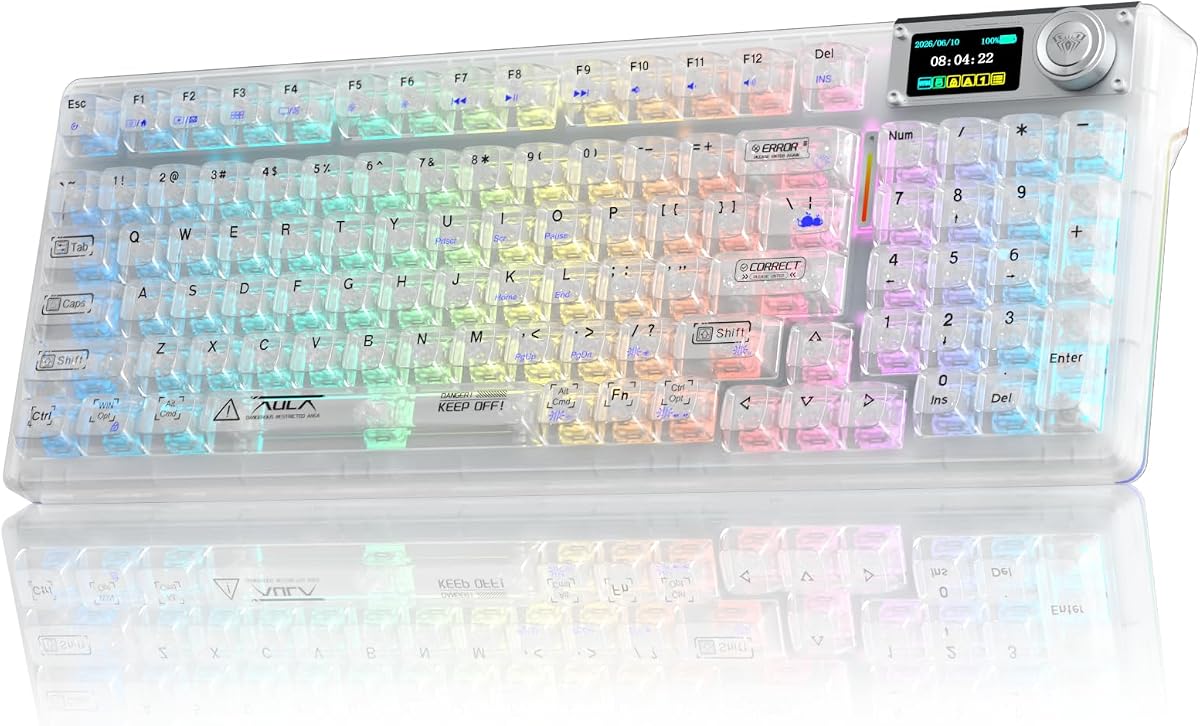
The Aula F98Pro V3 introduces a smart LCD screen that displays system info in real time. This feature adds a unique functional layer beyond standard keyboard capabilities.
We may earn a commission when you buy through this link, at no additional cost to you.
Its massive 10000mAh battery ensures you rarely need to plug in for power. The Ice Crystal switches offer excellent light transmission, enhancing the RGB effects on the clear chassis.
The screen customization requires a driver connection on Windows, which limits accessibility for Mac users. Some users report software quirks, but the hardware features remain attractive for power users.
This keyboard is a great choice for those who want extra tech features like a screen and large battery. It balances practicality with a futuristic look suitable for a modern desk.
The TFT screen shows battery level, time, and connection status without needing to check system menus.
Five-layer noise-dampening filling eliminates cavity noise for a smooth typing experience.
We may earn a commission when you buy through this link, at no additional cost to you.
This white version of the X98 series provides a clean and modern look for minimalist setups. The high-transparency PC material ensures the RGB lighting shines through vividly.
We may earn a commission when you buy through this link, at no additional cost to you.
Snow switches offer a smooth and quiet typing experience right out of the box. The keyboard supports connecting up to five devices, making it versatile for work and entertainment.
Some users might find the switch feel softer than expected, but the overall feedback remains positive. It is a solid option for those who prioritize a bright, clean aesthetic.
If you want a keyboard that blends seamlessly with white desk accessories, this model is an excellent choice. It balances style and performance effectively for a reasonable price.
The double-layer clear keycaps maintain clarity while ensuring anti-fading of key characters over time.
Seamlessly switch between laptops and desktops using the robust Bluetooth and 2.4GHz wireless options.
We may earn a commission when you buy through this link, at no additional cost to you.
The Mercury V60 HE is engineered for competitive FPS games where split-second reactions matter. Its 8000Hz polling rate and rapid trigger technology give players a distinct advantage.
We may earn a commission when you buy through this link, at no additional cost to you.
The Crystal Rose design combines pink aesthetics with immersive RGB, creating a visually appealing desk setup. Hall Effect switches allow for precise adjustment of actuation points to suit your play style.
While the compact layout might limit use for productivity, it is perfect for gamers who want maximum mouse space. The cost is significant, but the performance features are top-tier.
This is the best choice for serious gamers who prioritize response speed. If you want a reliable tool for competitive play, the V60 HE delivers unmatched performance.
Magnetic switches provide adjustable actuation from 0.005mm to 3.5mm for customized input precision.
The transparent Crystal Rose chassis creates a visually appealing gaming desk setup for streamers.
We may earn a commission when you buy through this link, at no additional cost to you.
The Phantom81 Lite excels in customization through its support for QMK and VIA software. This allows users to map every key exactly to their needs, making it perfect for programmers.
We may earn a commission when you buy through this link, at no additional cost to you.
Its frosted ABS molding offers durability and a refined feel without being too heavy. The sound-enhancing gasket design provides a satisfying thocky experience that enthusiasts appreciate.
The battery life is moderate compared to some larger models, but it is sufficient for most daily use cases. The compact 75% layout optimizes desk space while keeping all essential keys.
Choose this if you value flexibility and a smooth typing feel. It is a fantastic option for DIY enthusiasts who want to tweak their device to suit specific workflows.
VIA compatibility enables users to customize every key and macro without complex tools.
The frosted finish guards against discoloration and adds a refined look to the device.
We may earn a commission when you buy through this link, at no additional cost to you.
This variant of the F98Pro V3 is highly rated for its balance of clear design and performance. It offers a robust feature set that satisfies most users looking for a full-size clear keyboard.
We may earn a commission when you buy through this link, at no additional cost to you.
The 10000mAh battery supports long work sessions without needing frequent charges. The gasket mount ensures a softer and more elastic typing feel that is comfortable for long periods.
Driver customization is powerful but restricted to Windows systems in wired mode. This might limit some users, but the core functionality remains strong across wireless connections.
It is a top recommendation for those wanting a clear keyboard with reliable battery life. The combination of aesthetics and utility makes it a standout choice for daily use.
Built-in 10000mAh high-capacity battery fits long-time work and high-intensity gaming.
Five-layer noise-dampening filling ensures a soft and smooth typing experience with every keystroke.
We may earn a commission when you buy through this link, at no additional cost to you.
Selecting the right acrylic keyboard involves weighing aesthetics against performance. This section breaks down the key factors to consider before making your purchase.
Acrylic chassis vary in clarity and durability. Look for models with reinforced frames to prevent scratching or yellowing over time. High-quality materials ensure your keyboard remains clear and sturdy for years of use.
Prioritize sturdy build materials to maintain aesthetic integrity and long-term durability.
Switch choice defines your typing experience. Linear switches offer smoothness, while tactile ones provide feedback. Hot-swappable boards let you experiment without soldering. This flexibility is crucial for finding your perfect feel.
Choose hot-swappable options to easily adapt the keyboard to your preferred switch style.
Modern clear keyboards often support multiple connection modes. Bluetooth allows connection to several devices, while 2.4GHz ensures low latency for gaming. Wired USB-C offers the fastest response for competitive play.
Verify that the connectivity modes match your workflow and gaming needs.
Wireless models depend on internal batteries. Larger capacities like 10000mAh extend usage between charges. Fast charging or USB-C connectivity makes maintenance easier. Long battery life is vital for uninterrupted productivity.
Look for high-capacity batteries to minimize downtime and recharging frequency.
Software support allows key remapping and macro creation. QMK and VIA compatibility offer deep customization for advanced users. RGB lighting control enhances the visual appeal of clear designs. Ensure the software supports your operating system.
Confirm software compatibility to fully utilize programmable features on your device.
Layout determines how many keys you have. Compact sizes save space, while full-size includes a numpad. 60% and 75% layouts are popular for gamers. Choose a size that fits your desk and workflow comfortably.
Select a layout that balances desk space with necessary key functions.
Gasket mounting provides a softer and more cushioned feel. It reduces typing noise and improves comfort. Top-mount designs are stiffer. If you value a quiet and creamy sound profile, look for gasket-mounted models.
Opt for gasket mounts to reduce noise and enhance typing comfort.
Beyond clear chassis, consider keycaps and lighting. Clear keycaps enhance RGB effects. Some models include screens or knobs for extra control. These details personalize your workspace and add utility.
Check for extra features like knobs that enhance usability and design.
Clean your acrylic keyboard regularly using a soft, lint-free cloth. Avoid harsh chemicals that can scratch the surface. Gently dust around switches to prevent debris from affecting key performance over time.
If you have a hot-swappable keyboard, ensure you power it off before changing switches. Push the switch out gently from the bottom to avoid bending the socket pins. This extends the lifespan of your PCB.
Protect your keyboard from direct sunlight to prevent yellowing or fading. Use a cover when not in use to keep dust off the clear surface. Proper storage maintains the pristine look of your acrylic chassis.
Yes, modern acrylic keyboards are designed with high-quality polymers that resist scratches. However, they can be more prone to surface marks than metal cases. Cleaning them gently helps maintain their transparency and longevity.
Clear keycaps allow RGB light to pass through more evenly than opaque ones. This creates a vibrant effect that matches the aesthetic of the chassis. It is a popular choice for builders who want maximum lighting impact.
Absolutely, many models offer wireless modes with 1000Hz polling rates and low latency. Some premium options even feature Hall Effect switches for rapid trigger support. These specs make them suitable for serious competitive play.
Acrylic is a specific type of high-grade plastic known for its clarity. It is harder and more scratch-resistant than standard ABS plastic. This makes it ideal for see-through chassis designs.
Hot-swapping is safe if you follow the instructions. You should always disconnect the keyboard before removing switches. Using compatible switch types ensures you do not damage the socket pins during replacement.
Use compressed air to blow out dust between keys. Wipe the surface with a microfiber cloth slightly dampened with water. Avoid alcohol directly on the acrylic to prevent clouding or damage to the finish.
Most models support both Windows and Mac via Bluetooth or USB-C. Some software drivers may only work on Windows, but basic functionality remains available. Always check the system requirements before buying.
A 75% or 96% layout is often ideal for offices. They include arrow keys and a function row while saving space. This balance helps improve productivity without cluttering your desk.
We have reviewed ten exceptional keyboards that combine clear design with robust features. From the budget-friendly YUNZII X98 to the premium IQUNIX EV63, there is an option for every preference and need.
Prioritize battery life, connectivity, and build quality based on your specific usage. Whether you need wireless freedom or a high-speed gaming rig, the right model will enhance your daily computing experience.
Remember that availability and pricing may change. Check current listings to ensure you get the best deal on your chosen model before making your final decision.