
Adesso AKB-132HB Multimedia USB Keyboard
4.2Editor score
Three built-in USB ports
Multimedia hotkeys included
Quiet membrane key switches
This expert guide compares the top 10 keyboards with USB ports for 2026, evaluating connectivity, durability, and typing comfort to help you choose the right
Finding a keyboard with USB port integration can streamline your workspace by reducing cable clutter and offering convenient peripheral connectivity. These devices combine essential typing functions with built-in hubs for flash drives or mice.
We evaluated ten models based on build quality, hub speed, compatibility, and typing experience. Our comparison focuses on real-world usability across different operating systems and desk setups to ensure reliable performance.
Each pick highlights unique strengths like backlit keys, mechanical switches, or compact designs. Prices and availability change frequently, so verify current details before purchasing to ensure you get the best value today.
4.2Editor score
4.4Editor score
4.3Editor score
This side-by-side comparison highlights key specifications for all ten keyboards, focusing on hub type, connectivity options, and layout features to help you decide quickly.






The Adesso AKB-132HB stands out as an affordable entry point for users needing integrated USB connectivity. It holds a 4.2 rating from users who value simplicity and low cost in office setups.
We may earn a commission when you buy through this link, at no additional cost to you.
Its three built-in USB hubs allow you to connect flash drives or mice directly without reaching behind the computer. The membrane switches provide a quiet typing environment suitable for shared workspaces.
While the build feels standard for the price, the hotkeys for Windows applications and media playback add convenience. Some users note that it lacks advanced customization options found in pricier models.
This keyboard is ideal for students or home offices where budget matters most. If you need basic USB expansion without spending much, this model delivers reliable performance.
The three USB hubs simplify cable management by placing ports within arm reach for immediate access.
Dedicated hotkeys let you manage volume and apps quickly, enhancing workflow without mouse dependency.
We may earn a commission when you buy through this link, at no additional cost to you.
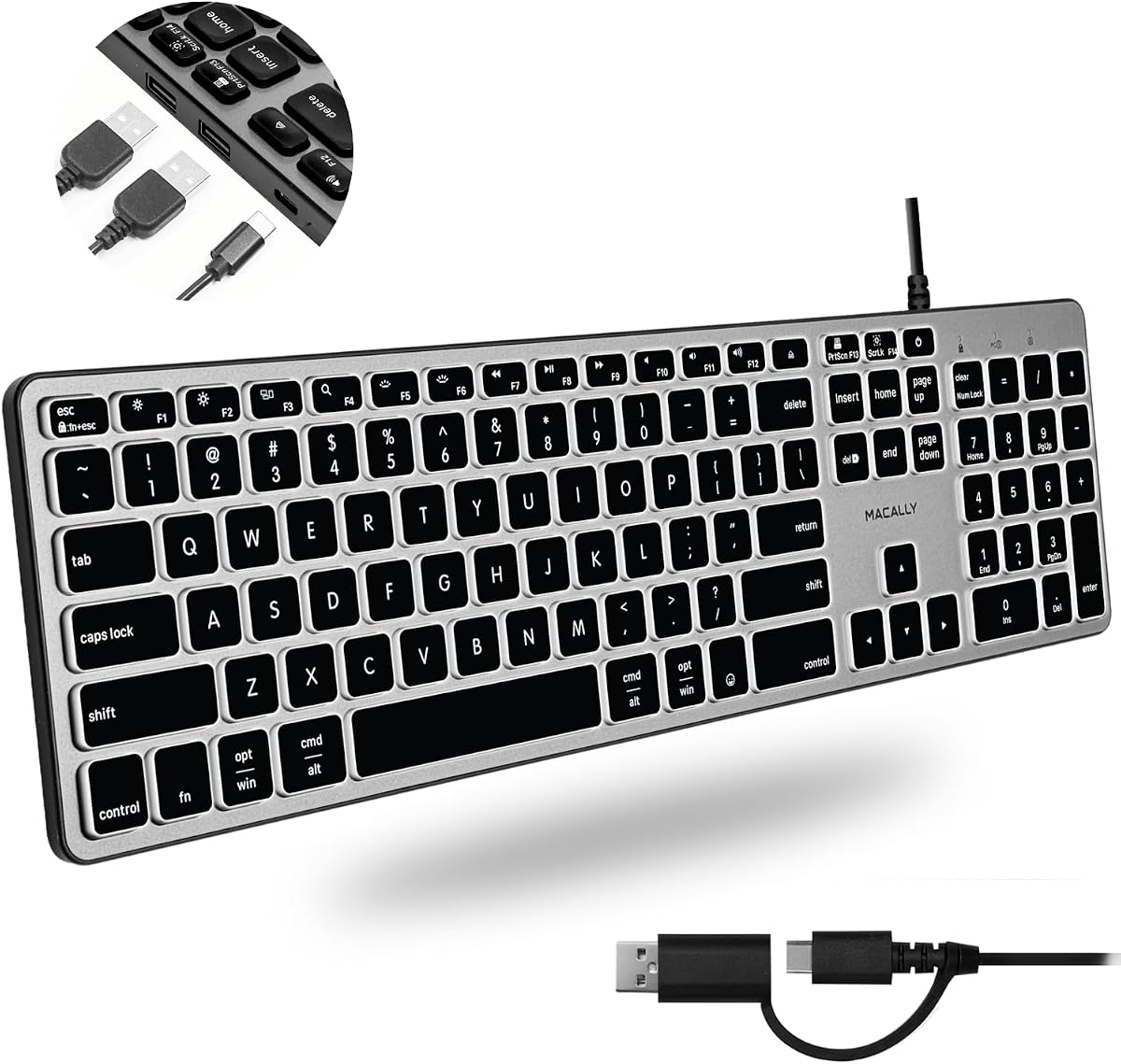
The Macally Wired Keyboard earns our Editor's Choice for its flexible connectivity and OS adaptability. With a 4.4 rating, it satisfies Mac and PC users needing modern USB-C integration alongside legacy ports.
We may earn a commission when you buy through this link, at no additional cost to you.
Its auto OS detection instantly adjusts shortcuts for Mac or Windows, saving setup time. The backlit keys offer three brightness levels, ensuring visibility in dim environments during long sessions.
Trade-offs include the corded connection limiting mobility and a price higher than basic membrane options. However, the inclusion of both USB-A and USB-C hubs justifies the cost for diverse hardware setups.
Recommended for MacBook Pro or Air owners who need extra ports without a separate dock. The durable build and warranty support make it a solid investment for daily productivity.
Auto detection ensures all 107 keys and shortcuts function correctly regardless of the host system.
Mixing USB-C and USB-A addresses current devices while maintaining compatibility with older accessories.
We may earn a commission when you buy through this link, at no additional cost to you.
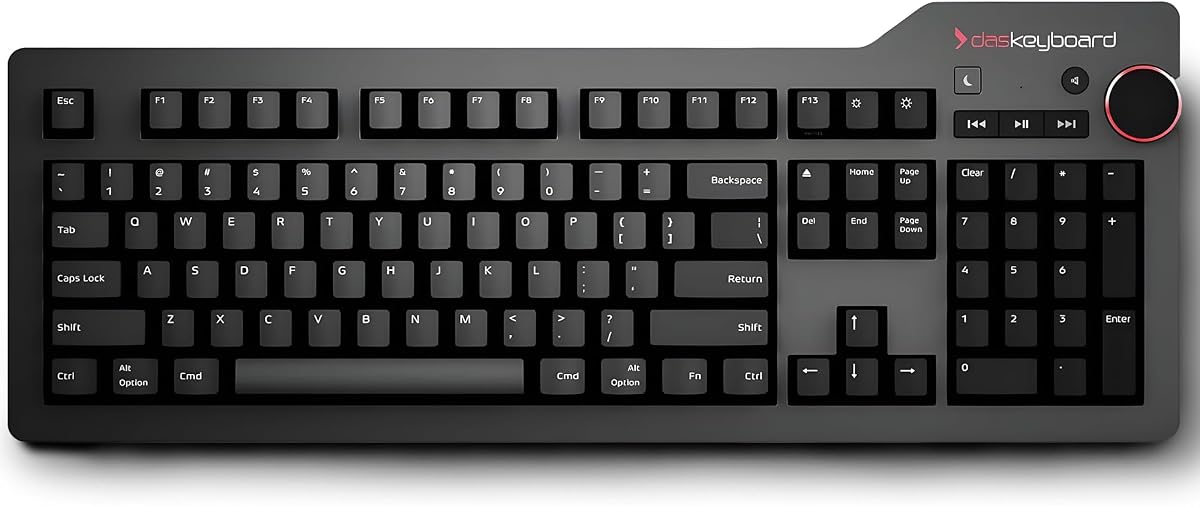
Das Keyboard 4 Professional delivers unmatched typing quality with Cherry MX Blue switches and premium materials. Its 4.3 rating reflects satisfaction among professionals seeking speed and durability in a mechanical device.
We may earn a commission when you buy through this link, at no additional cost to you.
The USB 3.0 hubs transfer data ten times faster than standard USB 2.0, ideal for large media files. The volume knob offers precise audio control without software navigation, enhancing multimedia workflows.
Noise from the switches may disturb quiet offices, and the price is significantly higher than membrane options. However, the 50 million keystroke lifespan ensures longevity that justifies the initial investment.
Choose this if you type frequently and prefer tactile feedback with fast data transfer. It suits creatives and developers working on Mac systems who value performance over budget constraints.
USB 3.0 speed allows quick uploads of large files directly through the keyboard hub connection.
The dedicated volume knob provides instant audio adjustments without opening system settings or apps.
We may earn a commission when you buy through this link, at no additional cost to you.
The Logitech K120 is a trusted choice for basic typing needs without integrated USB ports. With a high 4.6 rating, it offers reliability and comfort for users prioritizing durability over connectivity features.
We may earn a commission when you buy through this link, at no additional cost to you.
Its spill-resistant design protects against accidents, while deep-profile keys reduce hand fatigue during extended sessions. Plug-and-play setup works instantly on Windows systems without extra software installation required.
Lacking a USB hub means users must connect peripherals directly to the computer. This limitation suits simple desktops but may not suffice for crowded desks needing centralized connection points.
Ideal for schools or offices needing cost-effective replacements. If you already have hub ports on your PC, this keyboard provides dependable performance at a minimal cost.
Drainage holes prevent liquid damage, extending the keyboard's life in casual environments.
Adjustable tilt legs and deep keys support natural wrist angles to minimize strain.
We may earn a commission when you buy through this link, at no additional cost to you.
Perixx PERIBOARD-409H addresses space constraints with a mini layout and side-mounted USB hubs. Its 4.4 rating highlights user satisfaction with its compact form and functional design for tight desks.
We may earn a commission when you buy through this link, at no additional cost to you.
The USB hubs on the side allow easy device swapping without cluttering the main workspace. High-quality ABS caps and UV coating ensure longevity despite the smaller footprint compared to full boards.
Without a number pad, numeric entry is slower, which might hinder accountants or data entry clerks. The 5-foot cable offers flexibility but may require management to avoid tangling.
Best for users with limited desk space needing peripheral connections. It works well for casual typing and browsing where a number pad is unnecessary for daily tasks.
The mini design frees up table area for notebooks or other tools without losing typing function.
Side USB ports keep accessories accessible without extending reach beyond the keyboard's immediate area.
We may earn a commission when you buy through this link, at no additional cost to you.
The KOPJIPPOM Large Print Keyboard serves visually impaired users with oversized keys and bright backlighting. Its 4.5 rating reflects appreciation for the clarity and comfort it offers in low-light conditions.
We may earn a commission when you buy through this link, at no additional cost to you.
Four times larger font sizes reduce eye strain, while the LED backlight ensures visibility in dark rooms. The spill-proof design adds durability for shared environments like libraries or offices.
It lacks a USB hub, limiting connectivity expansion. Additionally, macOS support is partial, making it less suitable for Apple users seeking full shortcut compatibility.
Perfect for seniors or those with vision challenges needing clear, tactile feedback. If you prioritize readability over port connections, this keyboard delivers a comfortable and visible typing experience.
Large fonts help users identify keys quickly, reducing errors during typing sessions.
Adjustable LED brightness allows customization for any lighting environment without glare.
We may earn a commission when you buy through this link, at no additional cost to you.
Dell KB216 is a straightforward choice for basic office use with multimedia capabilities. Its 4.6 rating indicates satisfaction with its lightweight design and reliable connectivity for standard computing tasks.
We may earn a commission when you buy through this link, at no additional cost to you.
The chiclet-style keys provide a clean look and easy cleaning, while multimedia buttons allow quick access to common apps. It fits well in environments prioritizing cost over advanced features.
Without USB hubs, it relies on system ports for peripherals. This limits desk organization if multiple devices need frequent connection and disconnection.
Suitable for general office staff needing a simple, functional keyboard. If you do not require hub ports, this model offers efficient typing and media control at a low price.
Dedicated hotkeys streamline access to music and browser functions without opening applications.
Flat chiclet keys prevent dust buildup, making the keyboard easy to wipe down regularly.
We may earn a commission when you buy through this link, at no additional cost to you.
Das Keyboard 4 Professional offers a mechanical typing experience with robust build quality and fast USB 3.0 hubs. Its 4.3 rating appeals to professionals who value precision and durability in their peripherals.
We may earn a commission when you buy through this link, at no additional cost to you.
The aluminum top adds stability, while the large volume knob simplifies audio management during calls or media playback. Full N-key rollover ensures accurate input during fast typing or gaming.
The cost is high compared to standard keyboards, and the loud click may disrupt shared quiet spaces. However, the 50 million keystroke lifespan provides long-term reliability that offsets the price.
Ideal for developers or writers who need consistent tactile feedback and quick file transfers. If you prioritize build quality and speed over cost, this keyboard is a top-tier choice.
Gold-plated switches and aluminum casing ensure the keyboard withstands years of intensive use.
USB 3.0 ports enable rapid data transfer for large external drives without lag.
We may earn a commission when you buy through this link, at no additional cost to you.
The Dell Business Multimedia Keyboard provides reliable connectivity with two USB hubs for corporate environments. Its 4.6 rating suggests strong performance in business settings where durability and simplicity are valued.
We may earn a commission when you buy through this link, at no additional cost to you.
Spill resistance protects against spills, and the removable palm rest allows easy cleaning. The hot keys offer quick access to web and productivity tools, enhancing workflow efficiency.
Lack of extensive customization or universal OS detection limits flexibility for mixed environments. It works best when paired with Dell systems where compatibility is guaranteed.
Choose this for office setups needing a cost-effective hub solution. If you use Dell hardware and require basic USB expansion with spill protection, this keyboard is a practical option.
The removable palm rest simplifies cleaning and replacement when necessary for hygiene.
Dedicated hotkeys streamline daily tasks like email and calculator access without extra apps.
We may earn a commission when you buy through this link, at no additional cost to you.
The Macally Premium Wired USB C Keyboard bridges modern and legacy connectivity with a sleek design. Its 4.2 rating reflects appreciation for its aesthetic and practical port selection for Mac and PC.
We may earn a commission when you buy through this link, at no additional cost to you.
Space gray finish matches modern tech aesthetics, and the low-profile design ensures comfortable typing. The USB-C and USB-A ports handle various peripherals without adapters.
The scissor switches are quiet but may lack the tactile feel some users expect. While lifetime support is generous, the lack of wireless options may not suit mobile users.
Recommended for users seeking an elegant full-size keyboard with versatile ports. If you value design and reliability in a wired setup, this model balances form and function well.
The space gray finish matches contemporary Mac hardware for a seamless desk setup.
Combined USB-C and USB-A ports reduce adapter needs for diverse peripheral connections.
We may earn a commission when you buy through this link, at no additional cost to you.
Choosing the right keyboard requires balancing connectivity, build quality, and typing comfort. This guide outlines key factors to consider for your specific needs.
USB 3.0 hubs transfer data faster than USB 2.0, making them ideal for large file transfers. Check whether the ports are USB-A, USB-C, or a mix to match your peripherals.
Prioritize USB 3.0 hubs if you frequently move media files, otherwise USB 2.0 suffices for simple peripherals.
Membrane switches are quieter and cheaper, while mechanical switches offer tactile feedback and durability. Scissor switches provide a middle ground with low-profile typing.
Select mechanical for typing volume and membrane for quiet office environments.
Full-size layouts include number pads for data entry, while mini layouts save desk space. Ensure the layout matches your region's language requirements.
Choose full-size for accounting or mini for limited desk space.
Verify OS support for Windows, macOS, or Linux. Some keyboards auto-detect systems to remap keys automatically.
Look for auto OS detection to avoid manual key remapping.
Aluminum tops offer sturdiness while plastic keeps costs low. Spill-resistant designs protect against accidents in active workspaces.
Pick aluminum for long-term stability and spill resistance for shared desks.
Backlit keys improve visibility in dark rooms. Ergonomic features like adjustable feet reduce hand fatigue during long sessions.
Opt for backlighting if you work in dim lighting or low light conditions.
Media keys, volume knobs, and palm rests add convenience. Check if these features align with your daily workflow needs.
Prioritize media controls if you consume audio often.
Lifetime or multi-year warranties protect your investment. Local support can resolve issues faster than online-only brands.
Choose brands offering strong warranty terms for reliability.
Plug the keyboard into a USB port on your computer and allow the system to install drivers automatically. Connect peripherals like mice directly into the keyboard's built-in hubs for convenience.
Clean keys regularly with compressed air to remove dust. Use a microfiber cloth to wipe surfaces and avoid harsh chemicals that may damage the coating.
If your keyboard has spill-resistant features, tilt it gently to drain liquids if accidents occur. Allow it to dry completely before reconnecting to prevent hardware damage.
Not all models offer the same speed. Look for USB 3.0 hubs if you need fast transfers, as USB 2.0 models are slower but sufficient for basic devices.
Many keyboards support macOS, but check for auto OS detection or dedicated Mac shortcuts. Some models may need manual configuration for full compatibility.
Powered hubs can draw more energy, but most keyboards use bus power. High-power devices like external drives may need separate power sources.
They offer better durability and typing feedback. If you type extensively, the investment pays off through longevity and comfort over time.
Yes, especially models with N-key rollover. Ensure the hub doesn't introduce input lag, which can affect responsive gameplay.
Turn off the keyboard, unplug it, and tilt it upside down to drain liquids. Let it air dry completely before reconnecting to avoid damage.
Manufacturers omit hubs to reduce costs or maintain compact sizes. Basic models focus solely on typing rather than connectivity expansion.
Check the hub's power rating. High-power devices like external hard drives may need direct PC connection or a powered hub for stability.
We highlighted the Macally Wired Keyboard as Editor's Choice for versatility and the Adesso AKB-132HB for budget value. The Das Keyboard 4 remains the top premium pick for professionals.
Prioritize USB 3.0 hubs and switch types based on your workflow speed. Ensure compatibility with your operating system to avoid key mapping issues.
Prices and stock change often, so check current listings before purchasing. This guide helps you find a model that balances connectivity, comfort, and cost effectively.