
Keyboard Cleaning Brush 6 Pcs
4.9Editor score
High-grade plastic and nylon material
Six piece versatile cleaning set
Lightweight and portable design
This comprehensive guide compares the top 10 laptop cleaning brushes available in October 2026 to help you find the perfect tool for maintaining your electronic
Keeping your laptop clean is essential for performance and longevity. Dust and debris can accumulate in keyboards and vents, causing overheating and damage. Using the right cleaning brush ensures gentle yet effective removal of particles without harming sensitive components.
We analyzed the leading laptop cleaning brushes based on durability, brush type, portability, and user feedback. Our selection includes a range of options from compact single tools to comprehensive kits designed for various cleaning needs across different environments.
Each pick highlights key features, pros, and cons to help you decide. Remember that product availability and pricing can fluctuate over time. Always check the current listings for the most accurate information before making your purchase decision.
4.9Editor score
4.6Editor score

4.5Editor score
Below you will find a side-by-side comparison of all ten selected laptop cleaning brushes. This table highlights the unique specifications and capabilities of each product to help you evaluate them quickly.



This five-piece set offers a robust solution for cleaning laptops and other electronic devices. With a high rating of 4.6 stars it stands out for its durability and effectiveness in tight spaces. The variety of shapes allows for targeted cleaning of keys and vents.
We may earn a commission when you buy through this link, at no additional cost to you.
The brushes are made with nylon bristles that resist shedding and breaking. The anti-static feature is crucial for protecting sensitive components from static electricity damage. Each brush in the set serves a different purpose allowing users to clean deep into keyboard crevices.
While the set does not include a dedicated storage case the compact nature of the brushes makes them easy to store in a drawer. Some users might find the size too small for general surface cleaning. However for detailed work these brushes are unmatched.
This set is ideal for anyone who owns multiple devices or needs a reliable cleaning tool for office work. The affordability and durability make it a top choice for budget-conscious buyers who do not want to compromise on quality.
The nylon bristles are designed to dissipate static charge preventing damage to motherboards and circuits.
Five distinct brush shapes ensure you can reach every corner of your device including vents and ports.
We may earn a commission when you buy through this link, at no additional cost to you.
The OXO Good Grips Sweep & Swipe is a premium tool designed for comprehensive cleaning of laptops and screens. It combines a soft brush for dust and a microfiber pad for smudges in one compact device. The retractable design ensures the bristles remain protected.
We may earn a commission when you buy through this link, at no additional cost to you.
Users appreciate the microfiber pad for its ability to clean screens without leaving streaks. The soft brush sweeps away dust from keys without scratching the surface. The built-in storage cover keeps both ends clean when not in use.
Although it is more expensive than basic brush sets the convenience and quality justify the cost. The larger size might not fit in every pocket but it is perfect for a desk or home use. The retractable mechanism feels sturdy and well-made.
This tool is recommended for users who want a high-quality solution that handles both dust and fingerprints efficiently. It is particularly well-suited for those who value brand reliability and thoughtful design in their cleaning accessories.
Combines dust removal with screen cleaning in a single tool saving time and effort.
The built-in cover ensures the brush and pad stay clean and ready for the next use.
We may earn a commission when you buy through this link, at no additional cost to you.
This all-in-one kit is designed for users who need a complete solution for their electronics. It includes a retractable brush keycap puller and multiple cleaning cloths. The comprehensive nature of the kit makes it suitable for deep cleaning sessions.
We may earn a commission when you buy through this link, at no additional cost to you.
The keycap puller allows for removing keys to clean underneath which is ideal for gamers or heavy users. The metal pen tip helps remove stubborn stains from screens without scratching. The flocking sponge is perfect for cleaning earbuds and cases.
While the kit is packed with tools it might be too much for simple daily cleaning tasks. The variety of components requires organization to avoid losing small parts. However the value provided by the inclusion of so many tools is significant.
This kit is best for those who own multiple devices and want a single solution to handle all cleaning needs. It is also a great gift for tech enthusiasts or students who need to maintain their devices in a dorm setting.
Allows you to remove keys safely for deep cleaning underneath the keyboard surface.
Specially designed to clean small accessories like earbuds and charging cases gently.
We may earn a commission when you buy through this link, at no additional cost to you.
The Nanxudyj brush features a unique retractable design that allows you to adjust the bristle length. This adjustability makes it versatile for different cleaning tasks. The ABS handle ensures durability while the static absorption helps attract dust effectively.
We may earn a commission when you buy through this link, at no additional cost to you.
The three-step adjustment allows you to push the bristles out for more coverage or retract them for precision work. The static absorption feature helps pull dust out from tight spaces. It can be rinsed with water for easy maintenance.
Users sometimes find the retractable mechanism a bit stiff to use initially. The bristles might feel stiff before breaking in. However once the brushes settle they provide excellent cleaning performance for keyboards and vents.
This tool is perfect for users who want a durable and adjustable cleaning solution. It is especially useful for car interiors or office desks where multiple cleaning scenarios exist. The two-pack ensures you have a backup for convenience.
The three-step sliding mechanism lets you adapt the brush to different cleaning depths.
Designed to attract dust through electrostatic charge for more efficient removal.
We may earn a commission when you buy through this link, at no additional cost to you.
This ten-pack value set offers excellent cost-effectiveness for long-term use. Each brush features an anti-static design that protects sensitive electronics. The soft nylon bristles ensure gentle cleaning without scratching delicate surfaces.
We may earn a commission when you buy through this link, at no additional cost to you.
The quantity of brushes allows you to keep one in your car bag and desk. The mini design makes them easy to hold and maneuver around keyboard gaps. They are safe for motherboards and cameras due to anti-static features.
Some users find the brushes so small that they require a steady hand to use effectively. The packaging is simple and may not offer much protection during travel. However the utility and price point make it a winner.
This set is ideal for those who own multiple devices or need backups for family use. The affordability and protective features make it a smart buy for everyday cleaning needs without breaking the budget.
Includes ten brushes ensuring you always have a clean tool available for daily needs.
The built-in static protection prevents damage to sensitive electronic components.
We may earn a commission when you buy through this link, at no additional cost to you.
This kit includes ten different sizes allowing for cleaning various components. It features seven hard brushes and three soft bristle brushes for different surfaces. The variety ensures you have the right tool for every cleaning task.
We may earn a commission when you buy through this link, at no additional cost to you.
The hard brushes are effective for removing debris from keyboard gaps and fans. The soft bristles are safe for delicate surfaces like screens and lenses. The anti-static protection is important for computer motherboards.
Users should note that the yellow bristle brush is not anti-static and should be used on non-sensitive surfaces. This distinction is important to avoid damage. The nylon material is high-quality and durable.
This set is great for users who need specific tools for different parts of their devices. It is suitable for both home and office environments where diverse electronics need maintenance. The variety makes it a comprehensive solution.
Ten different brush sizes ensure you can reach any gap or corner effectively.
Mix of brush types allows for safe cleaning of both tough and delicate areas.
We may earn a commission when you buy through this link, at no additional cost to you.
The OXO Good Grips Electronics Cleaning Brush is designed for small hard-to-reach places. It combines soft bristles with a slim silicone wiper for versatile cleaning. The retractable bristles help keep the tool clean when not in use.
We may earn a commission when you buy through this link, at no additional cost to you.
The silicone wiper is particularly effective at grabbing dirt from keys and edges. The bristles are soft enough to avoid scratching screens or plastic. The compact size makes it easy to carry in a bag.
The silicone wiper does not retract which means it needs its own cap to stay clean. While the brush is versatile some users prefer sets with multiple sizes. The build quality remains high and durable.
This brush is recommended for users who want a reliable single tool for quick cleanups. It is ideal for those who value brand reputation and design. The simplicity makes it easy to use without complications.
The slim silicone edge grabs dirt and dust from small gaps effectively.
The retractable mechanism protects the bristles and keeps the tool tidy.
We may earn a commission when you buy through this link, at no additional cost to you.
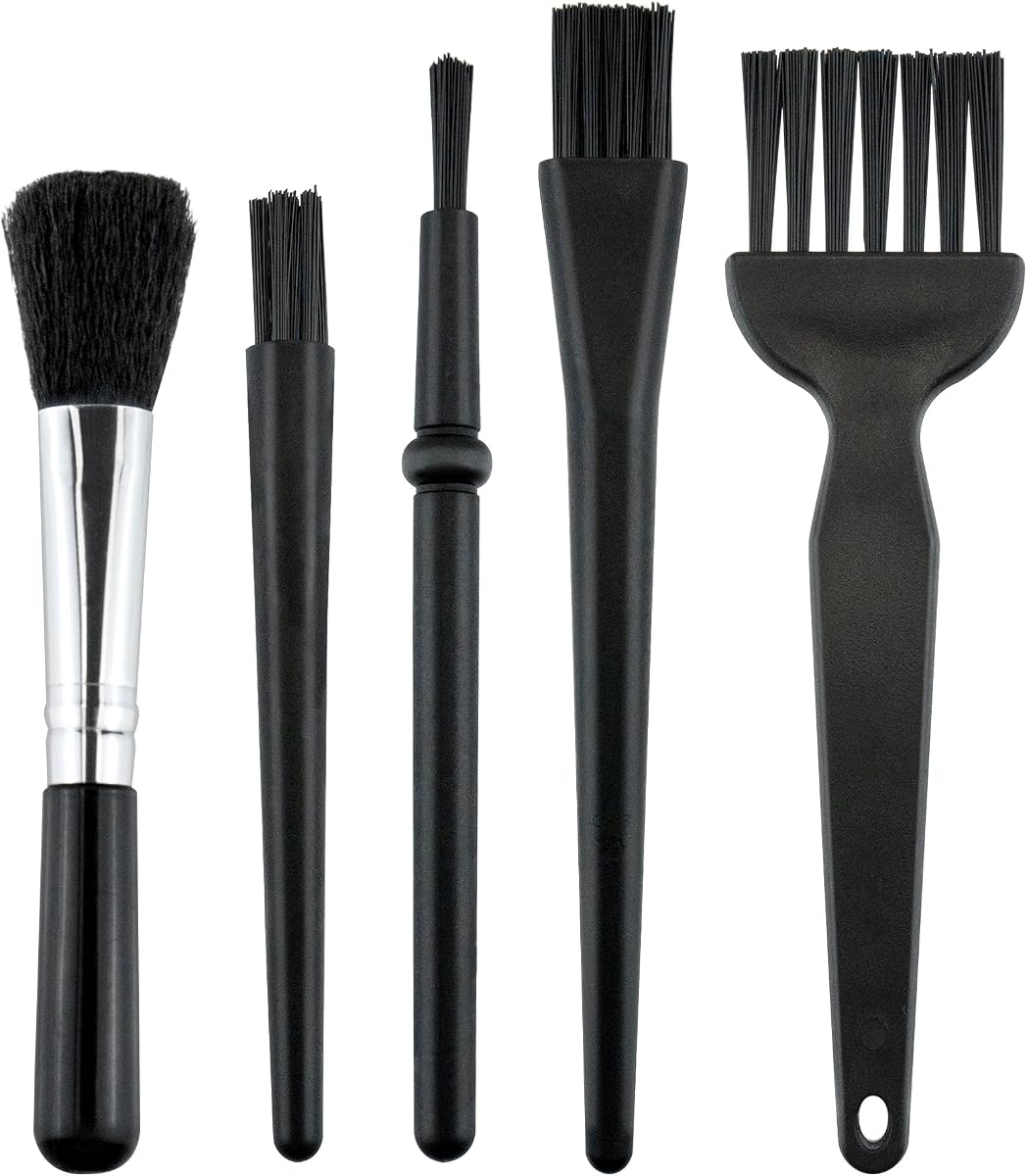
This six-piece set has a high user rating of 4.9 stars indicating strong satisfaction. It features comfortable high-quality plastic handles that are easy to hold. The nylon bristles are anti-static and durable for long-term use.
We may earn a commission when you buy through this link, at no additional cost to you.
The brushes are small and lightweight making them perfect for carrying around. They are effective for cleaning keyboards vents and other electronic products. The anti-static properties ensure safety for sensitive components.
While it has fewer pieces than some other sets it is sufficient for most cleaning needs. The design is basic but functional. The high rating suggests users find them very effective for the price.
This set is recommended for those looking for a reliable compact cleaning solution. It is great for home or office use. The quality and rating make it a strong contender in the budget category.
Users rate this set highly for its reliability and effective cleaning performance.
The plastic handles are designed for comfort and ease of use during cleaning.
We may earn a commission when you buy through this link, at no additional cost to you.
This kit stands out with a perfect 5.0 rating from users. It includes ten anti-static brushes stored in a resealable bag. The ergonomic design ensures comfortable grip during use. It is ideal for detailed cleaning tasks.
We may earn a commission when you buy through this link, at no additional cost to you.
The seven hard brushes are effective for deep cleaning GPU heatsinks and fans. The three soft brushes are for delicate surfaces. The resealable bag keeps all brushes organized and portable for travel.
Users should note the yellow brush is non-anti-static for non-sensitive surfaces. The bag quality is generally good but may wear with heavy use. The variety of colors helps identify brush types easily.
This set is recommended for those who need a portable and organized cleaning solution. It is great for travel or office desks. The perfect rating and storage bag make it a top choice for reliability.
A perfect 5.0 user rating indicates high satisfaction with cleaning performance.
The storage bag keeps brushes organized and easy to carry anywhere.
We may earn a commission when you buy through this link, at no additional cost to you.
This kit is designed for professionals and tech enthusiasts who need precision cleaning. It includes ten brushes with anti-static bristles safe for sensitive components. The zipper pouch provides durable storage for travel and organization.
We may earn a commission when you buy through this link, at no additional cost to you.
The variety of sizes and stiffness levels allows for tailored cleaning. It is ideal for motherboards fans and cameras. The ESD certification ensures safety during use on sensitive hardware.
The zipper pouch is sturdy but the zipper might be stiff initially. The price is higher than basic sets but justified by the quality. It is a robust solution for heavy-duty cleaning needs.
This kit is recommended for those who repair electronics or own high-end devices. The professional-grade quality ensures safety and effectiveness. The storage pouch adds value for users on the go.
Brushes meet ESD standards ensuring safety for sensitive electronic components.
The included pouch keeps all tools organized and protected during transport.
We may earn a commission when you buy through this link, at no additional cost to you.
Selecting the right laptop cleaning brush depends on your specific needs and the types of devices you own. Consider factors like brush material size and portability to find the best match.
Look for brushes made with nylon or soft bristles that do not scratch surfaces. Anti-static materials are crucial for protecting sensitive electronics from static discharge damage.
Choose nylon or soft materials with anti-static properties for safety and durability.
Mini brushes are easier to carry and reach tight spaces. Larger sets might be better for home use where storage is not a concern. Consider where you will keep the brush.
Opt for mini sizes if you travel often or large sets for stationary home use.
Hard brushes are better for removing dust from deep gaps. Soft bristles are needed for delicate surfaces like screens. A mix of both ensures versatility.
Select a mix of hard and soft brushes to handle both tough and delicate areas.
Sets with more pieces offer better value and variety. A single brush is simple but limited in function. Decide how many tools you realistically need.
More pieces provide variety but a smaller set is sufficient for basic cleaning.
Some kits include pouches or retractable covers for storage. This keeps the brushes clean and organized. Without storage brushes might get dirty in a bag.
Choose kits with storage cases or pouches to keep tools clean and organized.
Reputable brands often provide better quality control and warranty support. Reviews can help gauge real-world performance. Quality materials last longer and work better.
Stick with well-known brands to ensure quality and longevity.
Price varies from affordable sets to premium kits. Determine how much you are willing to spend. Often mid-range options offer the best balance of cost and quality.
Set a budget that fits your needs and look for value in the mid-range.
Ensure the brush is safe for all your devices. Some brushes are specific for keyboards while others work on screens. Versatility is key for multiple devices.
Verify the brush works safely on all device types you own.
Start by turning off your laptop and unplugging it to avoid any electrical issues. Use the soft brush to sweep dust away from the keys gently. Do not press too hard to avoid pushing debris further in.
For deeper cleaning use a hard brush to reach tight gaps between keys. If using a retractable brush adjust the bristle length to suit the task. Always brush away from the center to expel debris.
Clean the brushes regularly by shaking them out or rinsing with water if allowed. Let them dry completely before storing to prevent mold. Store them in a dry place or case when not in use.
Yes if the brushes are made of materials like nylon you can rinse them with water. Make sure to let them dry completely before using them again. Some brushes have plastic handles that may not like water.
Anti-static brushes prevent static electricity from building up and damaging your laptop components. This is important for safety and the longevity of your device. Regular brushes can generate static that harms sensitive parts.
You should clean your laptop at least once a month to prevent dust buildup. If you use it frequently or in dusty environments clean it more often. Regular maintenance prevents overheating and damage.
Many of these kits include soft bristles or microfiber pads that are safe for screens. Avoid using hard bristles on screens as they can scratch the surface. Check the product specs for screen safety.
A brush is essential for removing dust from keys. Some kits include keycap pullers for deeper cleaning. For regular maintenance a good brush is usually sufficient.
Store brushes in a dry place or a case to keep them clean. Retractable brushes are easy to store in a drawer. Avoid leaving them in direct sunlight or heat.
Yes many of these brushes are designed for small electronics like phones. Just ensure you use soft bristles on lenses to avoid scratches. These tools are versatile for various devices.
Dust buildup can cause keys to stick and lead to overheating. Over time debris can damage internal components of the laptop. Regular cleaning prevents these issues.
Choosing the right cleaning brush depends on your budget and specific needs. The options listed range from compact single tools to comprehensive kits. Each has unique features to suit different environments.
Prioritize brushes with anti-static properties to protect your device. Look for durable materials and portability if you travel often. The best choice is the one you will use consistently.
Prices and availability change so check the current listings before buying. Remember to inspect product details carefully. With the right tool you can keep your laptop clean for longer.