
NIMO 15.6 AI Ready Laptop
4.8Editor score
Intel 4 Core N150
180 degree Lay Flat Hinge
65W PD Fast Charging
Finding the right laptop for Karaoke Gear means looking for strong audio processing and clear screens. You want a machine that handles music files and video streams without lag during performances or rehearsals.
We compared these ten products by reviewing their hardware specs and user feedback. Each model offers unique strengths for streaming, recording, or running karaoke software at home or on the go.
Every pick shows specific details like processor speed and connectivity options. Prices and availability can change quickly, so verify current deals before making your final selection for your setup.
4.8Editor score

4.5Editor score

4.5Editor score
As an Amazon Associate we earn from qualifying purchases.
This side-by-side comparison highlights key differences across all ten models. Review processor types, screen sizes, memory capacity, and special features to find the unit that fits your specific karaoke needs.






This HP model ranks high for users who need a reliable machine for karaoke setups. It offers a large 17.3-inch display which is perfect for showing lyrics alongside video tracks.
We may earn a commission when you buy through this link, at no additional cost to you.
The AMD Ryzen 5 processor paired with 16GB of RAM ensures that streaming services and karaoke software run smoothly. You can manage multiple browser tabs and audio apps without noticeable lag during a session.
While the device is robust, it does weigh more than thinner options. However, the trade-off provides better battery life and connectivity options for external speakers and microphones.
Ideal for home stations or small venue setups, this laptop handles the demands of audio processing well. It is a solid investment for anyone serious about performance and screen real estate.
The 17.3-inch FHD anti-glare display offers plenty of space to view lyrics clearly without straining your eyes during long sessions.
With 16GB of RAM, you can easily switch between video players, music libraries, and streaming apps while keeping the audio stream stable.
We may earn a commission when you buy through this link, at no additional cost to you.
The Dell Pro 15.6 Laptop stands out with its 120Hz refresh rate screen which enhances the smoothness of video playback during karaoke. This makes it ideal for high-frame-rate music videos.
We may earn a commission when you buy through this link, at no additional cost to you.
Powered by the Intel Core 3 100U and 16GB DDR5 memory, it delivers quick response times for launching applications. The fast SSD ensures you load your playlist instantly.
One limitation is the storage space which might require external drives for large media libraries. However the portability and connectivity options like HDMI and SD card slot add significant value.
This device is perfect for those who prioritize display quality and speed. It balances performance and portability making it a top choice for mobile performers or home enthusiasts.
The 120Hz refresh rate display ensures that video content plays fluidly reducing motion blur during fast-paced music videos.
With USB-A, USB-C, HDMI, and SD card slots you can easily connect external speakers, microphones, and storage devices without dongles.
We may earn a commission when you buy through this link, at no additional cost to you.
This NIMO laptop is a fantastic value for entry-level karaoke setups. It runs quietly thanks to the efficient Intel N150 processor which is great for library or home use.
We may earn a commission when you buy through this link, at no additional cost to you.
The 180-degree lay-flat hinge allows for easy screen sharing during duets or group sessions. You can flip the screen fully back to face a partner without awkward angles.
While 8GB RAM is standard it handles basic streaming and audio tasks well. The fast charging feature ensures you are never stranded without power during a long event.
If you need a reliable and affordable machine for casual singing this is a strong contender. The warranty and port options make it a safe choice for students and hobbyists.
The energy-efficient processor runs with minimal fan noise ensuring your vocals remain the focus during performances or practice sessions.
Dual USB-C ports and full USB-A support mean you can connect any mixer or microphone adapter without carrying extra dongles.
We may earn a commission when you buy through this link, at no additional cost to you.
This HP OmniBook offers impressive battery longevity making it great for outdoor parties or travel. You can perform for hours without needing to find an outlet nearby.
We may earn a commission when you buy through this link, at no additional cost to you.
The 17.3-inch FHD display provides clear visuals for lyrics with wide viewing angles. This helps others see the screen from different positions in the room.
While the processor is entry-level it handles basic tasks well. The AI noise reduction is useful if you are recording yourself or participating in online karaoke sessions.
Choose this if mobility and uptime are your main priorities. It is a dependable machine for casual use where battery endurance matters most.
With up to 14 hours of battery life you can enjoy a full day of use without constantly searching for a charging source.
Advanced AI noise reduction filters out background sounds ensuring your voice is the primary focus during calls or recordings.
We may earn a commission when you buy through this link, at no additional cost to you.
The HP Ultrabook 14 comes with a bundle that includes useful accessories like wireless earbuds and a mouse. This adds value right out of the box for new users.
We may earn a commission when you buy through this link, at no additional cost to you.
It features 16GB of RAM which supports heavy multitasking when running karaoke software alongside video editors or chat apps. The storage is split between internal and external drives.
The 14-inch screen is compact and portable but might be small for some lyrics displays. However the anti-glare coating helps in bright environments like living rooms.
This model is ideal for those who want a complete package without buying extra peripherals. It balances performance and convenience well for everyday entertainment needs.
The included accessories reduce the need for additional purchases making it a convenient choice for setting up a quick home studio.
16GB of DDR4 RAM ensures that switching between music apps and video players remains smooth even with multiple tabs open.
We may earn a commission when you buy through this link, at no additional cost to you.
This HP 255 model is designed for mobile workstyles with a thin and light chassis. It fits easily into a backpack making it convenient for transporting to events.
We may earn a commission when you buy through this link, at no additional cost to you.
The AMD Ryzen 3 7330U provides a good balance of efficiency and power for everyday tasks. With 16GB of RAM it handles multitasking without slowing down.
The screen offers crisp visuals suitable for viewing video content. However the storage might require cloud solutions or external drives for large music collections.
Pick this laptop if you need something easy to carry around. It offers solid performance for its size making it a reliable companion for on-the-go entertainment.
The slim profile and light weight make it easy to carry between rooms or locations without adding bulk to your gear.
Support for Android apps allows you to use a wider range of entertainment and utility apps directly on Windows.
We may earn a commission when you buy through this link, at no additional cost to you.
The 2K touchscreen on this HP OmniBook allows for intuitive control over software interfaces. You can tap to pause or skip tracks without navigating complex menus.
We may earn a commission when you buy through this link, at no additional cost to you.
Its display delivers incredible detail which makes reading lyrics easier on a smaller screen compared to larger non-touch models. The resolution adds clarity to visuals.
While it comes at a higher price the premium display features justify the cost for interactive use cases. The AI features also help during online interactions.
This unit is great for users who value tactile interaction and high resolution. It stands out for its screen quality and modern design features.
The touchscreen interface lets you control playback and settings directly with your fingers enhancing the user experience during sessions.
A 2K resolution ensures that text and images appear sharp making it easier to read lyrics on a 16-inch screen.
We may earn a commission when you buy through this link, at no additional cost to you.
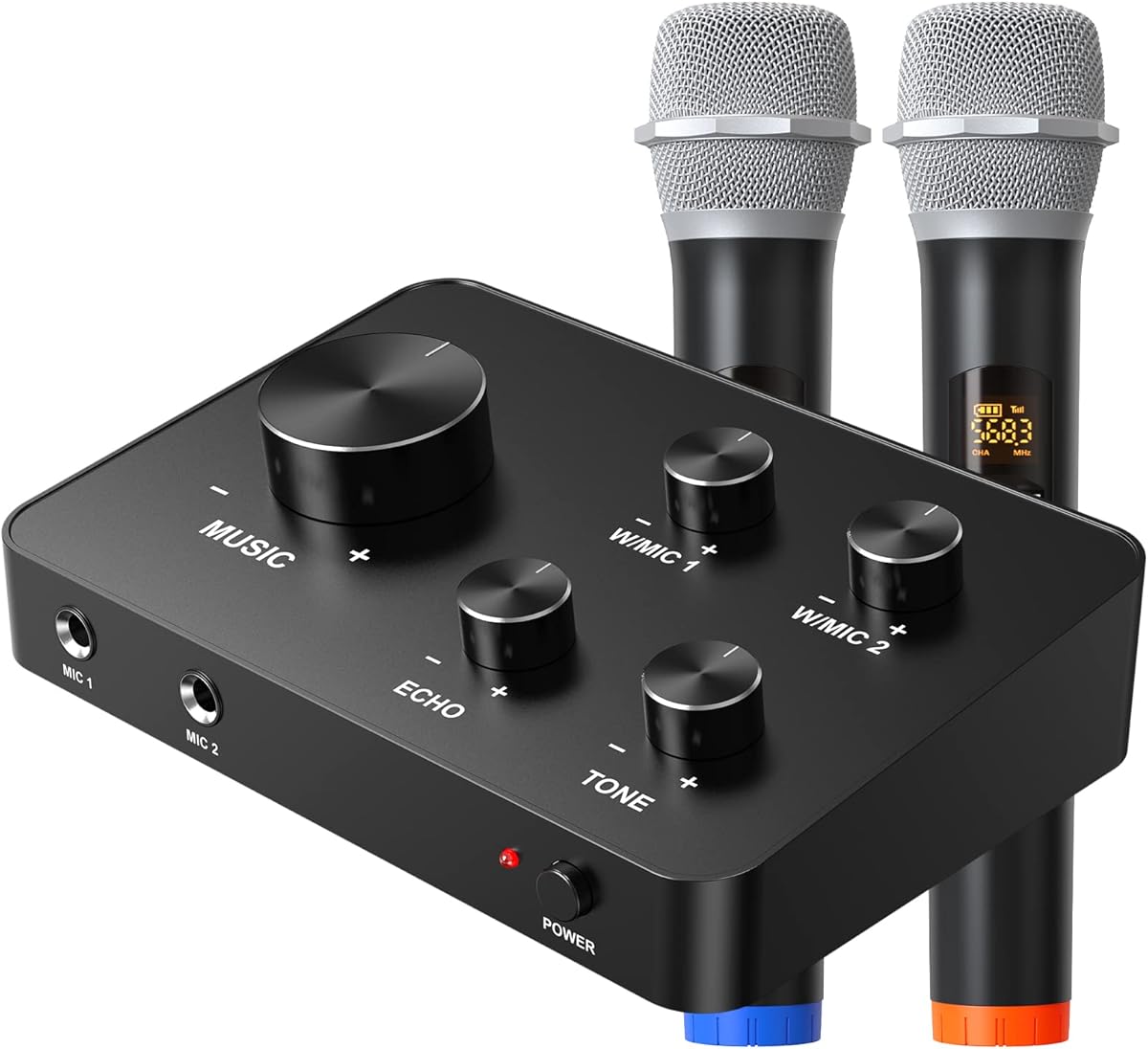
This mixer system comes with two wireless microphones making it ready for duets right out of the box. The UHF wireless technology provides a strong connection up to 100 feet.
We may earn a commission when you buy through this link, at no additional cost to you.
It connects easily to PCs and TVs via HDMI or AUX cables. This flexibility ensures it works with most existing karaoke setups without extra adapters.
The audio quality is functional but lacks advanced audio fidelity. Still, for casual home parties it offers reliable performance and straightforward controls.
Ideal for beginners looking for a complete start-up kit, this system simplifies the process of adding vocals to music tracks.
Enjoy a 100ft operating range allowing performers to move around freely without being tethered by cables.
Support for both wired and wireless inputs gives you the option to connect multiple devices for a larger group.
We may earn a commission when you buy through this link, at no additional cost to you.
This mixer offers advanced control over audio effects and input sources. It supports HD ARC and optical inputs which is great for integrating with modern soundbars.
We may earn a commission when you buy through this link, at no additional cost to you.
With 16 frequency selections you can minimize interference during events. Independent volume controls for mic and music allow precise balance during performance.
The system does not include microphones so you must purchase them separately. Setup can be complex for casual users but offers deep control for enthusiasts.
If you have a high-end sound system this mixer integrates well. It is suitable for those who need detailed control over audio output quality.
HD ARC support allows you to use the TV as a remote for audio control simplifying your setup.
Independent volume knobs for music and microphone ensure the vocals never overpower the backing tracks.
We may earn a commission when you buy through this link, at no additional cost to you.
This portable mic doubles as a speaker making it a standalone entertainment option. The built-in DSP chip ensures clear vocals for singing practice or casual play.
We may earn a commission when you buy through this link, at no additional cost to you.
It supports voice cancellation which is perfect for rehearsing familiar songs. You can use it with any smartphone via Bluetooth for instant access to music.
The light show adds a fun visual element to parties. Battery life of 10 hours is sufficient for long events without needing frequent charges.
Great for kids or spontaneous sing-alongs this mic is lightweight and easy to use. It is a fun accessory for those who want simplicity and portability.
Since it includes a built-in speaker you do not need external speakers to start singing immediately.
Six sound effects including chipmunk and alien voices make it a fun gift for younger users.
We may earn a commission when you buy through this link, at no additional cost to you.
Selecting the right laptop for karaoke gear involves evaluating several key factors to ensure smooth performance and compatibility with your setup.
A larger screen helps viewers read lyrics without straining their eyes. Look for FHD or higher resolution to ensure text is crisp and readable from a distance.
Prioritize screens with anti-glare coatings for better visibility in various lighting conditions.
The processor handles the load of running karaoke software while streaming music videos. A mid-range CPU like Ryzen 5 or Core 3 is usually sufficient.
Ensure the processor supports multitasking so you can manage audio and video without lag.
RAM is critical for switching between applications smoothly. Aim for at least 8GB but 16GB is safer for complex setups.
Storage should accommodate your music library. SSDs provide faster boot times than traditional hard drives.
If you plan to use the laptop for outdoor events or travel, battery life becomes a priority.
Look for models offering at least 8 hours of real-world usage to avoid interruptions.
Check that the laptop has enough ports to connect external speakers or mixers. HDMI and USB-C are essential.
Verify wireless capabilities like Wi-Fi 6 for stable streaming during events.
While you may use external speakers, built-in audio quality matters for testing tracks.
Laptops with stereo speakers or audio enhancement technologies provide a better initial experience.
Windows 11 is widely supported by most karaoke software. Ensure compatibility with the apps you plan to use.
Some software requires specific versions or admin access so verify these requirements before buying.
Heavier laptops often have better cooling and battery life but are harder to transport.
Balance your need for mobility with the power required for your specific karaoke setup.
To get the most out of your setup, start by installing your preferred karaoke software and connecting any external speakers through the HDMI or AUX ports.
Keep your laptop clean by wiping the screen and keyboard regularly. Avoid using it directly near water or food to prevent spills that could damage the hardware.
Update your drivers and operating system regularly to maintain performance. If you notice overheating, ensure the ventilation ports are not blocked by objects.
You generally need a mid-range processor like an Intel Core i3 or AMD Ryzen 3, along with 8GB to 16GB of RAM. A dedicated graphics card is not necessary but a 120Hz refresh rate helps with video playback.
Yes, most laptops have a combined audio jack that supports microphones. You can also use USB or Bluetooth adapters to connect wireless mics or mixers easily.
A larger screen is recommended for home setups so guests can read lyrics easily. For portable use, a 15-inch display is a good balance between visibility and portability.
Windows 11 is the most common platform with wide support for karaoke apps. Many Android apps also run well on modern Windows systems for additional functionality.
Ensure your speakers are connected via a wired connection instead of Bluetooth. Updating your audio drivers and closing background apps also help reduce latency.
Yes, models with long battery life and anti-glare screens are best for outdoor use. Check the weather resistance of your gear and use power banks if needed.
We highlighted the HP 17 inch Business Laptop Computer as a top pick for its large display and reliable performance. The NIMO laptop offers great value for budget buyers needing portability.
When selecting your unit consider how much mobility you need versus the power required. A balance of good RAM, clear visuals, and connectivity is key for a smooth karaoke experience.
Prices and stock can fluctuate quickly so check the latest deals on the products listed. Your perfect karaoke companion is out there waiting to help you sing your heart out.