
HP OmniBook 3 17 inch FHD Laptop AMD Ryzen 5 8GB RAM 512GB SSD Silver
5.0Editor score
WiFi 7 connectivity included
17.3 inch FHD display
12 hours battery life
Modern computing demands faster connectivity for seamless multitasking and cloud access. A laptop with WiFi 7 offers cutting-edge wireless performance, ensuring minimal latency and maximum throughput for your daily workflow and entertainment needs.
We analyzed ten distinct models featuring the latest wireless standards and powerful processors. Each entry was selected based on its balance of performance, display quality, battery life, and connectivity options to ensure a comprehensive guide for diverse user requirements.
Every pick highlights specific strengths like AI capabilities, screen size, or port selection. Please note that prices and availability fluctuate frequently, so verify current details on the retailer site before making your final purchase decision today.
5.0Editor score

5.0Editor score

4.7Editor score
As an Amazon Associate we earn from qualifying purchases.
This side-by-side comparison highlights the key specifications of every model reviewed in this guide. You will see differences in processor types, memory capacity, storage options, and display sizes to help you narrow down your choices effectively.




This HP OmniBook 3 ranks as the top pick for those seeking a laptop with WiFi 7 on a budget. With a perfect 5.0 rating, it offers a massive 17.3 inch display and next-gen connectivity that outpaces previous standards significantly.
We may earn a commission when you buy through this link, at no additional cost to you.
The AMD Ryzen 5 processor handles office apps efficiently while the integrated Windows AI Copilot assists with complex tasks. The 300 nits brightness ensures clear visuals for streaming or work, and the 62.5% sRGB gamut adds color fidelity.
While 8GB RAM is standard for this price point, it might slow down heavy multitasking compared to 16GB models. The older Ryzen 4000 series is less power-efficient than newer chips, but it remains reliable for daily productivity.
Students and remote professionals will find this machine ideal for long lectures or travel. The 12 hour battery life promise and lightweight design make it a strong choice for anyone needing a large screen with modern wireless speeds.
Equipped with Wi-Fi 7 and Bluetooth, this laptop offers up to 3x faster speeds than previous standards for smoother streaming and file transfers.
The 17.3-inch Full HD IPS anti-glare screen provides expansive viewing for productivity while the 12-hour battery keeps you unplugged all day.
We may earn a commission when you buy through this link, at no additional cost to you.
The second HP OmniBook 3 variant stands out with a powerful Intel Core Ultra 7 processor and 16GB of DDR5 RAM. This model brings exceptional performance for demanding business tasks and productivity applications compared to the base Ryzen version.
We may earn a commission when you buy through this link, at no additional cost to you.
Its 17.3-inch Full HD IPS display offers vibrant colors and comfortable viewing for spreadsheets or presentations. The 1TB PCIe SSD ensures quick responsiveness and ample space for professional workflows without needing external drives.
Designed for everyday business, this laptop includes a backlit keyboard and precision touchpad for an efficient working experience. While the rating is not available, the specs suggest a reliable machine for remote work and collaboration.
Professionals needing a thin and lightweight design with premium features should consider this option. The AI noise reduction and privacy camera add secure collaboration tools that are essential for modern office environments.
Experience exceptional performance with the Intel Core Ultra 7 255U AI Processor delivering smooth multitasking and fast responsiveness.
Enjoy a spacious 17.3-inch display and 16GB DDR5 RAM for ample space for documents, applications, and professional workflows.
We may earn a commission when you buy through this link, at no additional cost to you.
This HP OmniBook 7 AI Touchscreen delivers next-level AI experiences with an NPU delivering up to 47 TOPS for Windows Copilot+. It offers a large 17.3-inch touchscreen with 400 nits brightness for crisp visuals in any lighting.
We may earn a commission when you buy through this link, at no additional cost to you.
Designed for demanding work, the 6-cell 83Wh battery keeps you productive without constant charging while the power-efficient CPU supports next-gen Wi-Fi 7. The versatile high-speed connectivity includes Thunderbolt 4 for ultra-fast data transfer.
While the price is higher, the 32GB onboard RAM ensures smooth multitasking across demanding applications. The 5MP IR camera with noise reduction and DTS:X Ultra audio enhance video calls and media consumption significantly.
Creative professionals and heavy multitaskers will appreciate the expansive screen space and high-speed memory. This machine brings seamless performance and intelligent automation for a truly next-generation computing experience anywhere.
Powered by Intel Core Ultra 7 258V with 47 TOPS NPU to unlock smarter workflows and faster content creation.
The 17.3-inch touchscreen offers edge-to-edge glass with 400 nits and Thunderbolt 4 for ultra-fast data transfer.
We may earn a commission when you buy through this link, at no additional cost to you.
The Acer Aspire 14 AI brings new AI experiences with an Intel Core Ultra 7 processor delivering speed and responsiveness for any task. With up to 22 hours of battery life it is perfect for long work sessions without interruption.
We may earn a commission when you buy through this link, at no additional cost to you.
Its 14-inch WUXGA display offers a breathtaking resolution for entertainment and creative tasks. Intelligent AI solutions like AcerSense streamline settings and elevate communication with intuitive features built into the system.
While this model lists Wi-Fi 6E rather than WiFi 7, it still offers solid wireless performance for most users. The 180 degree lie-flat hinge provides versatile and convenient use on the go for students or travelers.
Creative professionals and students looking for a portable AI laptop should consider this sleek design. The durable aluminum chassis and lightweight build make it easy to carry everywhere while maintaining reliable performance.
Discover the power of Recall and Click to Do on Copilot plus PCs to locate past content and interact with text easily.
The sleek durable and lightweight aluminum chassis with a 180 degree hinge is ideal for work and creative pursuits.
We may earn a commission when you buy through this link, at no additional cost to you.
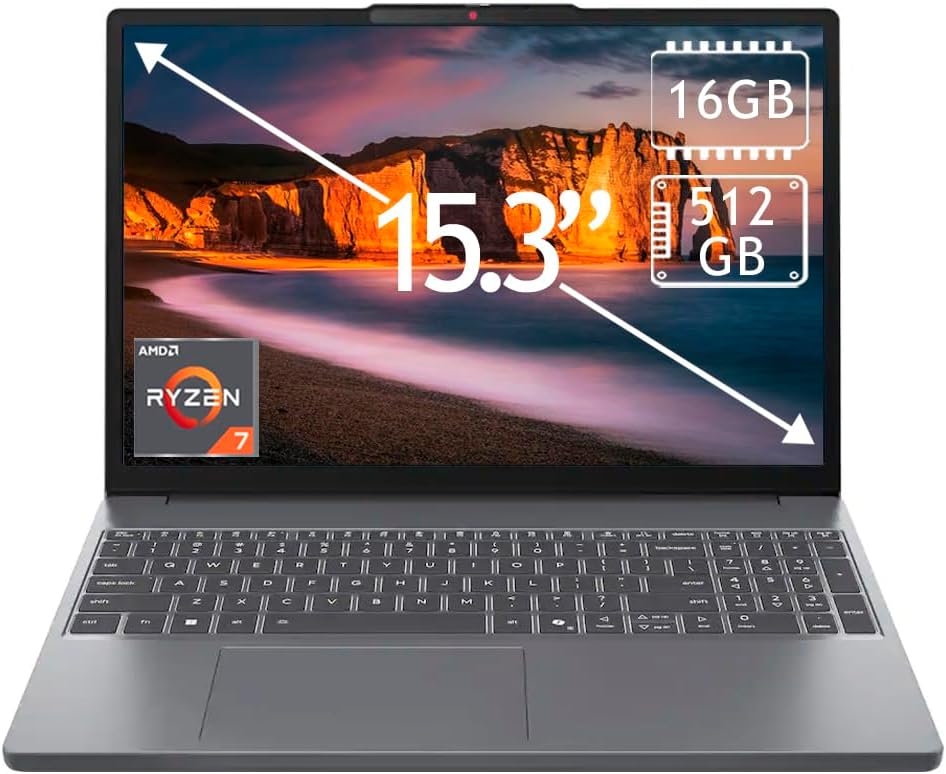
This Lenovo IdeaPad Slim 3 features a sharp 15.3-inch 2K Touchscreen that delivers vibrant colors and smooth touch interaction for work and entertainment. With a 5.0 rating it stands out for its responsive performance in daily tasks.
We may earn a commission when you buy through this link, at no additional cost to you.
The AMD Ryzen 7 170 processor handles multitasking and productivity efficiently while 16GB DDR5 RAM ensures quick boot-up times. The 512GB PCIe SSD offers ample storage for documents and media without slowdowns.
While it features Wi-Fi 6 rather than WiFi 7, the wireless connectivity remains faster and more stable for most users. The Full HD webcam ensures clear video calls and the Windows 11 Home interface provides enhanced productivity tools.
Users seeking a touchscreen experience on a budget will find this machine ideal. The Luna Grey design is stylish and the integrated Bluetooth and Wi-Fi 6 keep devices paired seamlessly for everyday computing tasks.
The 15.3 inch 2K Touchscreen delivers sharp visuals and smooth touch interaction for work and entertainment.
Powered by AMD Ryzen 7 170 with 16GB DDR5 RAM and 512GB PCIe SSD for smooth multitasking performance.
We may earn a commission when you buy through this link, at no additional cost to you.
This Dell Pro 16 laptop offers professional productivity in a modern design with built-in AI capabilities. With Intel Core Ultra 9 vPro processor it reaches unstoppable productivity while meeting security and manageability needs for business users.
We may earn a commission when you buy through this link, at no additional cost to you.
The 16-inch FHD+ display offers an expansive screen with narrow bezels for detailed work. Graphics and NPU support accelerate digital content creation and video editing with creation apps for creative professionals.
The 32GB LPDDR5X memory ensures smooth performance for demanding applications and the FHD+ webcam supports crystal clear video calls. AI noise cancellation enhances communication so you can focus on the conversation without distraction.
IT departments will appreciate the multilayer security and remote manageability of the Intel vPro Platform. The Ice Blue power button and stylish rounded edges add a premium touch to this reliable business laptop.
Professional productivity in a new modern design with an Intel Core Ultra 9 288V vPro processor for business stability.
The 16.0-inch display offers narrow bezels and Ice Blue power button with Fingerprint Reader for secure access.
We may earn a commission when you buy through this link, at no additional cost to you.
This HP laptop features a massive 32GB RAM and 1TB SSD to handle multiple applications without slowdowns. With an AMD Ryzen 7 7730U processor it switches between projects quickly and stores documents and photos without sacrificing responsiveness.
We may earn a commission when you buy through this link, at no additional cost to you.
The Full HD IPS touchscreen delivers clear visuals and responsive touch control whether reviewing presentations or managing daily tasks. Wide viewing angles and sharp detail help make long work sessions more comfortable for students and professionals.
While it uses Wi-Fi 6 for reliable browsing and online meetings, the 32GB RAM is a standout feature for power users. Windows 11 Pro offers a modern interface and enhanced productivity tools for budgeting and everyday office tasks.
Students and remote workers needing high capacity memory on a budget will find this machine suitable. The lightweight 3.52 lb design and 10.75 hour battery life make it easy to stay productive whether you are commuting or moving between classes.
With 32GB RAM and a high-speed 1TB SSD you can keep multiple applications open and switch between projects quickly.
The 15.6-inch Full HD touchscreen delivers clear visuals and Windows 11 Pro offers a modern interface.
We may earn a commission when you buy through this link, at no additional cost to you.
The Acer Aspire Go 15 offers powerful Ryzen performance with 8 cores and 16 threads for responsive multitasking. Equipped with 16GB LPDDR4X memory and a 512GB PCIe NVMe SSD it ensures quick boot times and smooth application loading.
We may earn a commission when you buy through this link, at no additional cost to you.
Enjoy sharp visuals on the 15.6-inch Full HD IPS display with narrow bezels that deliver vibrant colors and wide viewing angles. Modern connectivity includes Wi-Fi 6 and Bluetooth providing flexible options for remote work and online classes.
While the RAM is LPDDR4X, it is fast enough for everyday tasks and entertainment. The slim Pure Silver chassis combines portability with dependable performance for a reliable notebook that is easy to carry everywhere.
Students and home office users seeking a balanced laptop should consider this model. Windows 11 offers modern security and an intuitive experience for home or office use without breaking the bank.
The AMD Ryzen 7 7730U processor delivers responsive multitasking for work and streaming while maintaining power efficiency.
The slim Pure Silver chassis combines portability with dependable performance for home or office use.
We may earn a commission when you buy through this link, at no additional cost to you.
This MacBook Air packs blazing speed and powerful AI capabilities into an incredibly portable design with the M5 chip. It supports up to 18 hours of battery life so you can power through a full day of classes without plugging in.
We may earn a commission when you buy through this link, at no additional cost to you.
The gorgeous Liquid Retina display supports 1 billion colors making photos and videos pop with rich contrast. Apple Intelligence helps you write and express yourself effortlessly while grounding privacy protections for your data and peace of mind.
The 12MP Center Stage camera automatically keeps you in frame during calls and the three-mic array ensures clear sound. Thunderbolt 4 ports and MagSafe charging provide modern connectivity while macOS runs apps fast for smooth workflows.
Students and professionals already in the Apple ecosystem will appreciate the synergy between iPhone and Mac. With next-generation GPU and Neural Accelerators it handles creative workflows smoothly for a truly premium experience.
This thin and light powerhouse is ready to take on almost any task with up to 18 hours of battery life.
Mac and iPhone work better together allowing you to control iPhone from your Mac and share photos seamlessly.
We may earn a commission when you buy through this link, at no additional cost to you.
This AI Ready laptop offers smooth and responsive performance powered by an AMD Ryzen 7 7730U processor and 16GB memory. Enjoy extended productivity thanks to exceptional battery life and support of Copilot as your everyday AI companion.
We may earn a commission when you buy through this link, at no additional cost to you.
The 15.6 inch Full HD IPS display offers a sharp detailed view for web browsing and movies. Acer BluelightShield lowers blue light levels to lessen negative effects of exposure during long work sessions or study hours.
Seamlessly connect devices through a full-function USB Type-C port while Wi-Fi 6 and HDMI 2.1 connectivity enhance your digital experiences. AcerSense manages battery life and storage for optimal performance without requiring extra software.
Budget-conscious students will appreciate the intuitive control and PurifiedVoice enhancements for video calls. The 512GB PCIe Gen4 SSD ensures lightning fast boot times while the narrow bezel design improves visual immersion.
Do more quicker than ever across multiple applications with the centralized generative AI assistance of Copilot in Windows.
Acer BluelightShield lowers blue light levels to lessen negative effects of exposure for extended viewing sessions.
We may earn a commission when you buy through this link, at no additional cost to you.
Choosing the right laptop with WiFi 7 involves balancing performance needs with portability and budget. Here are key factors to consider before making your purchase.
Look for latest-gen processors like Intel Core Ultra or AMD Ryzen 8000 series which include NPUs for local AI tasks. These chips handle background AI features efficiently without draining your battery.
A strong CPU ensures your laptop remains responsive during heavy multitasking or complex computations.
16GB RAM is a comfortable baseline for modern multitasking; 32GB is ideal for professionals handling large datasets or creative workflows. DDR5 memory types will improve speed and efficiency compared to older DDR4 variants.
Choose SSDs over HDDs for faster boot times and application loading speeds in your daily workflow.
Prioritize IPS panels with at least 300 nits of brightness for outdoor or bright office use. Higher resolutions like 2K or WUXGA offer sharper text and more screen real estate for productivity.
Touchscreens add versatility for note-taking or creative work but may reduce battery life slightly.
Modern laptops with efficient processors should offer at least 10 hours of real-world usage. Always check independent reviews for battery performance since manufacturer claims can vary based on workload.
Long battery life is essential for students and travelers who need all-day mobility.
Ensure the laptop includes USB-C or Thunderbolt ports for modern peripheral support and fast data transfer. HDMI 2.1 is necessary if you plan to connect to 4K monitors or TVs.
Wi-Fi 7 support provides future-proof speeds for home networks and public hotspots.
Backlit keyboards and numeric keypads are essential for typing in low-light environments or data entry tasks. Look for durable chassis materials like aluminum or reinforced plastic for long-term use.
A comfortable keyboard layout reduces fatigue during long work sessions or writing tasks.
Consider laptops with Windows Copilot+ features or dedicated NPU support for local generative AI tasks. These capabilities can assist with writing, image generation, and workflow automation securely.
AI-ready systems are becoming standard and offer future software advantages over older hardware.
Determine your budget range and compare models that offer the best combination of specs for that price. Mid-range options often provide nearly identical performance to premium models with fewer luxury features.
Balance your needs against the cost to ensure you are not overpaying for unused features.
To maximize WiFi 7 performance ensure your router is updated to support the new standard and placed centrally in your home. Use the 6GHz band for the fastest speeds and least interference from other devices.
Keep your laptop on a flat hard surface to prevent overheating during extended use. Avoid placing soft objects like blankets over vents which can restrict airflow and damage internal components.
Regularly update your drivers and operating system to maintain security and performance. Use built-in battery care features to prevent overcharging and extend the lifespan of your lithium-ion battery.
Yes WiFi 7 offers up to 3x faster speeds and lower latency compared to WiFi 6. It supports wider channels and multiple AP access to reduce interference which is crucial for high bandwidth applications like 4K streaming or gaming.
To fully utilize WiFi 7 you need a compatible access point. However most laptops are backward compatible so they will work with existing WiFi 6 or 6E routers but you won't see the full speed benefits.
Laptops with dedicated NPUs like the Intel Core Ultra or AMD Ryzen AI series handle AI tasks better. These chips process AI workloads locally which is faster and more secure than relying on cloud services.
For general use 16GB is usually sufficient. However if you run virtual machines or heavy creative apps like video editing then 32GB or more will prevent slowdowns and ensure smoother multitasking performance.
Most modern laptops offer between 10 to 18 hours on a single charge. Actual life depends on brightness and workload. Newer chips like the M5 and Core Ultra provide better efficiency than older generations.
While not dedicated gaming rigs these models can handle casual gaming. Models with dedicated GPUs like the Intel Arc or AMD Radeon are better for gaming. Most are optimized for productivity and general use.
Many thin laptops have soldered RAM which cannot be upgraded. Always check the product specs before buying. If future upgrades are important look for models with accessible slots or buy higher capacity initially.
The HP OmniBook 3 and OmniBook 7 offer the best balance of screen real estate and next-gen wireless speeds. For macOS users the 2026 MacBook Air remains a top choice for portability and AI integration.
Prioritize your specific needs like screen size or processor power when making a choice. Most options listed here provide excellent performance for students and professionals alike.
Always verify the current prices and promotions before purchasing as these values change frequently. Use the links provided to explore the latest deals and ensure you get the best value for your money.