
Lexar E31 64GB USB 3.2 Gen 1 Flash Drive
4.6Editor score
High speed transfers up to 100MB/s
Durable all metal construction
Integrated keyring loop for portability
This guide compares the top Lexar USB Flash Drive models for 2026, highlighting speed, capacity, durability, and security features to help you choose the right
Portable storage remains essential in our digital lives. A reliable flash drive ensures you can transfer files quickly between devices. Lexar offers a wide range of USB drives known for performance and durability.
We compared ten top models based on speed, compatibility, and design. Each option serves different needs from basic file storage to high-speed media transfers. Our analysis focuses on real-world usability and value.
Each pick highlights key strengths and ideal use cases. Prices vary by retailer and capacity, so check current listings before buying. This guide helps you find the perfect Lexar drive for your workflow.
4.6Editor score
4.6Editor score

4.6Editor score
The following table compares all ten top models side by side. Look at capacity speed and unique features to find the match for your needs.


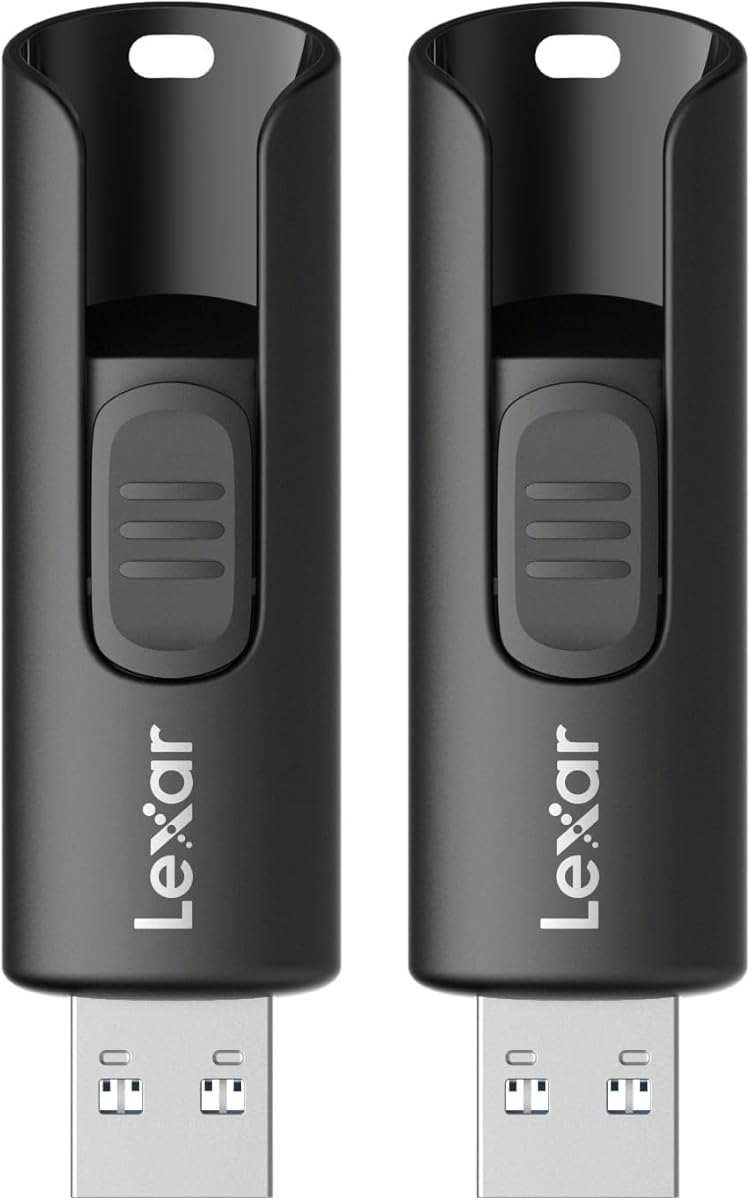
The Lexar A30E 128GB 2-Pack earns Editor's Choice for balancing performance and price. With a 4.6 rating users praise its reliability for daily file transfers. It offers modern USB 3.2 Gen 1 speeds in a slim form factor.
We may earn a commission when you buy through this link, at no additional cost to you.
Its standout quality is the combination of speed and security. Transfer speeds reach 100MB/s which is ten times faster than standard USB 2.0. Lexar DataShield adds password protection and encryption for sensitive files without needing extra software.
The only trade-off is the lack of USB-C connectivity. If you need to connect to newer tablets or MacBooks directly you may need an adapter. However for most laptops and desktops the Type-A port works perfectly.
Buy this if you need reliable portable storage for work or school. The 2-Pack ensures you have a backup drive handy. It is a solid all-rounder for anyone who values speed and security in a compact drive.
Achieve transfer speeds up to 100MB/s for quick file moves. This is significantly faster than older USB 2.0 standards.
Protect sensitive files with password protection and encryption. Deleted files in the safe are securely erased to prevent recovery.
We may earn a commission when you buy through this link, at no additional cost to you.
The Lexar D50E stands out as the premium choice with SSD-level speeds. It boasts 400MB/s read transfers which is four times faster than standard USB drives. This makes it ideal for large video files or high-resolution photos.
We may earn a commission when you buy through this link, at no additional cost to you.
Its dual USB-A and USB-C connectors eliminate the need for adapters. You can plug directly into modern laptops or smartphones. The Lexar App adds convenience by allowing easy photo backup from iOS and Android devices.
While powerful it comes at a higher price. The app does not yet support iCloud content backup which might limit some users. Still the hardware performance and durability justify the cost for professionals.
Choose this drive for high-end workflows requiring fast data access. It fits perfectly in a mobile workstation setup. If you value speed and universal connectivity this is the top recommendation.
Enjoy read speeds up to 400MB/s and write speeds to 360MB/s. This handles large media files with ease.
Use USB-A and USB-C connectors without cables or adapters. Ensures compatibility across all modern devices.
We may earn a commission when you buy through this link, at no additional cost to you.
The Lexar E31 offers excellent value for budget-conscious buyers. It maintains a 4.6 rating by delivering reliable USB 3.2 Gen 1 performance at a low cost. The sleek all-metal build feels premium despite the affordable price.
We may earn a commission when you buy through this link, at no additional cost to you.
Its compact design includes an integrated keyring loop. This ensures you can attach it to your keychain and avoid losing it. Transfer speeds reach 100MB/s which is plenty for everyday documents and media files.
The main limitation is the 64GB capacity. It may not suit users needing large storage for video editing. Also it lacks advanced encryption features found in higher models. For basic storage it is a solid choice.
Buy this for daily use or school assignments. It is a reliable tool for transferring files quickly without breaking the bank. If you need a spare drive this is a smart pick.
The all-metal build provides reliability and style. It withstands daily wear better than plastic alternatives.
Integrated loop allows attachment to keychains or lanyards. Keep your digital world accessible and secure.
We may earn a commission when you buy through this link, at no additional cost to you.
The Lexar S80 delivers impressive read speeds of 150MB/s. It is a strong choice for users who frequently read large files from the drive. The retractable design keeps the port safe without removable caps.
We may earn a commission when you buy through this link, at no additional cost to you.
Security is handled by advanced software with 256-bit AES encryption. This allows you to store sensitive data privately. The 3-year warranty adds peace of mind for long-term use.
It only supports USB Type-A ports. If you work with modern USB-C devices you will need an adapter. Also the encryption software may require installation unlike plug-and-play options.
Select this drive for standard high-speed transfers on PCs. It balances speed security and durability well. For those who prioritize read performance it is a great pick.
Read speeds up to 150MB/s ensure quick access to files. Ideal for running apps or reading large media.
Use 256-bit AES encryption to protect private data. Securely store files with password protection.
We may earn a commission when you buy through this link, at no additional cost to you.
The D40E is a 2-Pack dual drive solution perfect for mobile use. It features both USB-C and USB-A connectors in a single slim unit. This makes it easy to connect to smartphones and laptops alike.
We may earn a commission when you buy through this link, at no additional cost to you.
The 360-degree swivel design protects the ports without a cap. You can switch between connectors easily while keeping them safe. The metal housing ensures durability and heat resistance during use.
Transfer speeds are capped at 100MB/s which is decent but not top-tier. The pack of two offers value if you need multiple drives for family or team use. The added weight is slight but noticeable.
Pick this for sharing files across different device types. It removes the guesswork about which port to use. Great for travel where versatility is key.
USB-C and USB-A connectors offer broad compatibility. Work seamlessly with phones and older computers.
The 360-degree swivel design protects connectors effectively. No caps to lose or damage over time.
We may earn a commission when you buy through this link, at no additional cost to you.
The TwistTurn2 3-Pack is ideal for casual users needing multiple drives. It offers excellent value for low-cost storage. The twist design hides the connector so you never lose a cap.
We may earn a commission when you buy through this link, at no additional cost to you.
At USB 2.0 speeds it is slower than modern options. This makes it best for small documents or music files. The 32GB capacity limits it to basic tasks rather than large media.
Despite the speed it remains a reliable option for everyday use. The hinge protects the interface during transport. It is a great choice for gifting or classroom settings.
Buy this for simple storage needs or as a backup. If speed is not a priority this multipack is cost-effective. It keeps your digital files organized and portable.
The hinged jacket rotates to hide the port. Ensures the connector stays safe from dust and damage.
Use right out of the box with no software. Compatible with most PC and Mac systems.
We may earn a commission when you buy through this link, at no additional cost to you.
The D400 offers a generous 256GB capacity in a dual format. It bridges the gap between storage size and portability. The swivel design ensures the connectors stay protected during use.
We may earn a commission when you buy through this link, at no additional cost to you.
It supports USB-C and USB-A for wide compatibility. Transfer speeds hit 130MB/s which handles large files well. Lexar DataShield adds a layer of security for private files.
The main downside is the lack of 360-degree rotation. You must align the drive manually which takes a second. Still the storage size and security features make it a strong contender.
Choose this for storing high-resolution videos or photos. It fits well on Android devices and Macs. A practical choice for professionals with larger storage needs.
256GB allows for extensive photo and video libraries. Keep your entire content library in your pocket.
A durable metal build offers elegance and protection. Adds a premium feel to the drive.
We may earn a commission when you buy through this link, at no additional cost to you.
The S60 5-Pack offers a versatile assortment of colors. It is great for organizing files by project or person. The sliding cover protects the connector securely without a loose cap.
We may earn a commission when you buy through this link, at no additional cost to you.
At 32GB per drive it is best for small documents. USB 2.0 speeds mean slower transfers but it works well for text files. The high user rating reflects consistent quality across the set.
It lacks modern speed which may frustrate media users. However for office tasks or school work it is sufficient. The bulk option ensures you have a spare available anytime.
Buy this for teams or families sharing storage needs. The variety makes it easy to assign drives. A practical solution for basic file sharing tasks.
The sliding cover protects the connector effectively. Prevents dust entry and accidental damage.
Five distinct colors help organize different file types. Assign a color per project for clarity.
We may earn a commission when you buy through this link, at no additional cost to you.
The M400 is a solid choice for speed and style. It delivers 150MB/s read speeds which is great for opening apps. The design feels durable and fits well in a pocket.
We may earn a commission when you buy through this link, at no additional cost to you.
Lexar DataShield is included to protect your files. This makes it safe for business or personal sensitive data. It is backwards compatible with older USB ports for flexibility.
The capacity is fixed at 128GB which suits most users. It lacks USB-C so modern tablets need an adapter. But for laptops it performs reliably.
Select this for a blend of looks and function. It is an upgrade from basic plastic drives. Ideal for those who care about aesthetics and speed.
Features a stylish design that is built to last. A metal body resists daily wear.
Read speeds reach 150MB/s for fast access. Efficient for frequent file reading tasks.
We may earn a commission when you buy through this link, at no additional cost to you.
This S60 3-Pack holds the highest rating in the group. It offers a straightforward solution for basic storage tasks. The sliding cover ensures the port stays safe during transport.
We may earn a commission when you buy through this link, at no additional cost to you.
At USB 2.0 speeds it is not ideal for large videos. But for documents and music it works perfectly. The 3-pack means you always have a spare available.
It is fully backwards compatible with older ports. This ensures it works even on legacy systems. For budget storage it is a reliable choice.
Buy this for home or office basic storage. It is simple effective and easy to use. The top rating proves its consistent performance.
Users rate this drive highly for performance. It offers consistent quality over time.
A sliding cover protects the connector. It keeps the port safe from dust and scratches.
We may earn a commission when you buy through this link, at no additional cost to you.
Choosing the right Lexar drive depends on your storage and speed needs. Consider capacity compatibility and security features to find the best fit.
Capacity determines how much data you can store. Options range from 32GB to 1TB depending on your needs. For basic documents 32GB or 64GB is sufficient. For photos and videos choose 128GB or higher.
Pick capacity based on your average file size. A larger drive is future-proof but costs more.
Speed affects how fast files move between devices. USB 3.2 Gen 1 drives offer up to 400MB/s read speeds. Older USB 2.0 drives are slower but cheaper. High speeds are vital for large media files.
Prioritize speed if you transfer large files often. For text files standard speeds are fine.
Connector type ensures the drive fits your device. Type-A is standard for laptops but USB-C is common in newer Macs and phones. Dual drives offer both connectors in one. This avoids adapter issues.
Choose dual connectors for universal use. Type-A is best for traditional PCs.
Durability protects your data from damage. Metal housings resist drops and heat better than plastic. Retractable or swivel designs keep ports safe. Look for sturdy materials if you carry the drive daily.
Opt for metal builds for daily carry. Retractable caps prevent loss.
Security features keep your data private. Lexar DataShield allows password protection and encryption. This prevents unauthorized access to files. Encryption is vital for business or sensitive personal data.
Ensure the drive has encryption if needed. Check if software installation is required.
A warranty protects your purchase from defects. Lexar typically offers 2 or 3-year limited warranties. Check coverage terms before buying. Good support ensures peace of mind.
Prioritize models with longer warranties. This indicates reliable quality and trust.
Price varies by capacity and features. Multipacks offer better value per gigabyte. Balance cost with performance needs. A higher price may justify better speeds.
Compare price per GB across models. Multipacks save money for teams.
To use your drive simply plug it into an available USB port. The system will recognize it automatically. You can drag and drop files to transfer them. Safely eject the drive via the system tray before removing it.
Store your drive in a cool dry place to avoid damage. Protect metal contacts from dust and moisture. Use the retractable cover or cap when not in use. Avoid exposing it to extreme temperatures.
Maintain performance by formatting the drive occasionally. Use NTFS for Windows or APFS for Mac to optimize storage. Check for firmware updates if available. Keep the surface clean with a soft dry cloth.
USB 3.2 offers faster transfer speeds up to 400MB/s while USB 2.0 is slower around 40MB/s. USB 3.2 is backward compatible with USB 2.0 ports. This means you can use a newer drive on an older computer.
Use Lexar DataShield software to password protect files. It encrypts data with 256-bit AES to prevent unauthorized access. You can create a secure safe and manage permissions through the app.
Yes Lexar drives work with Macs via USB ports. Most models are plug and play. You may need to format the drive to exFAT for full read write access on macOS.
Lexar typically offers a 2 or 3-year limited warranty. This covers defects in materials and workmanship. Check the specific product page for detailed terms and conditions.
Yes drives with USB-C connectors work directly with Android phones. For Type-A drives you need an OTG adapter. Ensure your phone supports USB OTG for file access.
A Lexar drive can last for many years with proper care. Lifespan depends on write cycles and storage conditions. Avoid physical shocks and extreme heat to maximize its life.
We explored ten top Lexar models ranging from basic multipacks to high-speed dual drives. The A30E 2-Pack stands out for value while the D50E leads in speed. Each option serves specific user needs effectively.
Prioritize capacity and connectivity based on your devices. If you use modern laptops or phones choose a dual connector drive. For budget needs the E31 or S60 packs offer solid performance.
Always check current prices and compatibility before buying. Prices vary by retailer and may change frequently. Choose the Lexar drive that fits your workflow to ensure reliable portable storage.