
TP-Link ER605, Wired Gigabit VPN Router
4.4Editor score
Five Gigabit Ports total
USB WAN port for backup
Multiple VPN protocol support
This guide compares the top ten load balancing routers for businesses and power users seeking reliable multi-WAN failover and bandwidth aggregation solutions.
Finding the right network hardware is crucial for maintaining stable internet connections in modern offices and homes. A load balancing router distributes traffic across multiple internet links to ensure consistent performance and uptime for all connected devices.
We evaluated ten top-rated models based on port variety, security features, and ease of management. Our analysis covers devices ranging from budget-friendly options to enterprise-grade gateways designed for high-traffic environments.
Each pick highlights specific strengths like VPN support or cloud management. Please note that product specifications and pricing can change over time, so always verify current details before making your final purchase decision today.
4.4Editor score

4.7Editor score

4.0Editor score
The following table provides a quick side-by-side overview of the key specifications for each router model reviewed in this guide to help you compare features at a glance.


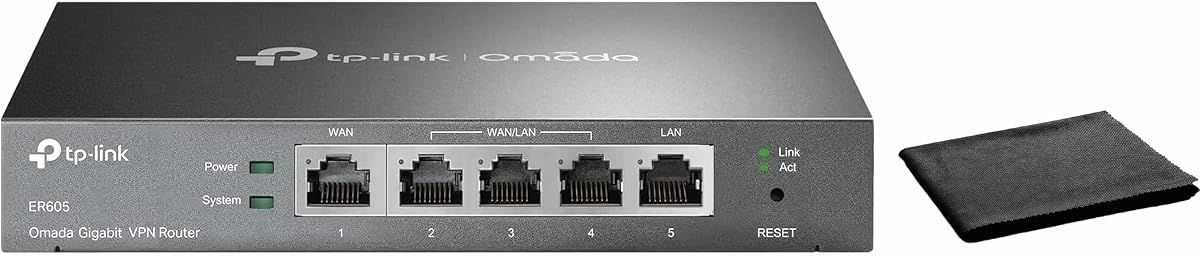

The TP-Link ER605 stands out as an excellent entry point for those needing reliable network stability without breaking the bank. It offers essential load balancing capabilities with a solid four point four star rating from users who value straightforward functionality and consistent uptime.
We may earn a commission when you buy through this link, at no additional cost to you.
Its design includes five Gigabit ports which allow you to connect multiple internet service providers simultaneously. This setup ensures that if one line fails, traffic automatically shifts to the others. You can also add a 4G modem via USB for an extra layer of redundancy.
While it lacks the advanced features of higher end models, it provides robust security including firewall policies and DoS defense. The only notable limitation is the absence of Wi-Fi which requires a separate access point for wireless coverage in your space.
This device is ideal for small offices or home labs where wired connections are preferred. It delivers the core load balancing functions you need at a very competitive price. For budget conscious buyers, it represents a smart choice for securing your network perimeter.
The flexible port layout allows for seamless integration of multiple ISP connections and LAN devices without congestion or hardware bottlenecks.
Built-in security tools like SPI firewall and IP filtering keep your network safe from unauthorized access and common online threats.
We may earn a commission when you buy through this link, at no additional cost to you.
The ER7206 is built for growing networks that demand more scalability than basic home gear can offer. With a strong 4.5 star rating, it handles high traffic loads efficiently while integrating smoothly into the Omada ecosystem for centralized control and monitoring.
We may earn a commission when you buy through this link, at no additional cost to you.
It supports up to four WAN ports which means you can distribute bandwidth across several internet lines to maximize speed and reliability. This is particularly useful for businesses where downtime can cost money. The router also supports a massive number of simultaneous client connections.
One consideration is that to fully leverage its capabilities you may need other Omada hardware or controllers. Additionally the price is higher than simpler options but the performance justifies the cost for professional environments. It is a solid choice for scalable network expansion.
If you need a gateway that can grow with your organization this model delivers the necessary throughput and management tools. It balances performance and features well for small to medium enterprises. The remote access features make it easy to manage sites from anywhere.
Designed to support up to 700 clients, this router ensures stable performance even as your business grows and adds more devices.
Seamless integration with Omada controllers allows for unified management of your entire network infrastructure from a single interface.
We may earn a commission when you buy through this link, at no additional cost to you.
The Cudy R700 brings a unique appeal to tech savvy users who want deep control over their network settings. Rated 4.4 stars, it stands out for its support of OpenWRT which allows you to install custom firmware and tailor the router to specific needs.
We may earn a commission when you buy through this link, at no additional cost to you.
It connects up to five ISPs with automatic failover ensuring continuous internet access even if one provider has an outage. The included VPN suite lets you create secure tunnels for remote work or site-to-site communication. This level of flexibility is rare at this price.
While powerful, the reliance on OpenWRT means the learning curve can be steep for average users. You may need to reference community guides to get the most out of it. However, those who value control will appreciate the advanced firewall and segmentation capabilities available.
This router is perfect for home labs or small offices that need robust features without enterprise costs. It offers a compelling mix of hardware and software flexibility. If you are willing to explore customization this device delivers excellent value and performance.
Full OpenWRT support unlocks advanced VLAN segmentation and custom QoS policies that are typically reserved for more expensive gear.
WireGuard and OpenVPN support allow you to securely connect remote teams or branch offices without extra hardware.
We may earn a commission when you buy through this link, at no additional cost to you.
The Alta Labs Route10 is engineered for networks that demand maximum speed and raw processing power. With a rating of 4.0 stars, it targets enthusiasts and businesses with multi-gigabit internet plans who need a gateway that can handle heavy traffic without bottlenecks.
We may earn a commission when you buy through this link, at no additional cost to you.
It features two 10Gbps SFP+ ports and four 2.5G ports allowing you to utilize high bandwidth fiber or cable connections. The quad-core Qualcomm processor ensures that even with complex firewall rules or VPN traffic the router maintains low latency and high throughput.
The integrated PoE+ support simplifies deployment by powering access points directly through the router. However it does not broadcast Wi-Fi so you will need separate access points for wireless coverage. This design focuses on delivering pure routing performance at the highest level.
If you have upgraded your internet to 10G and need a router that matches that speed this is a top choice. It brings enterprise-level hardware to a focused audience. For those who prioritize bandwidth efficiency the Route10 is a standout option.
Equipped with 10Gbps SFP+ ports, this router prepares your network for the next generation of high-speed internet service plans.
Integrated 40W PoE+ output means you can power your access points without needing extra power injectors or outlets.
We may earn a commission when you buy through this link, at no additional cost to you.
The ER7412-M2 offers a versatile configuration that supports both modern 2.5G connections and standard Gigabit networks. It holds a 4.5 star rating for its ability to handle complex network setups while maintaining speed and security for all connected users.
We may earn a commission when you buy through this link, at no additional cost to you.
Its port configuration includes two 2.5G ports plus ten Gigabit ports which offers incredible flexibility for different connection types. Load balancing works across up to eleven WANs ensuring optimal use of every available internet link. This makes it suitable for large offices or ISPs.
The device includes Deep Packet Inspection which helps in identifying and controlling specific traffic types more effectively. While powerful, it works best within the Omada ecosystem so you may need a controller to unlock full features. It is a robust choice for advanced setups.
If you need a router that can handle high throughput and complex traffic rules this model delivers. It balances port speed and security features well. For organizations investing in 2.5G networks, this router ensures your hardware does not limit your bandwidth.
Advanced DPI allows for granular control over network traffic, helping to block malicious data and prioritize critical applications.
With up to twelve active ports, you can connect a wide variety of devices and internet lines without needing extra switches.
We may earn a commission when you buy through this link, at no additional cost to you.
The TL-R470T+ is a dependable choice for environments where Gigabit speed is not the primary concern but multi-WAN stability is. With a 4.2 star rating, it serves small offices or cafes that need to combine multiple slower internet lines into one stable connection.
We may earn a commission when you buy through this link, at no additional cost to you.
It features four WAN ports that allow load balancing to maximize total available bandwidth. This is useful when individual lines are not fast enough on their own. The portal authentication feature helps manage user access which is beneficial in public or shared spaces.
The main limitation is the 100M port speed which does not support modern Gigabit internet plans. However for specific use cases this hardware remains practical. It also includes lightning protection which adds durability for areas with frequent electrical surges.
If you are looking for a simple way to aggregate slower internet links this router is a good fit. It provides essential failover tools at a low cost. For legacy networks or budget setups, it offers reliable performance.
Portal authentication allows you to control who connects to the network, making it easier to manage guest access securely.
Built-in lightning protection helps safeguard your equipment from power surges caused by storms or unstable electrical grids.
We may earn a commission when you buy through this link, at no additional cost to you.
The TL-R480T+ is designed for smaller setups that need basic load balancing without extra bulk. It holds a 4.2 star rating and is known for its ease of use and reliable performance in connecting multiple internet sources to your local network.
We may earn a commission when you buy through this link, at no additional cost to you.
Its ports can be configured to serve as either WAN or LAN connections giving you flexibility in how you set up the network. This adaptability makes it easy to adapt to different wiring scenarios. The small case fits neatly in tight spaces.
While it lacks advanced features like deep security or high client counts it does the core job well. It is a practical device for a small office with just two or three internet lines. The balance of size and function is its main selling point.
If you need a no fuss router to keep your internet flowing this model is worth considering. It avoids unnecessary complexity while delivering stability. For basic load balancing tasks it remains a solid performer in the budget category.
Configurable ports allow you to assign roles based on your needs, simplifying the physical setup process.
The compact case ensures this router can fit easily into small desks or cabinets without taking up much room.
We may earn a commission when you buy through this link, at no additional cost to you.
The ER-605 offers a mix of business features aimed at making network management simpler for small teams. With a 4.3 star rating, it provides essential load balancing and security tools that keep your connection stable and safe from common internet threats.
We may earn a commission when you buy through this link, at no additional cost to you.
Its dual WAN ports allow for failover and load balancing across two lines. This setup ensures that if one drops the other takes over. You can also manage the network via the cloud which lets you check status remotely without physical access.
Bandwidth management helps prioritize important traffic like video calls over downloads. However it has fewer ports than similar models which might limit physical connections. For small businesses needing remote oversight this is a practical tool to simplify IT tasks.
If you need a router that is easy to set up and monitor from anywhere this fits the bill. It covers the essentials for business security and stability. For small offices, it provides a balanced mix of control and simplicity.
Cloud monitoring enables you to check your network status and configure settings from a browser anywhere in the world.
Bandwidth management ensures your critical business apps get the speed they need even when others are using the network.
We may earn a commission when you buy through this link, at no additional cost to you.
The EdgeRouter 4 is a favorite among network professionals who value reliability and control. With a 4.6 star rating, it is known for its solid build quality and ability to handle complex routing tasks quietly without fans or noise distractions.
We may earn a commission when you buy through this link, at no additional cost to you.
It includes three Gigabit ports and an SFP slot for fiber connections which makes it versatile for various infrastructure needs. The fanless design is perfect for quiet offices or server rooms where noise is a concern. You can mount it on a wall or desk easily.
The software interface is powerful but complex requiring some networking knowledge to configure properly. This might discourage casual users but enthusiasts love the control. It is a robust choice for those who want a router they can fully manage and tune.
If you need a silent and powerful router for a professional environment this is a top contender. It offers high performance without the noise of standard units. For advanced setups, it remains a highly respected device in the industry.
The fanless design ensures the router runs silently making it ideal for environments where noise levels must be kept low.
Wall, rack, and desk mount options mean you can place the router wherever fits your physical setup best.
We may earn a commission when you buy through this link, at no additional cost to you.
The Omada Fusion 2.5G earns top marks for combining modern speeds with easy management tools. It has a 4.7 star rating and stands out with a touchscreen that lets you diagnose issues on the device itself without needing a laptop.
We may earn a commission when you buy through this link, at no additional cost to you.
It features five 2.5G ports which deliver high speed connections to your devices. The Quad-Core CPU handles traffic efficiently ensuring smooth performance. You can set it up via Bluetooth and manage it through the cloud portal for remote control.
While it requires an investment and works best with Omada devices the benefits are clear. The touchscreen simplifies maintenance and the cloud access helps manage multiple sites. For those seeking a modern high performance router this is a top choice.
If you want the best mix of speed and user experience this router delivers. It simplifies IT tasks while providing top tier performance. For businesses upgrading to multi-gigabit internet it is a standout model to consider.
The built-in touchscreen provides instant health insights and speed tests directly on the router for fast troubleshooting.
License-free cloud access lets you manage your network from anywhere with a web browser or mobile app.
We may earn a commission when you buy through this link, at no additional cost to you.
Choosing the right router involves looking at several key factors beyond just price. Here are the most important elements to consider.
The primary purpose of a load balancing router is to connect to multiple internet service providers. You should check how many WAN ports are available to match your needs. Some models support two while others support up to four or more.
Ensure the router has enough ports for your planned ISP connections without needing extra switches.
Check whether the ports support Gigabit or faster speeds like 2.5G or 10G. Using an older 100M router will limit your internet speed even if you pay for faster plans. Look for devices that match your current ISP speeds.
Prioritize routers with at least Gigabit ports to avoid bottlenecks in your network.
If you need to access your network remotely or connect to other sites securely, look for strong VPN support. Features like IPsec, OpenVPN, or WireGuard ensure your data stays private. Check if the device allows for multiple concurrent tunnels.
Strong VPN support is essential for business users who need secure remote access.
Understand how the device switches connections. Failover means it waits for a drop before switching while load balancing shares traffic across both. Ensure the logic matches your business continuity requirements.
Choose a router that offers the specific traffic management logic you need.
Look at how you will control the router. Some offer cloud portals which allow remote access while others rely on a local web interface. Consider if you want to manage the network from a phone or browser.
Cloud management features simplify maintenance for those who need remote oversight.
Advanced security like SPI firewalls, DoS protection, and MAC filtering helps keep your network safe. These tools are critical for businesses that handle sensitive data. Check for features like Deep Packet Inspection for granular control.
Ensure the router includes essential security layers to protect your data.
If you have many wired devices, you may need more LAN ports. Consider if the router allows for expansion via switches or has enough built-in ports. This affects how many devices you can connect directly.
Select a router that can grow with your network to avoid replacing it soon.
Connect your internet cables to the WAN ports and your computers to the LAN ports. Then log in to the web interface to set up load balancing rules based on your preferences.
Keep your firmware updated to ensure security patches and performance improvements are applied. Use the cloud monitoring tool if available to check for issues without physical access.
Place the router in a well-ventilated area to prevent overheating. Dust the vents occasionally with compressed air to maintain proper airflow and extend the device's lifespan.
The main benefit is increased reliability and performance. By combining multiple internet lines you get faster speeds and continuity if one line fails.
Standard Ethernet cables work fine for Gigabit routers. If you use 2.5G or 10G models ensure your cables support the higher speeds.
Most of these routers focus on wired connections. You usually need to pair them with a separate access point for Wi-Fi coverage.
Some models are easy with web wizards while others require more technical knowledge. Look for features like cloud setup if you want simplicity.
Security features protect your network from external threats. Look for firewalls and VPN support to keep your data safe.
Yes, some models offer SDN or cloud controllers to manage multiple sites from a single dashboard for easier administration.
We reviewed ten top models ranging from budget friendly options to high end enterprise gateways. Each offers unique strengths in port speed, management, and security.
Focus on matching the router speed to your internet plan and check the security features before buying. For most businesses the Fusion 2.5G or ER605 are excellent starting points.
Remember to verify current specs and prices before purchasing since models may change. This guide helps you narrow down the best choice for your needs.