
HP Chromebook 14 Laptop
4.3Editor score
Up to 14 Hours Battery Life
Intel Celeron N4120
Thin and Lightweight Design
Finding a laptop that balances performance with efficiency is crucial for modern users who need reliable computing without draining your battery quickly. Low power consumption laptops offer extended usage times and reduced energy costs, making them ideal for students and professionals alike.
We evaluated ten top-rated models based on processor efficiency, battery longevity, display quality, and overall value. Our analysis focuses on devices that deliver smooth everyday performance while minimizing energy draw, ensuring you stay productive wherever you go without constant access to an outlet.
Each pick highlights key strengths and potential trade-offs to help you choose the right device for your specific needs. Prices and availability change frequently, so verify current details before purchasing to ensure you get the best deal available at the time of your order.
4.3Editor score

5.0Editor score

4.8Editor score
As an Amazon Associate we earn from qualifying purchases.
This side-by-side comparison highlights the core specifications of each model to help you quickly identify which device aligns with your power efficiency and performance requirements for daily tasks.



This HP model stands out as the top choice for users seeking a balance between energy efficiency and modern computing capabilities. With a perfect rating and strong performance metrics, it delivers reliable everyday computing while consuming minimal power. The inclusion of DDR5 RAM and an SSD ensures responsiveness that belies its low energy footprint.
We may earn a commission when you buy through this link, at no additional cost to you.
The Intel N150 processor is specifically designed to handle daily tasks like web browsing and document editing without excessive heat or power draw. Coupled with up to 11.5 hours of battery life, you can work through long sessions unplugged. The 1TB OneDrive subscription adds significant value for storing files without cluttering the local drive.
While the display resolution is standard HD, the micro-edge design maximizes screen real estate for a budget device. The trade-off of limited local storage is mitigated by cloud solutions, keeping the system lightweight and fast. This approach aligns well with modern workflows where internet access is ubiquitous.
If you need a dependable laptop for school or office tasks without worrying about battery anxiety, this is an excellent pick. It combines essential specs with a focus on efficiency, making it ideal for users who prioritize portability and endurance over heavy graphics performance.
The N150 processor optimizes power usage to extend battery life without sacrificing speed for common applications.
With 1TB of cloud space included, you save power by reducing local drive activity and access files remotely.
We may earn a commission when you buy through this link, at no additional cost to you.
For those strictly prioritizing battery life and cost, this Chromebook delivers impressive efficiency. Its Intel Celeron processor is optimized for low power tasks, ensuring you can work for hours on a single charge. Chrome OS keeps the system clean and fast by relying heavily on cloud apps which reduces local resource usage.
We may earn a commission when you buy through this link, at no additional cost to you.
The 14-hour battery life claim is a strong selling point for students and travelers who may not have access to power outlets. The device is incredibly thin and light, making it easy to carry in any bag. Fast charge technology ensures you can get a quick boost of power when you are running low.
The main limitations are storage and the reliance on internet connectivity for full functionality. However, for basic web browsing, email, and document editing, this device handles everything smoothly. The HD display is sufficient for reading text and watching media in a typical room.
Choose this if you want the most affordable option that still offers high endurance and portability. It is perfect for light users who do not need heavy local storage or complex software compatibility, focusing instead on web-based tasks and battery longevity.
The efficient processor and optimized Chrome OS allow for extended unplugged usage throughout the day.
Fast charge technology provides significant power in under an hour to keep you productive on the go.
We may earn a commission when you buy through this link, at no additional cost to you.
This jumper laptop offers a rare combination of high memory and low energy draw in a larger form factor. The Intel Celeron 5205U is designed for stability and efficiency, providing smooth daily performance without excessive power usage. The 12GB RAM allows for significantly more multitasking than typical budget models.
We may earn a commission when you buy through this link, at no additional cost to you.
The 15.6-inch FHD IPS display provides excellent color accuracy and viewing angles for media and work. Eye-care features like blue light filtering help reduce strain during long sessions, adding to the value. The 256GB SSD ensures fast boot times and responsive application launches without draining the battery.
While the chassis is heavier than 14-inch options, the larger screen and better multitasking capabilities make it worth the trade-off for stationary use. The storage can be expanded via an SD card, offering flexibility for media files. The 38Wh battery is adequate but not as long-lasting as some competitors.
Ideal for users who need a bigger screen and more RAM without compromising too much on efficiency. It serves well as a home office machine or for students who need more power for multiple tabs and documents while still enjoying a lightweight experience.
With 12GB of RAM, you can keep many apps open without slowing down the system or increasing power draw.
The IPS panel with blue light filtering ensures comfortable viewing for long periods of study or work.
We may earn a commission when you buy through this link, at no additional cost to you.
The Lenovo V15 brings business-grade features to a budget-friendly low-power laptop. Powered by the Intel N100, it balances performance with energy efficiency effectively. The UFS storage offers faster read/write speeds than traditional eMMC, making the system feel snappier for daily tasks.
We may earn a commission when you buy through this link, at no additional cost to you.
Its 15.6-inch Full HD display with anti-glare coating is perfect for long work hours without eye strain. TÜV Rheinland certification ensures the screen is safe for eyes, which is crucial for productivity. Wi-Fi 6 ensures you connect quickly to modern networks for efficient data transfer.
Windows 11 S mode provides enhanced security and performance but limits app installation to the Microsoft Store. The 4GB RAM is sufficient for basic multitasking but might feel limited for heavy users. However, the military-grade durability makes it a robust choice for travel.
This model is great for small business users who need reliability and a good screen without high energy consumption. The combination of fast storage and low power processing makes it a strong contender for office work and web browsing.
UFS 3.1 storage provides rapid access to files and boot times that keep your workflow moving smoothly.
Low Blue Light certification reduces harmful emissions, protecting your eyes during extended viewing sessions.
We may earn a commission when you buy through this link, at no additional cost to you.
This 2026 edition introduces AI features and modern connectivity to the affordable laptop segment. The Intel N150 ensures that you get consistent performance without worrying about battery drain. The addition of a dedicated Copilot key streamlines access to AI tools for enhanced productivity.
We may earn a commission when you buy through this link, at no additional cost to you.
The Natural Silver finish looks modern and professional, while the slim design makes it easy to slip into any bag. The 11.5-hour battery life supports all-day use for students and remote workers. Windows 11 is intuitive and supports the latest security features.
While the display is HD, the anti-glare technology helps in various lighting conditions. The 1TB Cloud Storage ensures you have plenty of room for files without needing expensive local upgrades. It is a balanced option for those who want new features at a reasonable price.
If you are looking for a laptop that feels current and ready for AI integration, this is a solid choice. It combines essential performance with a focus on usability, making it ideal for daily productivity tasks and online learning.
The Copilot key allows quick access to advanced tools to help you work smarter and faster.
With 1TB of space, you can store all your media and documents securely in the cloud.
We may earn a commission when you buy through this link, at no additional cost to you.
This Essential model offers a step up in memory with 8GB of DDR5 RAM, which helps with multitasking. The Intel N150 processor keeps power consumption low while delivering enough speed for daily tasks. The UFS storage ensures that the system boots quickly and files open instantly.
We may earn a commission when you buy through this link, at no additional cost to you.
The privacy shutter on the camera adds a layer of security for remote workers and students. The 15.6-inch Full HD display provides a clear view for all content. Wi-Fi 6 ensures you have a stable connection for video calls and streaming without lag.
It is built to withstand everyday wear and tear thanks to MIL-STD testing. The battery life supports a full day of use for most users. The 128GB storage is modest but can be expanded via the included card reader.
For users who need a balance of performance and portability with added privacy features, this is a great option. It offers reliable hardware that can handle modern workloads efficiently without breaking the bank.
8GB of DDR5 RAM allows you to run more apps simultaneously without slowing down the system.
The physical camera shutter gives you total control over when your webcam is active for privacy.
We may earn a commission when you buy through this link, at no additional cost to you.
This laptop stands out for its fanless design, which ensures silent operation during use. The N4020 processor is low power, making it suitable for quiet environments like libraries or shared offices. The FHD display adds value by offering clear visuals for the price.
We may earn a commission when you buy through this link, at no additional cost to you.
Type-C PD charging allows you to use a compact charger and potentially share it with other devices. The external TF card slot lets you expand storage easily if you have many files. Windows 11 is pre-installed, ready for use right out of the box.
While performance is basic, it handles web browsing and media playback well. The lack of a fan reduces dust accumulation and extends the life of the device. It is an excellent choice for those who value silence over raw speed.
If you need a laptop that works quietly and keeps up with light tasks, this is a strong contender. Its simple design and expandability make it a flexible option for students and casual users.
The fanless design means you work in total silence, making it ideal for quiet environments.
Type-C PD charging ensures you can power up quickly with a modern compact adapter.
We may earn a commission when you buy through this link, at no additional cost to you.
The ASUS Vivobook Go is designed with students in mind, offering a balance of portability and features. The N4500 processor provides stable performance for online classes and homework. The fast charge technology ensures you can get back to work quickly if the battery runs low.
We may earn a commission when you buy through this link, at no additional cost to you.
The SonicMaster audio provides better sound quality than typical budget models, enhancing video calls and media. The ErgoSense keyboard is designed for comfortable typing during long study sessions. Privacy shutter adds security for video meetings.
While the storage is limited, it is sufficient for essential apps and cloud storage. The Wi-Fi 5 connectivity is adequate for most home networks. It is a solid choice for education-focused tasks without high power usage.
Choose this if you are a student who needs a reliable, lightweight laptop for daily academic tasks. It combines good audio and typing comfort with essential features to support your learning environment.
SonicMaster speakers deliver crystal clear sound for media and video calls without external speakers.
The ErgoSense keyboard provides a comfortable typing experience for long hours of writing.
We may earn a commission when you buy through this link, at no additional cost to you.
This 2027 edition of the HP 14-inch laptop offers a slim profile and modern internals. The N150 processor supports speeds up to 4.4 GHz, delivering efficient performance for multitasking. DDR5 RAM ensures compatibility with future software standards.
We may earn a commission when you buy through this link, at no additional cost to you.
The 1TB Cloud Storage bundle is a significant value add for saving space locally. The compact design makes it easy to carry in a backpack or briefcase. It supports multiple ports for easy connectivity to external monitors and devices.
While the RAM is standard, the cloud storage reduces local dependency. The anti-glare display ensures you can work in various lighting conditions. It is a well-rounded option for general productivity and daily use.
If you need a modern, slim laptop that includes cloud benefits, this is a great pick. It balances performance and size well for users who travel frequently or work from different locations.
At 0.71 inches, this laptop is incredibly thin and easy to slip into any bag for travel.
The high frequency processor ensures smooth performance for apps and web browsing.
We may earn a commission when you buy through this link, at no additional cost to you.
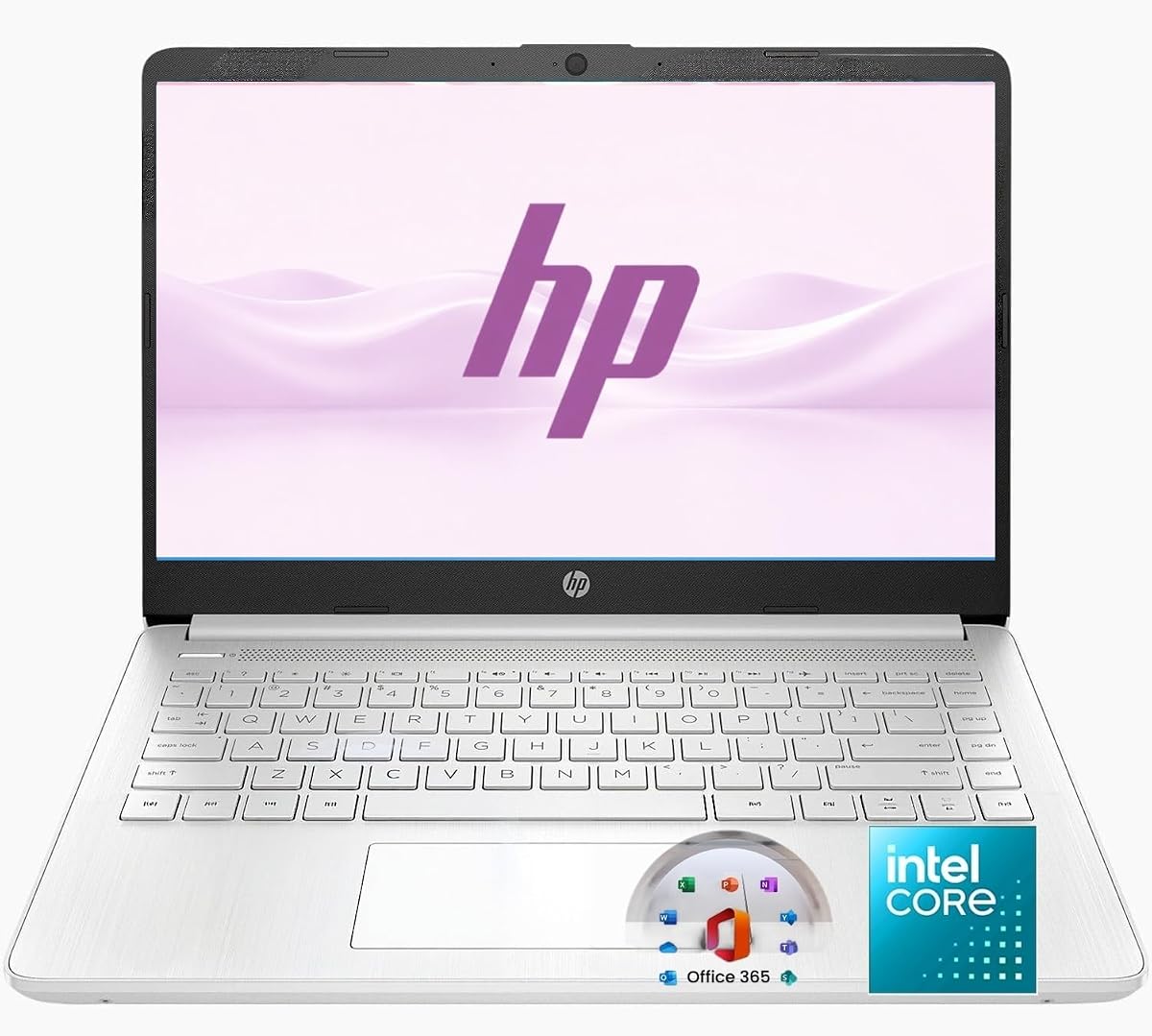
This HP model comes bundled with Office 365, providing essential productivity tools for work and school. The 8GB RAM is a strong feature for this category, allowing for better multitasking. The N150 processor ensures efficient usage for daily tasks.
We may earn a commission when you buy through this link, at no additional cost to you.
Wi-Fi 6 ensures you have a reliable connection for online classes and video calls. The lightweight design makes it easy to carry around campus or the office. The 128GB UFS storage provides fast access to files and applications.
The inclusion of software saves you money on subscriptions. It is a complete package for those starting a new job or school term. The privacy shutter on the camera adds security for remote meetings.
If you need a laptop ready for work with software included, this is a great option. It offers the hardware and software needed for productivity without additional setup or cost.
Get one year of Office 365 for free, covering all your document and spreadsheet needs.
Wi-Fi 6 ensures faster and more stable wireless connections for your daily online tasks.
We may earn a commission when you buy through this link, at no additional cost to you.
Selecting the right low power laptop involves considering several technical factors to ensure you get the efficiency and performance you need.
The processor is the heart of your laptop's energy usage. Look for modern low-power chips like Intel N-series or Ultra series which are designed to balance speed with power conservation. These processors handle daily tasks efficiently without generating excessive heat.
Prioritize models with newer generation processors that use advanced manufacturing processes to reduce energy draw while maintaining performance for common apps.
Battery life is often the primary reason for choosing a low power laptop. Check for models offering at least 10 hours of usage to ensure you can work through a full day without charging. High capacity batteries paired with efficient components lead to the best endurance.
Always review real-world testing results rather than just manufacturer claims to get a true sense of how long the battery lasts under typical usage.
The screen can significantly impact power consumption. LCD panels with lower brightness settings and efficient backlight technology help extend battery life. Look for displays with high refresh rates if you need video clarity, but prioritize those with low energy requirements.
An anti-glare coating is also beneficial as it reduces the need for higher brightness in bright environments, saving power indirectly.
Sufficient RAM ensures smooth multitasking without draining power from constant resource swapping. 8GB is often the sweet spot for balancing performance and efficiency. Solid state drives (SSDs) use less power than traditional hard drives and boot faster.
Opt for SSD storage to reduce the energy needed for accessing files and booting the operating system quickly and efficiently.
The operating system plays a huge role in background processes and power management. Chrome OS and Linux often offer longer battery life due to their lightweight nature. Windows 11 includes power saving modes that help manage resources effectively.
Choose an OS that fits your software needs and offers good power management tools to maximize your battery usage.
Wi-Fi 6 and Bluetooth 5 support ensure you have stable connections without high power costs. Look for devices that allow easy connectivity to peripherals without dongles that draw extra power. USB-C with Power Delivery helps in quick charging and efficiency.
Efficient connectivity ensures your laptop does not waste energy searching for networks or managing unstable connections.
A lightweight and thin chassis often implies better engineering for power efficiency. Heavy laptops usually require larger components that consume more power. Durability is also important to ensure the device lasts long and maintains its efficiency over time.
Select a build quality that withstands travel to prevent damage that could affect battery or system performance later.
Low power laptops come at a wide range of prices. Focus on the value proposition of the device in terms of battery life and included software. Sometimes paying slightly more for a better processor or more RAM offers better long-term efficiency.
Calculate the cost per hour of battery life and the included features to determine the true value of the laptop.
To maximize battery life, adjust your screen brightness to the lowest comfortable level and enable power saving modes in your settings. This helps your laptop manage resources efficiently while maintaining a functional display.
Keep your laptop's software up to date to ensure you have the latest power management patches and security features. Regular updates help the system run smoothly without unnecessary background tasks that drain power.
Use a hard surface when using your laptop to ensure proper airflow. Overheating can cause the fan to run more often which drains the battery faster. Also, avoid leaving it in hot environments to protect the battery health.
A low power consumption laptop is designed to use less electricity than standard models. This is achieved through efficient processors, optimized operating systems, and battery-friendly components. These devices typically offer longer battery life and reduced heat generation.
Yes, modern low power laptops are fast enough for web browsing, email, and document editing. While they may not handle heavy gaming or professional editing, they provide smooth performance for most home and office needs.
You can extend battery life by lowering screen brightness, closing unused apps, and using power saving modes. Keeping your software updated also helps ensure efficient resource usage during operation.
Generally, low power laptops run cooler because they have efficient processors that do not draw excessive power. This reduces heat generation and makes them comfortable to use on your lap.
Chrome OS is often the most power efficient due to its lightweight design. However, Windows 11 and Linux also offer good power management tools that can help maximize battery life on compatible hardware.
Many low power laptops have soldered RAM and storage which limits upgrades. It is best to choose a model with sufficient RAM and storage upfront since adding more later may not be possible.
They are great for students because they offer long battery life for school days and are lightweight for carrying around campus. They also typically come at a lower price point which fits a student budget.
Some low power models can display 4K content but may struggle with heavy decoding. For smooth playback, ensure the laptop has integrated graphics that support 4K decoding to avoid draining the battery.
We reviewed ten excellent laptops that balance performance with energy efficiency. The HP New Everyday Slim Laptop stands out for its perfect rating and cloud integration, making it a top pick for most users.
Prioritize battery life and processor efficiency when selecting a device. Look for models that fit your specific workflow, whether that is a larger screen for multitasking or a compact design for travel.
Remember to check current prices and availability before purchasing as these values change frequently. Ensure you select the configuration that best matches your needs to get the most out of your investment.