
Raycue Mac mini M6 M5 Pro M4 Dock
4.3Editor score
8TB NVMe SSD Support
10Gbps USB Data Transfer
Integrated Wi-Fi Shielding
The Mac Mini M4 Dock represents a crucial upgrade for modern workspace setups requiring extensive connectivity and storage expansion. Finding the right accessory means balancing port availability with design compatibility for your specific computer model needs today.
We evaluated ten leading models based on storage capacity, transfer speeds, and build quality to determine the best options available. Each product offers unique advantages ranging from simple stands to comprehensive workstation hubs with advanced NVMe capabilities.
Every recommendation highlights key specifications and potential trade-offs to help you make an informed decision for your specific setup. Please note that product availability and pricing can change frequently so verify current details before purchasing any item.
4.3Editor score

4.5Editor score

3.9Editor score
As an Amazon Associate we earn from qualifying purchases.
This side-by-side comparison highlights the essential specifications and unique capabilities of each dock to help you identify the perfect match for your professional or home office requirements quickly.


The UGREEN Mac mini Dock & Stand stands out as the Editor's Choice due to its exceptional balance of storage and connectivity. With a rating of 4.5 stars it delivers massive 8TB expandable storage and an 11-in-1 hub that transforms your workspace.
We may earn a commission when you buy through this link, at no additional cost to you.
Its massive 8TB expandable storage allows you to unlock the full potential of your Mac Mini M4 for large file transfers and 4K editing. The 11-in-1 high-speed connectivity hub includes multiple USB-A and USB-C ports plus card readers for versatile peripheral support.
While it offers an optional power adapter for multi-device setups the included short cable ensures a clutter-free workspace immediately upon setup. The precision-engineered design matches your Mac Mini curves perfectly with anti-slip pads for stability and scratch protection.
This dock is ideal for creative pros and multitaskers needing storage speed and connectivity in one elegant solution. If you need to upgrade your Mac Mini M4 for storage and portability this hub delivers everything you need in a compact package.
Supports up to 8TB of ultra-fast internal storage via M.2 NVMe SSDs for seamless workflow enhancement.
Features 11 ports including USB-A USB-C and SD card readers for all your essential peripherals.
We may earn a commission when you buy through this link, at no additional cost to you.
The Raycue Mac mini Dock offers exceptional value as the Best Budget choice with solid features at a lower price point. It provides up to 8TB internal storage expansion and reliable 10Gbps data transfer speeds for efficient workflows.
We may earn a commission when you buy through this link, at no additional cost to you.
Its lightning-fast 10Gbps data transfer ensures swift file movement ideal for drives and HDD devices. The flawless Wi-Fi shielding blocks interference ensuring stable wireless performance essential for streaming and video calls without dropped signals.
While it lacks some advanced cooling fans its optimized thermal design maintains peak performance efficiently. The compact hub keeps your workspace clutter-free with a short cable perfect for users prioritizing value and essential connectivity.
This dock is perfect for budget-conscious users needing reliable storage and connectivity without overspending. It delivers fast speeds expanded storage and seamless connectivity for professionals who demand performance and efficiency in a tidy setup.
Expand your Mac mini M6 M5 Pro M4 capabilities with up to 8TB internal storage for massive capacity.
Conductive paint shielding blocks 5G Wi-Fi interference ensuring stable high-speed wireless performance.
We may earn a commission when you buy through this link, at no additional cost to you.
The ACASIS 40Gbps Mac mini Dock leads as the Best Premium option delivering extensive storage and advanced display capabilities. It supports up to 16TB expandable storage via dual-bay NVMe SSDs ideal for demanding professional workflows.
We may earn a commission when you buy through this link, at no additional cost to you.
Its versatile connectivity includes three USB-A 3.2 ports for 10Gbps speeds and SD/TF 4.0 slots for seamless content transfer. The efficient cooling system features dual silent fans maintaining safe temperatures even during hours of intensive operation.
While it includes a detailed troubleshooting guide for monitor or SSD issues the cooling fans may introduce slight noise under heavy load. This dock provides complete package with adapters and tools ensuring easy setup out of the box.
This dock is recommended for professionals needing massive storage and multi-display setups with robust cooling support. If you require ultra-fast transfer speeds and high capacity storage expansion this solution offers everything you need.
Supports 2 NVMe SSDs delivering up to 16TB in RAID 0 mode for massive capacity expansion.
Features two silent cooling fans that activate automatically maintaining safe temperatures during use.
We may earn a commission when you buy through this link, at no additional cost to you.
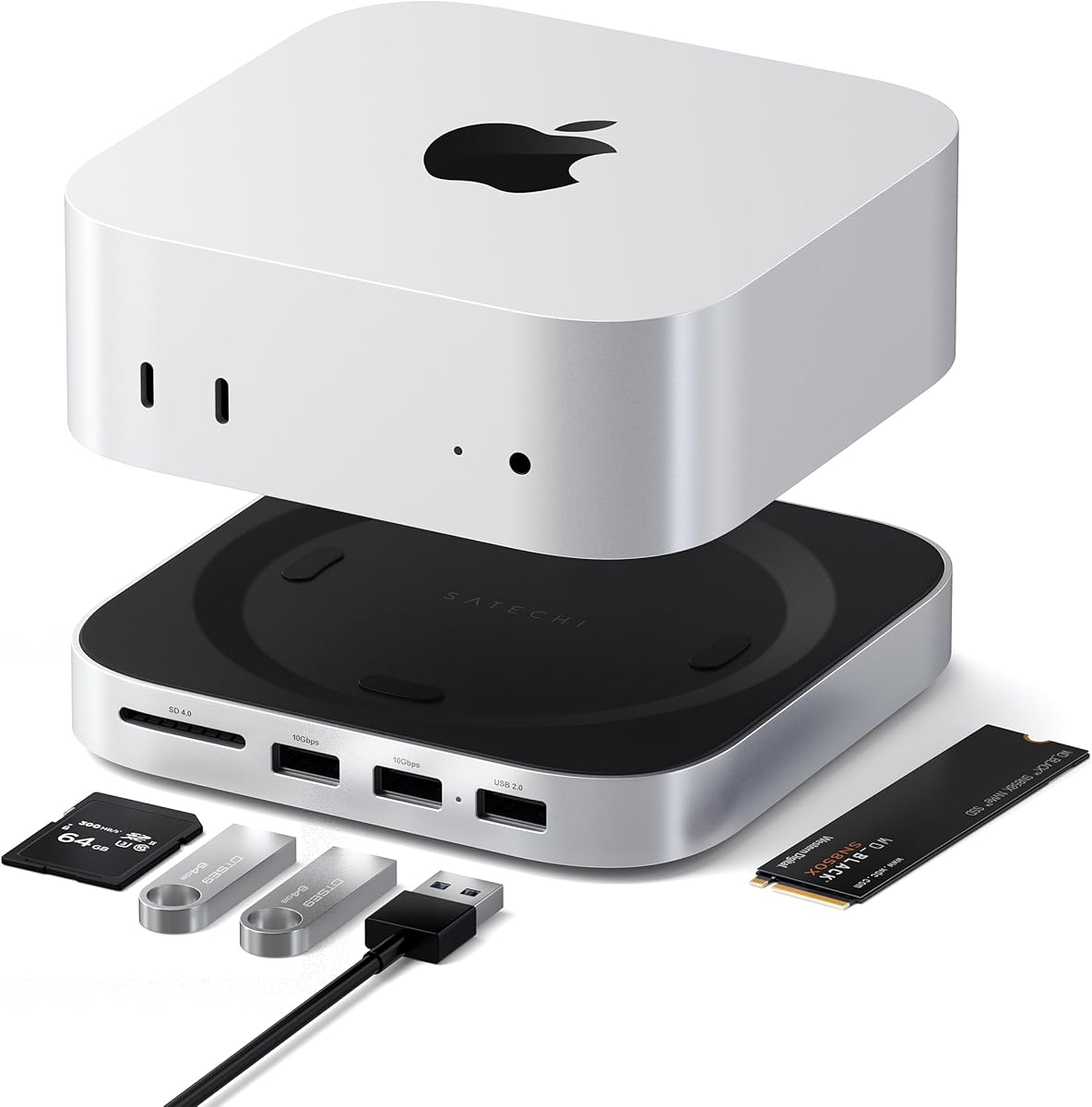
The Satechi Mac mini Hub & Stand is designed specifically for Mac mini M6 M5 Pro and M4 setups with premium aluminum construction. It offers up to 4TB NVMe SSD storage and front-facing connectivity in a streamlined hub stand design.
We may earn a commission when you buy through this link, at no additional cost to you.
Its optimized cooling features heat-dissipating bottom vents and a recessed top ensuring proper airflow without obstructing the Mac mini M4 fan. The front-facing ports allow easy access to USB-A and SD card readers for quick media transfer.
While USB-A ports do not support Apple SuperDrive or iPad charging the SD card reader reaches up to 312MB/s for fast media access. The industry-grade aluminum build ensures stability and scratch protection for your Mac mini M4.
This dock suits users preferring a minimalist aluminum design with dedicated power button access and excellent cooling support. If you need reliable expansion with durable build quality and easy peripheral access this hub delivers consistent performance.
Crafted from industry-grade aluminum with optimized cooling vents to maintain optimal Mac mini temperatures.
Features front-facing ports for easy access to USB and SD cards without moving the Mac mini.
We may earn a commission when you buy through this link, at no additional cost to you.
The UGREEN Mac mini Dock DP Hub offers high-refresh display support ideal for creative work and entertainment with 4K@144Hz output. It combines an 8TB NVMe enclosure with versatile connectivity including DisplayPort USB and audio ports for all your needs.
We may earn a commission when you buy through this link, at no additional cost to you.
Its high-speed connectivity hub includes Mount and Hub with M.2 SSD enclosure supporting 4K240Hz DP and 10G USB ports. This setup is perfect for creative work and presentations delivering seamless productivity with crystal-clear lag-free visuals.
While SSDs must be purchased separately the dock supports M.2 NVMe SSDs up to 8TB for massive expandable storage. The precision-engineered design matches your Mac Mini curves perfectly with anti-slip pads for stability and scratch protection.
This dock is tailored for gamers and creators needing high refresh rate visuals alongside massive storage capacity. If you want a powerful workstation hub that delivers speed and storage in one solution this dock is perfect.
Supports 4K@144Hz via DP port enabling crystal-clear lag-free visuals for creative work.
Unlock the full potential of your Mac Mini with up to 8TB of ultra-fast internal storage.
We may earn a commission when you buy through this link, at no additional cost to you.
The 4URPC Mac mini Dock transforms your workspace with triple-screen productivity capabilities combining HDMI DisplayPort and Thunderbolt ports. It features an 8TB NVMe SSD enclosure and a 13-in-1 hub to simplify your setup completely.
We may earn a commission when you buy through this link, at no additional cost to you.
Its triple-display output supports 4K@144Hz on DisplayPort and 4K@60Hz on HDMI allowing you to multitask efficiently. The 8TB storage expansion provides ample space for RAW photos and 4K video without relying on cloud storage.
While SATA SSDs are not supported the M.2 NVMe enclosure offers speeds up to 10Gbps for fast local access. The perfect fit design matches your Mac mini M4 M5 Pro and M6 dimensions exactly for stable performance.
This dock is ideal for photographers videographers and designers needing massive storage and multi-monitor productivity. If you want a cleaner workspace ready for work study or entertainment this hub delivers seamless connectivity and speed.
Boost productivity with triple-screen workspace setup using DisplayPort HDMI and Thunderbolt ports.
Store over 1600 hours of 4K video with up to 8TB of NVMe SSD storage.
We may earn a commission when you buy through this link, at no additional cost to you.
The ACASIS Mac mini Dock Hub features a 2-bay NVMe SSD enclosure supporting up to 16TB storage with RAID options. It combines versatile connectivity with efficient cooling to maintain safe operating temperatures during extended professional use.
We may earn a commission when you buy through this link, at no additional cost to you.
Its HDMI output supports 4K@60Hz for seamless screen mirroring ideal for meetings and entertainment. The aluminum alloy build with side vents ensures optimal heat dissipation and the complete package includes cables and tools for easy setup.
While you must not plug or unplug SSDs while powered on the included troubleshooting guide helps resolve connection issues. The dual fan cooling system activates automatically maintaining safe temperatures even after hours of continuous operation.
This dock is perfect for users needing massive storage capacity with robust cooling and multi-screen support. If you require a comprehensive solution for storage expansion and display flexibility this hub provides everything you need.
Supports 2 NVMe SSDs delivering up to 16TB in RAID 0 mode for extreme capacity needs.
Features two silent cooling fans that activate automatically maintaining safe 60C during use.
We may earn a commission when you buy through this link, at no additional cost to you.
The UGREEN 8-in-1 Thunderbolt 4 Dock provides massive expansion with three Thunderbolt 4 ports supporting up to 40Gbps transfer. It delivers dual 4K@60Hz display support alongside gigabit ethernet and USB-A ports for comprehensive connectivity needs.
We may earn a commission when you buy through this link, at no additional cost to you.
Its powerful Thunderbolt 4 allows you to transfer data at speeds up to 40Gbps and display resolutions up to 8K. The 85W high-speed charging enables you to charge your laptop while working without needing another charger plugged in.
While full-featured USB-C laptops may support only a single display the dock meets high-performance expansion needs for most users. The included 140W GaN charger ensures stable power for all connected devices including your laptop.
This dock is recommended for users needing maximum bandwidth and multiple high-resolution displays. If you want professional-grade Thunderbolt 4 expansion with reliable power and data transfer this dock is the ideal solution.
Transfer data at speeds up to 40Gbps with powerful Thunderbolt 4 connectivity for professional workflows.
Charge your laptop up to 85W while working using the included 140W GaN charger.
We may earn a commission when you buy through this link, at no additional cost to you.
The RayCue Mac mini Dock HDMI Hub supports both NVMe and SATA SSDs offering flexible storage options up to 8TB. It features a brushed aluminum finish and 4K HDMI output for vibrant video synchronization and meetings.
We may earn a commission when you buy through this link, at no additional cost to you.
Its superspeed data transfer includes 10Gbps USB-A and USB-C ports ideal for drives and HDD devices. The dock supports M4 M4 Pro Mac Mini and 2024 Mac Mini designs ensuring a natural extension of your device.
While you may need an extra USB-C charging port for adequate power supply when using hard drives the HDMI output mirrors or extends screens seamlessly. The brushed finish and silver alloy match Mac mini aesthetics perfectly.
This dock is perfect for users wanting a premium look with versatile SSD support and HDMI connectivity. If you need an aluminum dock that handles both NVMe and SATA SSDs with great video output this is it.
Supports both NVMe and SATA M.2 SSDs up to 8TB for flexible storage expansion options.
Output up to 4K@60Hz to mirror or extend your screen to HDTV or monitor.
We may earn a commission when you buy through this link, at no additional cost to you.
The M5 Retro Dock Station blends classic Macintosh-inspired design with modern tech featuring a built-in 5-inch HD display. It offers massive expandable storage up to 8TB with a powerful 14-in-1 hub that simplifies connectivity for many devices.
We may earn a commission when you buy through this link, at no additional cost to you.
Its built-in 5-inch HD display allows quick access to notifications and monitoring apps while doubling as a photo frame. The 14-in-1 hub includes USB-C USB-A and audio ports plus SD card readers for comprehensive connectivity.
While the Thunderbolt 5 version with 80Gbps bandwidth launches later the 10Gbps version is ideal for everyday users. The integrated dock design saves desk space and creates a streamlined vintage-modern workstation setup effortlessly.
This dock suits users seeking a unique aesthetic with solid performance and storage expansion capabilities. If you want a stylish retro-modern workstation that transforms your desktop this dock offers both form and function.
Classic Macintosh-inspired design combined with modern tech to transform your desktop setup beautifully.
Built-in 5-inch HD display perfect for quick access to notifications monitoring apps or a photo frame.
We may earn a commission when you buy through this link, at no additional cost to you.
Selecting the right dock requires evaluating storage capacity port types and design compatibility with your specific Mac Mini model to ensure seamless workflow integration.
Look for docks supporting NVMe SSDs with capacities ranging from 4TB to 16TB depending on your file needs. Dual-bay systems provide RAID options for speed or redundancy while single-bay models offer simplicity and cost savings.
Prioritize docks with at least 8TB storage if you handle large video files or extensive photo libraries.
Ensure the dock offers the mix of USB-A USB-C Thunderbolt HDMI DisplayPort and SD card readers you need. High-speed 10Gbps or 40Gbps Thunderbolt ports are essential for fast data transfer and high-resolution displays.
Choose a hub with enough USB-A ports for legacy peripherals to avoid dongle clutter on your desk.
Verify display outputs match your monitor needs whether single 8K or triple 4K setups. HDMI and DisplayPort options allow versatile connections while Thunderbolt supports multi-display configurations for power users.
Select a dock with multi-screen support if you need separate timelines reference footage and tools on different monitors.
Some docks support pass-through power while others require external adapters for stable performance. Ensure the power delivery meets SSD and display demands to prevent disconnects or drive failures during use.
Opt for docks with stable 65W or higher adapters to minimize risks of disconnection during intensive workflows.
Aluminum builds and heat-dissipating vents maintain safe temperatures during long sessions especially with active SSDs. Anti-slip silicone pads protect your Mac Mini from scratches and improve stability on your workspace.
Active cooling fans provide better thermal management but may add noise compared to fanless passive designs.
Choose docks designed specifically for Mac Mini M4 M5 Pro or M6 models to ensure seamless integration. Precision-engineered molds match device dimensions and keep power buttons accessible without lifting the Mac.
Verify compatibility with your exact Mac model to avoid fit issues or obstruction of ports and fans.
Integrated short cables keep desks neat while longer cables offer more flexibility for complex setups. Consider cable length relative to your workspace layout to avoid clutter and maintain a clean workflow.
Select docks with tidy integrated cabling for a minimalist setup that reduces visible wires around your desk.
Check for manufacturer warranties covering materials and workmanship to protect against defects. Access to customer support and user manuals helps resolve setup issues quickly without downtime.
Look for at least a 2-year limited warranty and clear troubleshooting guides for peace of mind.
Begin by placing your Mac Mini securely on the dock ensuring the anti-slip pads hold it firmly in place. Connect the dock to your Mac via USB-C and power it on using the integrated lever if available.
Install your NVMe SSD by following the included screwdriver instructions to mount the drive correctly in the enclosure. Ensure the drive is not plugged or unplugged while powered on to prevent data loss or connection issues.
Maintain optimal performance by keeping the dock vents unobstructed and cleaning dust from fans regularly. Use compatible USB-C cables and avoid excessive force when connecting peripherals to protect port longevity.
Most high-end docks support only M.2 NVMe SSDs for maximum speed and efficiency. Some models like the RayCue HDMI Hub offer dual support for NVMe and SATA drives providing flexibility for older SSDs.
Depends on the dock and Mac Mini model. Some support dual 4K or triple displays via HDMI DisplayPort and Thunderbolt combinations. Verify display output specs before purchasing to match your multi-monitor needs.
Not always. Basic models may draw power from your Mac Mini but multi-device setups require external adapters. Always check if your dock needs stable power supply to prevent disconnects or SSD failures.
No you should not plug or unplug SSDs while the dock is powered on. This can cause data loss or connection errors. Always power off the dock before installing or removing drives safely.
Many docks support up to 8TB or 16TB expandable storage via dual-bay NVMe SSDs. Choose based on your file storage needs whether for video editing photography or general workflow expansion.
Most are designed exclusively for Mac Mini M4 M5 Pro or M6 models. Compatibility varies so always check the product specifications for support of M1 M2 or Intel Mac Mini models before purchasing.
Active cooling fans maintain safe temperatures automatically but ensure vents remain unobstructed. Dust buildup can reduce cooling efficiency so clean the dock periodically to maintain optimal operating temperatures.
Most products come with 1 or 2-year limited warranties covering defects. Check warranty terms during purchase to ensure protection against non-user-related quality issues and access to customer support.
The top picks offer diverse solutions from budget-friendly hubs to premium multi-bay storage docks tailored for various professional needs. The UGREEN Editors Choice stands out for balanced connectivity and storage while Raycue offers excellent value for budget users.
Prioritize docks that match your specific port display and cooling needs to ensure seamless integration and performance. Choose based on storage capacity and port variety required by your workflows for maximum efficiency.
Always check current pricing and availability before purchasing as product details may change frequently. Selecting the right dock enhances your Mac Mini M4 setup significantly for a cleaner and more productive workspace.