
VIVO Pneumatic Arm Quad Ultrawide
4.5Editor score
Pneumatic height adjustment arms
Fits ultra-wide screens up to 49 inch
Heavy-duty cast aluminum construction
This guide compares the top 4 monitor mount with adjustable arms for ergonomic setups, highlighting key features like load capacity, adjustability, and build
Finding the right 4 monitor mount with adjustable arms can transform your workspace into a highly efficient and ergonomic environment. Whether you are a trader, programmer, or creative professional, having multiple screens at eye level reduces strain and boosts productivity significantly.
We compared ten top-rated quad monitor stands based on their build quality, weight capacity, range of motion, and ease of installation. Our analysis focuses on real-world usability, ensuring you find a solution that fits your desk and monitor sizes perfectly without compromising stability.
Each pick in this list highlights specific strengths such as budget-friendly options, heavy-duty construction, or specialized ultra-wide support. Please note that product availability and pricing can change frequently, so verify the latest details before making your final purchase decision today.
4.5Editor score

4.5Editor score

4.5Editor score
This side-by-side comparison details the specifications of the ten leading quad monitor stands available this year. Reviewing these specs helps you identify which model offers the best balance of strength, flexibility, and value for your specific multi-monitor workflow needs.



The WALI Stacked 4 Monitor Mount stands out as a top choice for users needing a reliable quad setup without breaking the bank. With a solid 4.5 rating from thousands of users, it proves its worth through consistent performance and robust build quality suitable for daily office tasks.
We may earn a commission when you buy through this link, at no additional cost to you.
This mount supports screens up to 27 inches and handles up to 22 lbs per arm, making it perfect for standard office displays. The fully adjustable arms allow for precise positioning with tilt, swivel, and rotation options that help reduce neck strain during long work sessions.
While it lacks the premium feel of pneumatic systems, the steel frame ensures stability once tightened properly. The integrated cable management keeps wires hidden, though the assembly process might require some patience to align the arms correctly for maximum efficiency.
If you need a dependable quad monitor solution for trading or coding, this WALI model offers the best balance of affordability and function. Its space-saving design transforms cluttered desks into professional workstations effortlessly.
Elevating four monitors frees up valuable desk surface for keyboards and notebooks, creating a cleaner and more organized workspace environment.
The ability to rotate and tilt each arm independently ensures every screen is positioned at the perfect viewing angle for comfort.
We may earn a commission when you buy through this link, at no additional cost to you.
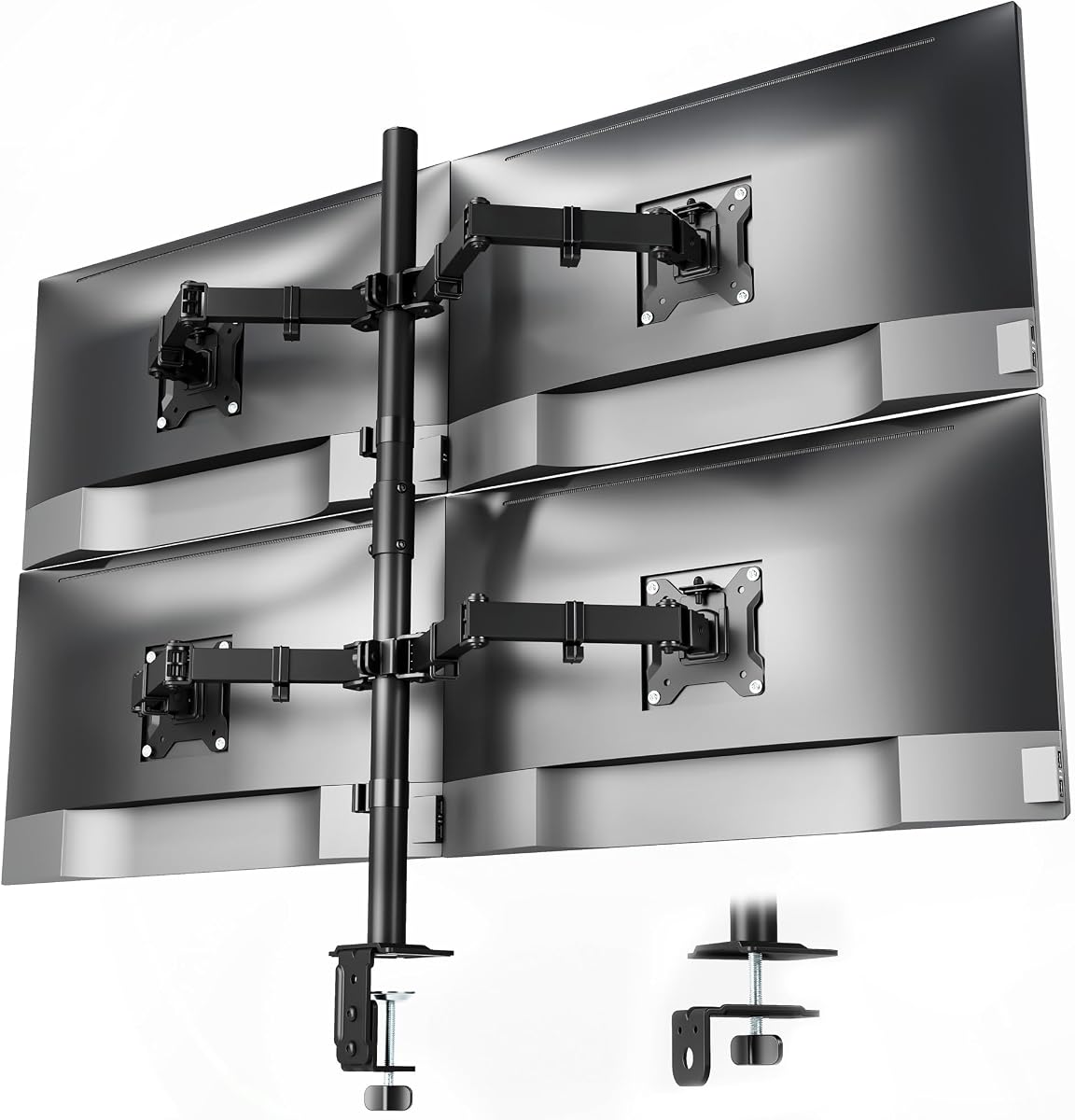
For users with large ultrawide displays, the VIVO Pneumatic Arm Quad Ultrawide offers unparalleled support and flexibility. Its ability to handle screens up to 49 inches makes it a unique solution for high-end multi-monitor setups where standard mounts fail.
We may earn a commission when you buy through this link, at no additional cost to you.
The cast aluminum construction ensures durability while the pneumatic arms provide effortless height adjustments at the touch of a hand. This feature eliminates the struggle of manually lifting heavy monitors, allowing seamless transitions between sitting and standing positions.
Despite the higher cost, the investment pays off in stability and ease of use. The detachable VESA plates simplify installation, though users must ensure their desk can support the weight given the heavy-duty nature of the mount structure.
This mount is ideal for professionals needing large visual real estate without compromising ergonomic comfort. If you want premium performance for ultrawide screens, this VIVO model delivers superior quality and reliability.
Specifically engineered to accommodate massive screens that standard quad mounts cannot support effectively or safely.
Pneumatic springs counterbalance weight so you can reposition screens smoothly without resistance or strain.
We may earn a commission when you buy through this link, at no additional cost to you.
The MOUNT PRO 4 Monitor Mount proves you do not need to spend a fortune to get a functional quad setup. With a rating of 4.5, it offers reliable performance for users who prioritize cost-efficiency over advanced features.
We may earn a commission when you buy through this link, at no additional cost to you.
Supporting screens up to 32 inches and weights up to 17.6 lbs, it covers most standard office monitors. The full range of motion including tilt and rotation allows for comfortable viewing angles, while the extra tall pole supports standing desk configurations.
While the build is simpler compared to premium models, it remains sturdy enough for daily use. The installation process is straightforward with clear instructions, making it a great entry-level choice for those setting up their first multi-monitor station.
If budget is your primary concern, this mount provides excellent value without sacrificing core functionality. It helps organize your workspace effectively while keeping expenses low for students or small office setups.
Provides a complete four-screen solution at a fraction of the cost of high-end pneumatic alternatives.
The tall center pole accommodates standing desks ensuring you can adjust screens to eye level while standing.
We may earn a commission when you buy through this link, at no additional cost to you.
The PUTORSEN Quad Monitor Mount offers a unique solution for users mixing a large ultrawide top screen with smaller displays below. This specialized design caters to traders and analysts who need diverse screen sizes on one stand without compromising stability.
We may earn a commission when you buy through this link, at no additional cost to you.
With a robust steel construction and gas springs, it handles up to 44 lbs on the top arm ensuring heavier monitors stay level. The 3-section arm design allows you to remove segments for a tighter setup near the wall providing flexibility in workspace layout.
Assembly can be more involved than standard mounts due to the dual-weight design, but the result is a highly functional workstation. The detachable VESA plates simplify installation though you should verify desk thickness fits the included C-clamp or grommet base.
Ideal for complex professional setups requiring varied screen dimensions, this mount excels where others fail. If you need a hybrid configuration for high-performance tasks, the PUTORSEN mount delivers precise support and stability.
Designed to support different screen sizes simultaneously allowing for optimized multi-tasking workflows.
The reinforced center bracket ensures even large ultrawides remain steady without sagging over time.
We may earn a commission when you buy through this link, at no additional cost to you.
The monTEK Quad Monitor Stand focuses on delivering a stable and reliable experience for everyday users. With a 4.5 rating, it stands out for its engineered stability that keeps displays perfectly level even when you adjust positions frequently.
We may earn a commission when you buy through this link, at no additional cost to you.
Each arm supports up to 22 lbs allowing use with larger 32-inch monitors. The quick-release VESA plates simplify attachment while the modern design fits any setting from home offices to corporate environments without looking out of place.
While the tilt range is standard, the build quality ensures no sagging occurs over time. The assembly process is straightforward usually taking under twenty minutes making it a hassle-free upgrade for your workspace today.
If you prioritize reliability and simplicity in your multi-monitor setup, this monTEK model is a strong contender. It offers essential features without unnecessary complexity ensuring a clean and organized desk area.
High-grade materials and joint designs prevent wobble ensuring monitors stay exactly where you place them.
A clean design that blends well with any office decor while maintaining a professional look.
We may earn a commission when you buy through this link, at no additional cost to you.
The MOUNTUP Quad Monitor Stand offers a balanced mix of features suitable for both home and office environments. Users appreciate its flexibility to rotate screens to portrait mode which is great for coding or document reading without losing stability.
We may earn a commission when you buy through this link, at no additional cost to you.
Supporting up to 17.6 lbs per arm it accommodates most standard monitors easily. The cable clips keep wires organized and the solid base ensures four arms stay aligned properly for a neat and tidy appearance on your desk.
Assembly is designed to be easy with a clear manual included in the package. While it lacks advanced pneumatic features the sturdy construction ensures monitors stay put even after frequent adjustments throughout the day.
For those needing a reliable quad stand with good adjustability this MOUNTUP model delivers value. Its ability to handle both portrait and landscape orientations makes it adaptable for diverse workflow requirements.
Allows users to rotate screens vertically ideal for viewing long documents or code lines efficiently.
One solid base supports four arms freeing up table space for other essential peripherals.
We may earn a commission when you buy through this link, at no additional cost to you.
The VIVO Quad Pneumatic Monitor Mount brings premium gas spring technology to those seeking effortless height adjustments. With dual pneumatic arms on the sides, it ensures smooth transitions that reduce strain on your wrists during frequent repositioning.
We may earn a commission when you buy through this link, at no additional cost to you.
Constructed with steel and aluminum it provides strong support for screens up to 32 inches. The tension can be adjusted to match specific monitor weights ensuring stability without excessive force required to move the arms into position.
While more expensive than basic mounts, the ease of use justifies the price for heavy users. Installation is drill-free using a robust C-clamp that secures the mount without damaging your desk surface permanently.
If you value smooth and effortless screen movement this VIVO pneumatic model is worth the investment. It combines durability with ergonomic comfort making daily adjustments a breeze for productive workflows.
Pneumatic springs reduce physical effort making it easy to move screens up and down smoothly.
You can tweak the tension to match your monitor weight for optimal movement performance.
We may earn a commission when you buy through this link, at no additional cost to you.
The Pholiten Quad Monitor Arm combines style with function through its gas spring technology. Its scientific design focuses on ergonomics allowing users to adjust stand positions according to individual height needs effortlessly throughout the day.
We may earn a commission when you buy through this link, at no additional cost to you.
With support up to 22 lbs it handles larger monitors with ease. The arms offer 80 tilt and 90 swing options which help eliminate glare and provide optimal viewing angles for any task you perform.
Assembly is designed to be a breeze thanks to clear instructions and included hardware. The sleek look enhances your workstation aesthetics while the smooth movement ensures you can change layouts quickly when needed.
If you want a modern-looking mount that performs well this Pholiten option stands out. Its focus on ergonomic health makes it a smart choice for users spending long hours in front of screens.
Adjustable brackets allow precise positioning to reduce neck and shoulder strain over time.
A clean design that adds a professional touch to any office or home workspace.
We may earn a commission when you buy through this link, at no additional cost to you.
The WALI Quad Monitor Desk Mount has earned the highest user rating among standard options thanks to its durability. It supports up to 22 lbs per arm and fits screens up to 32 inches making it a robust choice for daily heavy usage.
We may earn a commission when you buy through this link, at no additional cost to you.
Its integrated cable management system keeps wires hidden along the arms creating a tidy and organized work area. The two-stage locking system adapts to both clamp and grommet bases offering flexibility for different desk types.
While assembly requires attention, the instructions are clear enough to follow. This mount opens up valuable desk space for your keyboard and docking station making it easy to maintain a clutter-free environment efficiently.
For those seeking a reliable and long-lasting solution this WALI model is hard to beat. Its combination of strength and practical design ensures a clean workspace without compromising performance or value.
Built-in cable guides ensure wires stay hidden and your desk surface remains clear of clutter.
High-grade arms prevent sagging ensuring screens stay stable even after years of use.
We may earn a commission when you buy through this link, at no additional cost to you.
The VIVO Quad Monitor 13 to 32 inch model is a classic choice for those wanting straightforward functionality. It supports four screens and offers solid durability making it suitable for home offices and professional workstations alike.
We may earn a commission when you buy through this link, at no additional cost to you.
Its 3 plus 1 bracket design allows the top monitor to angle downward for better alignment with lower screens. With supports up to 22 lbs it provides sturdy support for most standard monitors while the longer upper bracket improves visibility.
Installation is drill-free using a heavy-duty C-clamp or optional grommet mount. Cable clips help keep cords organized ensuring your setup looks neat while maintaining safety and accessibility for your equipment.
If you prefer a tried-and-true option that works well without complications this VIVO mount is reliable. It offers essential features for a clean workspace making it a safe pick for many users.
A proven design that works well for standard setups without requiring complex installation.
Special bracket design helps align the top monitor perfectly for better viewing angles.
We may earn a commission when you buy through this link, at no additional cost to you.
Selecting the right 4 monitor mount with adjustable arms requires evaluating several key factors to ensure stability and ergonomic comfort. This guide breaks down essential elements to consider before you make your final purchase decision.
Always check the weight limit per arm to ensure it supports your specific monitors. Exceeding this limit can lead to sagging or instability which compromises safety and performance during daily use.
Choose a model with enough capacity to handle each screen securely.
Ensure the mount supports the physical size of your displays from 13 inches up to 49 inches. Larger screens often require heavier-duty brackets to maintain balance and prevent strain on the mounting structure.
Verify the size range matches your current and future monitor needs.
Confirm that your monitors have standard VESA mounting holes like 75x75mm or 100x100mm. Most mounts rely on these patterns for secure attachment so checking them beforehand prevents compatibility issues.
Check the back of your screens to confirm the hole spacing before buying.
Look for mounts offering tilt, swivel, and rotation capabilities to customize viewing angles. This flexibility is crucial for reducing neck strain and improving posture during long work hours.
Prioritize models that allow full motion control for maximum ergonomic comfort.
Measure your desk thickness to ensure the clamp or grommet base fits properly. Most mounts support a specific range of desk dimensions which affects the stability of the entire system.
Verify your desk matches the mount's thickness specifications for secure installation.
Materials like steel and aluminum determine how durable the mount will be over time. High-quality construction ensures the arms stay level and steady even after years of frequent adjustments.
Invest in robust materials to avoid frequent replacements or repairs.
Built-in clips or channels help route wires neatly along the arms preventing clutter. Organized cables reduce trip hazards and maintain a professional look for your workstation.
Select a model with integrated cable routing for a clean setup.
Consider how easy the mount is to assemble with clear instructions and labeled parts included. Simple installation saves time and ensures the hardware is used correctly for safety.
Choose a model with straightforward instructions for hassle-free setup.
When setting up your mount, first attach the arms to the central pole securely using the provided hardware. Ensure all bolts are tightened properly before hanging any monitors to prevent accidents during the process.
After attaching monitors, adjust each arm to your preferred height and angle while seated comfortably. Use the tilt and swivel functions to eliminate glare from windows or overhead lighting.
Regularly check the tension screws to maintain stability as you use the arms over time. Dust the mount with a soft cloth to prevent buildup that might hinder movement mechanisms.
No, most mounts include a C-clamp that secures to the edge of your desk without drilling. Alternatively you can use the grommet base which requires a small hole but no permanent modification.
Yes, as long as all screens fit within the weight and size limits per arm. However mixing sizes may look uneven so plan your layout carefully for the best visual result.
Exceeding weight limits can cause the arm to sag or fail over time. Always choose a mount that supports at least 20 percent more than your monitor weight for safety.
Most models come with clips or channels to organize wires along the arms. However some budget options may lack these features so check product details before buying.
Gas spring arms usually have a tension knob on the joint that you can turn to increase or decrease resistance. Refer to the manual for specific instructions on your model.
No, these stands are designed specifically for four screens. Adding more would require a separate mount or a different multi-monitor solution to maintain stability.
To recap the top picks include the WALI Stacked mount for value, the VIVO Pneumatic Arm for premium performance, and the MOUNT PRO option for budget buyers. Each offers distinct advantages depending on your specific desk and monitor requirements.
When making your decision prioritize stability and adjustability to ensure a comfortable workspace. Consider how often you move your screens and invest in a durable model that handles daily use well.
Remember to verify the latest pricing and availability before buying as these factors change frequently. A well-planned purchase helps you build an efficient and ergonomic multi-monitor workstation today.