
Thrustmaster T-Flight Hotas X
4.4Editor score
Detachable throttle for flexibility
Adjustable joystick resistance dial
Plug and play setup
Discover the top 10 airplane controllers for PC flight simulators. This guide compares features, precision, and value to help you find the perfect cockpit
Finding the right airplane controllers for PC can transform your flight simulation experience from basic gaming to realistic piloting. High-quality hardware provides the tactile feedback and precision needed to navigate virtual skies with confidence and immersion.
We evaluated ten top-rated flight sticks and yokes based on build quality, sensor accuracy, programmability, and overall user satisfaction. Each product was selected to offer a distinct value proposition for pilots ranging from beginners to seasoned enthusiasts seeking realism.
This list showcases detailed reviews and comparisons to help you choose the best controller for your specific needs and budget. Please note that prices and availability may change frequently, so verify current offers before making your final purchase decision.
4.4Editor score

4.0Editor score
4.6Editor score
This comparison table offers a side-by-side overview of the top airplane controllers for PC available this year. Review the key specifications for each model to quickly identify which hardware aligns best with your flight simulator goals and desk space.





The Logitech G X56 H.O.T.A.S stands out as a premier choice for serious flight simulation enthusiasts seeking maximum control. With a rating of 4.0 stars, users praise its ability to replicate complex cockpit environments through its extensive array of programmable inputs.
We may earn a commission when you buy through this link, at no additional cost to you.
Its standout quality lies in the sheer volume of controls available. The unit offers over 189 programmable controls allowing pilots to map nearly every function of their aircraft directly to the stick and throttle. Hall-effect sensors ensure that the x and y axes maintain pinpoint accuracy without wear over time.
While the price is higher than entry-level options, the investment is justified by the durability and feature set. The advanced 4-spring system allows for adjustable stick force, which is crucial for mimicking the weight of real aircraft control surfaces during turbulent flight scenarios.
This controller is best suited for users who demand a high-fidelity experience and have the desk space to accommodate twin throttles. It is an excellent choice for those who frequently switch between different flight sims and need extensive customization without constant software reconfiguration.
The mini analog stick control surfaces allow for precise pitch, roll, and yaw adjustments. This feature enhances the realism significantly during complex maneuvers.
RGB backlighting can be customized via software to match your gaming rig. This not only looks great but helps in identifying buttons during night flights.
We may earn a commission when you buy through this link, at no additional cost to you.
The Logitech G PRO Flight Yoke System delivers a professional simulation experience designed to build muscle memory for both new and experienced pilots. With a strong rating of 4.3 stars, it is highly regarded for its realistic feel and durable construction.
We may earn a commission when you buy through this link, at no additional cost to you.
Its primary strength is the stainless steel yoke shaft which provides robust and smooth control. This metal construction ensures that the yoke responds accurately to subtle inputs which is critical for precise flying in simulators like Microsoft Flight Simulator or Prepar3D.
Users should be aware that the throttle quadrant connects via a PS/2 cable which may require an adapter on modern computers. Despite this minor connectivity quirk, the inclusion of a full throttle quadrant with 54 programmable controls adds immense value to the package.
This setup is perfect for users who prefer traditional yoke controls over joysticks and need a stable platform. It is ideal for home cockpits where realism is the priority over compactness.
The realistic yoke controls help experienced pilots build muscle memory. This feature makes transitioning between sim and real-world flying easier.
The 2 position desk clamp provides mounting flexibility for a wide range of desks. This ensures controls stay exactly where you need them during intense sessions.
We may earn a commission when you buy through this link, at no additional cost to you.
The Thrustmaster T-Flight Hotas X is an accessible entry point into flight simulation controls for those on a budget. It holds a high rating of 4.4 stars due to its impressive functionality relative to its cost.
We may earn a commission when you buy through this link, at no additional cost to you.
The ergonomic design allows for comfortable use over hours without fatigue. A unique feature is the detachable throttle which lets you separate the joystick from the throttle for a more flexible cockpit configuration depending on your space.
While it lacks the complexity of higher-end models, the resistance dial allows you to fine tune stick tension to your liking. The preconfigured controls mean you can start flying immediately without needing to spend hours on software mapping.
This is the ideal choice for casual pilots or those trying flight sim for the first time. It offers a true-to-life experience that is both effective and easy to use.
Separate the full size throttle from the joystick to create your ideal flight sim cockpit mount configuration. This gives you the versatility to build the perfect arrangement.
Skip complicated configuration and start flying immediately with preconfigured controls. Built-in memory saves your custom programming even when disconnected.
We may earn a commission when you buy through this link, at no additional cost to you.
The Logitech G Saitek X52 Pro offers a classic flight control experience with an illuminated LCD display that helps track commands. It has a rating of 3.8 stars reflecting a mix of praise for features and criticism for wear.
We may earn a commission when you buy through this link, at no additional cost to you.
Key strengths include the progressive throttle with resistance adjustment which adds realism to engine control. The non-contact technology on axes improves longevity and ensures constant control even after extended use.
However, some users report that the buttons can wear out over time. The 5 position handle adjustment system helps suit all hand sizes which is a strong ergonomic feature for long flights.
This model is best for those who value visual feedback from the display and a compact design. It remains a solid option for those who need a reliable mid-range controller.
Illuminated buttons and enhanced gameplay through intuitive LCD multi-function display. This allows you to check commands before activating them.
5 position handle adjustment system to suit all hand sizes with soft-touch, contoured grip. This ensures maximum gaming comfort for everyone.
We may earn a commission when you buy through this link, at no additional cost to you.
The PXN 2113PRO is an entry-level controller that provides basic flight controls for Windows users. It has a rating of 3.6 stars indicating that it serves a niche for budget-focused users.
We may earn a commission when you buy through this link, at no additional cost to you.
Its vibration function adds a layer of immersion during crashes or turbulence if enabled correctly. The suction cups at the bottom help fix the base firmly which is useful for maintaining stability on smooth surfaces.
Users must note that this is ONLY for PC and does not support Mac or Xbox. Driver installation is straightforward but required for full functionality. This limitation should be considered before purchase.
This product is suitable for those who want a simple, compact stick without spending much. It is a good starting point for basic aviation simulation games.
You can make the right moves with rapid fire trigger and 12 programmable buttons. This provides an immersive fly experience for your flying dream.
Four power-grip suction cups at the bottom can fix firmly and easily when the table is smooth. This ensures your controls stay put during play.
We may earn a commission when you buy through this link, at no additional cost to you.
The Logitech G X52 is renowned for its magnetic non-contact sensors that provide enhanced longevity and pinpoint accuracy. With a rating of 4.3 stars it is a favorite among users seeking reliability and high performance.
We may earn a commission when you buy through this link, at no additional cost to you.
The multifunction LCD display allows you to check programmed commands before activating them which reduces errors in flight. It also features a built-in clock for timing your flight plan adding to the immersive experience.
The 3D twist with rudder lock is essential for simulation control allowing you to prevent accidental activation if using pedals. With 282 programmable commands over 3 modes you have immense control over your flight.
This controller is best for users who want a balance of performance and features without the bulk of a full HOTAS. It is highly recommended for those who value sensor accuracy above all.
Magnetic, non-contact X and Y axis sensors provide enhanced longevity and pinpoint accuracy. This ensures your inputs stay perfectly calibrated for years.
Multifunction LCD Display allows you to check all of the programmed commands on your HOTAS before activating them. It provides clear feedback during complex missions.
We may earn a commission when you buy through this link, at no additional cost to you.
The Thrustmaster TCA Yoke & Quadrant Boeing Edition brings the thrill of a real airplane simulator into your home with authentic Boeing controls. It holds a strong 4.4 rating for its exceptional realism and build quality.
We may earn a commission when you buy through this link, at no additional cost to you.
Its standout feature is the official Boeing license inspired by the Boeing 787 airliner in a 1:1 scale replica. The 100% metal internal structure ensures durability and a premium professional feel that plastic controllers cannot match.
The PENDUL_R mechanism replicates the pendular movement of a Dreamliner delivering smooth responsive control. This adds a unique physical sensation to the flight experience which is unmatched by other options.
This bundle is best for aviation enthusiasts who want to build a dedicated airliner cockpit. It is ideal for Microsoft Flight Simulator and any PC flight sim where realism is paramount.
The PENDUL_R mechanism replicates the pendular movement of a Dreamliner delivering smooth responsive control with a wide range. Feel every takeoff and landing like you're in the cockpit.
Yoke crafted with a 100% metal internal structure ensuring durability balanced weight and a premium feel. It is built to last for years of flying.
We may earn a commission when you buy through this link, at no additional cost to you.
The Thrustmaster TCA Sidestick Airbus Edition immerses you in the Airbus A320 cockpit with an officially licensed ergonomic replica. It carries a 4.3 rating from users who value accuracy and build quality.
We may earn a commission when you buy through this link, at no additional cost to you.
Its drift-free magnetic precision ensures flawless accuracy on every maneuver thanks to contactless magnetic sensor technology. This eliminates potentiometer wear giving the joystick an unlimited lifespan for your favorite flight simulator.
The integrated throttle axis with thrust reverser mechanism allows for a complete flight control solution in one compact unit. This saves space and simplifies the setup for those who do not have room for a separate throttle.
This controller is perfect for pilots who prefer sidesticks and want a high-fidelity Airbus experience. It is ideal for those focused on commercial aviation simulation in MSFS.
Enjoy flawless accuracy on every maneuver thanks to contactless magnetic sensor technology that eliminates potentiometer wear. This gives your joystick an unlimited lifespan.
Eliminate the need for extra peripherals with an integrated throttle axis and intuitive rudder control via the rotating handle. This gives you a complete flight solution in one unit.
We may earn a commission when you buy through this link, at no additional cost to you.
The Turtle Beach VelocityOne Flightstick offers a unique combination of features including an OLED display and compatibility with Xbox and PC. It holds a solid 4.2 rating for its versatility and modern design.
We may earn a commission when you buy through this link, at no additional cost to you.
Its high-precision non-contact main axes provide reliable control over time without physical wear. The customizable multi-function throttle and flap levers offer detailed control over aircraft systems.
The integrated OLED flight management display provides critical flight data without needing a separate monitor. This is especially useful for maintaining situational awareness during complex simulations.
This controller is ideal for users who want a modern interface and the flexibility to use it across different platforms. It is great for those who play on both PC and Xbox consoles.
The integrated OLED flight management display provides quick access to flight data. This enhances your situational awareness without needing to look at a screen.
The touchpad navigation sensor allows for full cursor control which is unique for flight sticks. This helps in managing complex menus in flight simulators.
We may earn a commission when you buy through this link, at no additional cost to you.
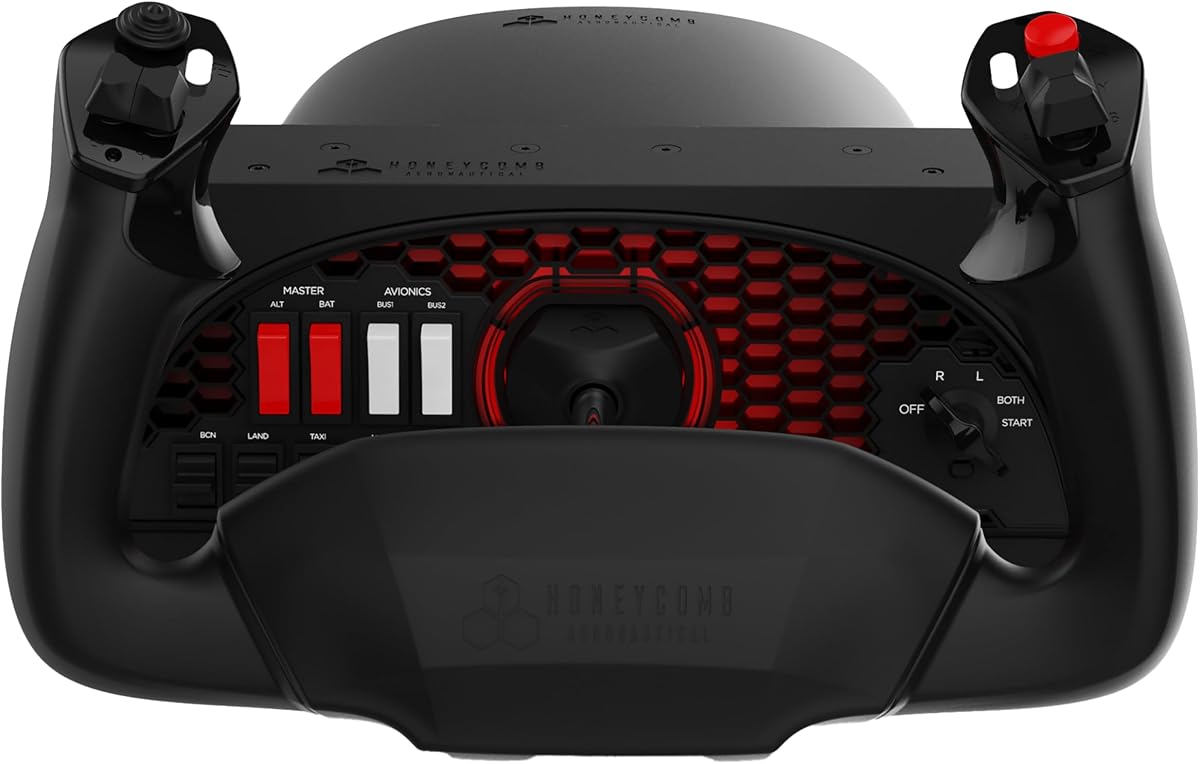
The Honeycomb Alpha Flight Controls Yoke & Switch Panel is trusted by aviation enthusiasts for its precision, realism, and reliability. With a top rating of 4.6 stars it leads the premium category for high-quality construction.
We may earn a commission when you buy through this link, at no additional cost to you.
Its standout feature is the 180-degree rotation range with a solid steel shaft for smooth control. The integrated switch panel adds realism by allowing you to toggle main alternator and avionics switches directly on the unit.
The dampened self-centering mechanism ensures effortless accurate maneuvers without a center detent. This makes flying feel natural and responsive which is a key factor in its high user approval.
This yoke is best for serious pilots who want a high-end setup that mimics real hardware. It is worth the investment for those dedicated to professional simulation experiences.
The switch panel features main alternator avionics light switches and a 5-position ignition switch. This creates a complete cockpit setup without extra peripherals.
Use two included heavy-duty clamps or a micro-suction pad that produces 40lbs of tensile strength. This offers flexibility for your desk setup.
We may earn a commission when you buy through this link, at no additional cost to you.
Selecting the right airplane controllers for PC involves balancing your budget, space, and desired level of realism. Consider the following factors to ensure you choose a controller that fits your simulation goals.
Flight sticks (HOTAS) are generally more versatile for combat games like War Thunder or Ace Combat. Yokes are better suited for civil aviation simulators like Microsoft Flight Simulator where traditional yoke controls are standard.
Choose a flight stick if you want a compact solution that works well for both combat and cargo. Opt for a yoke if you are focused on airliner simulation and want the most authentic feel.
Look for metal construction or reinforced plastics that will withstand hours of use. Controllers with solid shafts tend to offer smoother movement and less flex during intense maneuvers.
Prioritize models with metal components if you plan to use the controller daily. This ensures longevity and a consistent flying experience over time.
Hall-effect or magnetic sensors are superior to potentiometers because they do not suffer from wear and tear. These technologies provide consistent accuracy even after thousands of hours of use.
Check for sensor type before buying. Magnetic sensors are highly recommended for serious pilots who need long-term reliability.
More buttons and programmable controls mean you can assign complex functions directly to the hardware. This reduces the need to reach for your keyboard during critical moments.
Ensure the software allows for easy profile switching between games. This feature saves time when you play multiple flight simulators.
Yoke systems often require clamps and significant desk space. Flight sticks are more compact but may still need room for throttles.
Measure your desk area before purchasing. If space is limited, a standalone stick or a detachable throttle is a better fit.
Verify that the controller works with your operating system and preferred flight sim. Some require specific drivers or software to function correctly.
Always check system requirements on the product page. Most support Windows 10 or 11 but older systems may face issues.
Some controllers include features like RGB lighting, vibration, or built-in displays. These add immersion but increase the price.
Decide which extras matter most to you. A display might help manage complex systems while vibration adds excitement to combat games.
Entry-level controllers offer basic functionality at an affordable price. Premium models cost more but provide superior build quality and features.
Set a realistic budget before shopping. A high-end stick might be better value than a mid-range yoke depending on your needs.
Always connect your controller before launching the game to ensure it is recognized by the system. Use the provided software to map buttons to the correct aircraft functions.
Clean your controller regularly with a dry cloth to remove dust from sensors and buttons. Avoid using liquids directly on the unit to prevent electrical damage.
If you plan to store the controller for long periods, disconnect it from the computer. Store it in a dry place away from direct sunlight to protect the plastic and rubber parts.
The Honeycomb Alpha Yoke or Logitech G PRO Yoke are top choices for Microsoft Flight Simulator 2024. They offer the realistic control and precision needed for civil aviation. These models replicate real-world aircraft inputs effectively.
Many flight sticks come with a detachable or integrated throttle. However, a separate throttle quadrant provides more realistic controls. Check the product description to see what is included with the stick.
Most airplane controllers for PC are designed for Windows only. Some models support Mac but often require specific drivers or adapters. Always verify Mac compatibility on the product page before purchasing.
HOTAS stands for Hands On Throttle And Stick and is used for combat jets. A Yoke mimics the steering wheel of an airliner. Choose based on whether you fly fighter jets or passenger planes.
Stick drift is often caused by worn sensors. Try updating the driver or recalibrating the stick in Windows settings. If the problem persists, you may need to replace the controller.
Not always but higher price usually correlates with better sensors and build. Budget models are fine for casual play. Invest more only if you need professional-grade realism.
Most controllers are specialized for flight sims. Some can be mapped for space games but are not ideal for racing or action titles. Check game support before buying for other genres.
Some models like the Turtle Beach VelocityOne and Thrustmaster TCA Yoke Boeing Edition support Xbox. Most PC-only controllers will not work on consoles. Verify platform support carefully.
We have reviewed the top 10 airplane controllers for PC to help you find the perfect cockpit setup. Each model offers unique strengths whether you want a budget stick or a premium yoke.
Prioritize build quality and axis precision when making your decision. These factors will define how immersive and realistic your flight simulation experience truly is.
Remember to check current prices and availability before buying. Technology and deals change quickly so verify the latest offers from retailers.