
GE BigEZ OneTouch Remote
4.3Editor score
Vision-friendly backlit buttons
Preset for five major TV brands
Free U.S. technical support
This guide compares the best easy to use TV remote for seniors focusing on button size, setup simplicity, and compatibility for elderly users and caregivers.
Finding a remote that elderly family members can actually use is often harder than it seems. Small buttons and complex menus lead to frustration every single day. Simplified designs with large tactile controls solve these problems effectively for anyone with vision or dexterity challenges.
We evaluated ten real products based on user feedback, feature sets, and actual compatibility with common television models. Each option was chosen for its ability to reduce confusion while maintaining reliable performance for daily viewing habits across different household setups and brands.
Each pick below shows what makes a specific remote stand out in terms of usability and value. Note that prices change frequently on Amazon so check current listings before purchasing to ensure you get the best deal available at this moment.
4.3Editor score
4.2Editor score

4.4Editor score
The following table provides a side-by-side comparison of all ten remotes evaluated in this guide. Look closely at compatibility limits and button features to find the right match for your specific television setup and user needs.


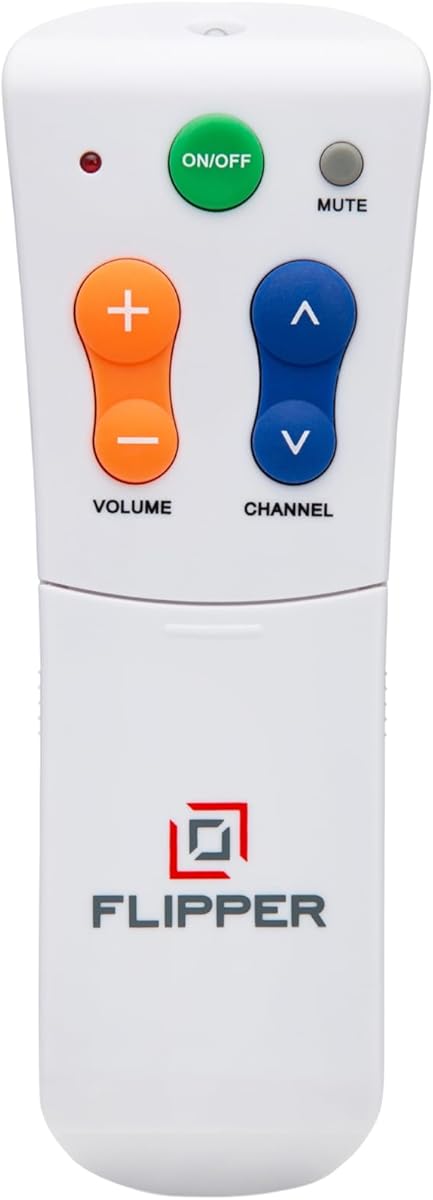
The Flipper Big Button TV Remote stands out as a top choice for seniors dealing with dementia or Alzheimer's. With a 4.2 rating it offers a simplified interface that eliminates overwhelming menus and complex navigation steps for everyday television use.
We may earn a commission when you buy through this link, at no additional cost to you.
Its standout feature is the four-button main layout using color-coding to differentiate power volume and channel controls. Caregivers can pre-program up to twenty-five favorite channels allowing users to cycle through content without memorizing numbers or searching endlessly.
While it excels at basic TV control it does not support navigation inside streaming apps like Netflix or YouTube. This limitation is acceptable for households relying on traditional cable or satellite but might frustrate users wanting full smart TV app access.
Anyone seeking independence for an elderly family member will find this remote invaluable. Its design prioritizes simplicity and reduces frustration making it a highly recommended option for care environments and home settings focused on ease of use.
The four-button design removes unnecessary complexity allowing users to focus on watching rather than operating the device.
Pre-programming favorite channels ensures quick access without requiring memory or manual channel searching by the user.
We may earn a commission when you buy through this link, at no additional cost to you.
The GE BigEZ OneTouch Remote offers exceptional value with a 4.3 rating making it ideal for seniors who need high visibility controls. Its white design and fully backlit buttons ensure easy use even in low light conditions without strain.
We may earn a commission when you buy through this link, at no additional cost to you.
Vision-friendly features include color-coded volume and channel buttons that assist those with color vision deficiencies. The remote supports five major TV brands plus one auxiliary device offering broad enough coverage for most standard living room setups effectively.
Compatibility is limited compared to universal remotes covering only specific brands like Samsung and LG. Users may need to check device lists before purchasing to ensure their TV model is supported for immediate functionality without issues.
For budget-conscious buyers needing reliable backlighting this remote is a strong contender. The included U.S. technical support adds peace of mind ensuring help is available if setup questions arise during initial installation.
Full backlighting ensures buttons remain visible at night reducing the need for additional lighting or close inspection.
Preset buttons for major brands streamline the setup process allowing quicker start times for new users.
We may earn a commission when you buy through this link, at no additional cost to you.
This remote delivers unmatched ease for Samsung owners with a 4.4 rating and zero setup requirements. The backlit buttons stay illuminated for thirty seconds ensuring visibility in dark rooms without needing to hold a button or search in shadows.
We may earn a commission when you buy through this link, at no additional cost to you.
It comes with a protective silicone cover and a wall hook adding practical value to the package. The cover prevents damage from drops or spills while the hook keeps the remote accessible and organized within the living space.
Users must own a Samsung TV for this remote to function properly limiting its appeal to other households. This specificity is a trade-off but ensures optimized performance and instant compatibility for Samsung families without programming effort.
If your home uses Samsung televisions this remote is the most convenient option available. The combination of backlighting and included accessories makes it a premium choice focused on durability and immediate usability for daily viewing.
No pairing or programming means the remote works out of the box reducing setup time and frustration significantly.
Included cover and hook extend the life of the remote and keep it from getting lost under cushions.
We may earn a commission when you buy through this link, at no additional cost to you.
The EZclicker Big Button Universal remote offers a compact solution with a 4.2 rating for users prioritizing size and portability. Its seven-inch length makes it easy to handle and store without sacrificing the tactile feedback needed for accurate pressing.
We may earn a commission when you buy through this link, at no additional cost to you.
Setup relies on a simple volume mute pairing method allowing quick activation without technical manuals. The remote supports top TV brands but excludes cable boxes and streaming sticks focusing solely on standard television control for simplicity.
While effective for basic TV use it lacks functionality for external boxes requiring separate remotes for full setup control. This limitation keeps the design clean and affordable but may require extra management if multiple devices are used together.
Ideal for small living spaces or minimal setups this remote balances size and function well. Users wanting a lightweight option for straightforward TV control will appreciate the ergonomic design and simplified programming steps included here.
Lightweight and small size ensures comfort in hand and easy storage in drawers or bedside tables.
Volume and mute button combination simplifies programming reducing steps to connect the remote to the TV.
We may earn a commission when you buy through this link, at no additional cost to you.
This remote delivers simplicity with a 4.4 rating by eliminating programming steps entirely. Simply insert batteries and start using it with supported Samsung LG or Sony TVs reducing setup frustration and wait time for new users immediately.
We may earn a commission when you buy through this link, at no additional cost to you.
Its compatibility spans multiple major brands offering broad utility for households with mixed devices. The extra-large enter button enhances accessibility making selection tasks easier without requiring precise finger pressure or repeated attempts to register input.
Users relying on streaming devices will find this remote limited as it does not navigate app menus or interfaces. This focus on traditional channel control ensures stability but requires separate solutions for streaming platform interactions and management.
Buyers wanting immediate functionality without setup guides will find this remote highly effective. The included 90-day warranty adds confidence to the purchase ensuring support is available if issues arise during initial usage and testing.
Zero programming steps mean the remote works instantly after battery insertion saving time and effort.
A 90-day replacement policy provides security for buyers ensuring satisfaction or refunds if the remote fails early.
We may earn a commission when you buy through this link, at no additional cost to you.
This remote features a traditional layout with a 4.4 rating appealing to users familiar with standard TV controls. The large clearly marked buttons reduce misclicks and ensure stress-free adjustments to volume and channels throughout daily viewing sessions.
We may earn a commission when you buy through this link, at no additional cost to you.
Its ergonomic body provides a comfortable grip that minimizes strain on hands during extended use. Compatibility covers most major TV brands making it a reliable replacement for lost or damaged remotes without complex pairing requirements.
The lack of backlighting may hinder use in dark rooms requiring external lighting to see the buttons clearly. This trade-off keeps the device simple and affordable but limits usability during nighttime entertainment without additional light sources nearby.
Seniors preferring familiar layouts will find this remote intuitive and easy to adopt. Its lightweight build ensures comfort and ease of handling making it suitable for users with limited strength or hand mobility challenges.
Standard button arrangement mimics original remotes easing the transition for users accustomed to conventional designs.
The lightweight body shape supports relaxed holding reducing fatigue during long viewing periods or frequent use.
We may earn a commission when you buy through this link, at no additional cost to you.
The Philips BigEZ OneTouch Remote introduces a OneTouch setup method aiming to simplify programming with a 3.8 rating. Its backlit keypad ensures visibility in dim settings helping users locate buttons without external light sources during use.
We may earn a commission when you buy through this link, at no additional cost to you.
It controls multiple devices including TVs and soundbars offering broader utility than single-device remotes. The colorblind-friendly button colors aid users with vision challenges making navigation more intuitive and reducing accidental presses on wrong controls.
Customer feedback suggests setup can be less reliable than expected leading to connectivity inconsistencies across brands. While promising the execution sometimes falls short of seamless operation requiring retries or assistance to establish consistent signal links.
Despite mixed reviews the remote offers useful features like multi-device support and backlighting. Users willing to troubleshoot during setup may still find value in its design and support options provided for ongoing issues.
The simplified setup process aims to reduce steps but may require patience for successful pairing on some models.
Support for additional devices consolidates controls into one remote reducing the need for multiple remotes.
We may earn a commission when you buy through this link, at no additional cost to you.
This remote focuses on basic functionality with a 3.0 rating offering a no-frills design for straightforward TV control. Its large buttons and simple layout provide clear visibility reducing confusion for users needing minimal complexity in daily operation.
We may earn a commission when you buy through this link, at no additional cost to you.
The design avoids advanced features like voice control ensuring the device remains easy to understand and operate. Compatibility covers most major brands but does not include detailed support for niche or newer smart TV interfaces requiring extra steps.
Users report mixed experiences regarding reliability which may stem from signal consistency or programming differences. While affordable the lower rating suggests potential issues that could require frequent checks or adjustments to maintain consistent performance.
Suitable for those seeking an ultra-simple and inexpensive option this remote delivers basic functionality. It works best for households where standard TV control is sufficient without need for advanced smart or streaming integration.
Removal of advanced features keeps the interface simple and accessible for users needing only power and volume control.
Low price point makes it accessible for those on tight budgets needing a replacement remote quickly.
We may earn a commission when you buy through this link, at no additional cost to you.
The EZclicker TV Remote Simple delivers extra simplicity with a 4.2 rating emphasizing ease of use through large tactile buttons. Its six-inch compact size makes it easy to handle for those with limited dexterity or grip strength challenges.
We may earn a commission when you buy through this link, at no additional cost to you.
The design avoids streaming or cable box integration keeping the focus strictly on basic TV operations. This limitation ensures fewer features to confuse users while still providing essential controls like power volume and channel switching effectively.
Users should note it does not support cable boxes requiring separate remotes for full setup functionality. For those using standalone TVs this remote offers reliable performance without unnecessary complexity or confusing menu navigation steps.
Ideal for users wanting straightforward operation this remote balances size and simplicity well. The tactile feedback ensures clicks are registered clearly reducing accidental presses and improving confidence when adjusting settings during viewing.
Feedback on button presses ensures users feel when a command is registered improving accuracy and reducing errors.
The six-inch profile fits comfortably in smaller hands and is easy to store when not in active use.
We may earn a commission when you buy through this link, at no additional cost to you.
The Anderic RR1004 Remote features glow-in-the-dark keys rated at 4.0 stars offering utility for low-light environments. Essential controls like power and volume are emphasized reducing menu complexity and allowing quick adjustments during nighttime TV viewing.
We may earn a commission when you buy through this link, at no additional cost to you.
Its learning function enables copying commands from existing IR remotes adding flexibility for specialized needs. Pre-programming for LG TVs ensures immediate use while other brands may require minor setup steps before becoming fully operational.
Users with non-IR devices like Bluetooth or RF remotes will find compatibility limited affecting broader smart home integration. The minimalist design ensures simplicity but requires careful attention to device type to confirm signal technology matches expectations.
This remote suits users needing a reliable replacement with low-light visibility features. The learning capability and LG pre-programming provide convenience while maintaining a straightforward interface ideal for daily essential television control.
Glow-in-the-dark keys allow users to locate buttons without external light sources during dark or nighttime hours.
Learning function lets users copy specific commands from old remotes preserving essential custom features if needed.
We may earn a commission when you buy through this link, at no additional cost to you.
Selecting the right remote involves evaluating several factors that directly impact ease of use and daily reliability for elderly users.
Look for remotes with oversized buttons that are clearly spaced to prevent accidental presses. A simple layout with essential controls like power volume and channel reduces cognitive load and makes navigation intuitive.
Prioritize models with large tactile feedback so users can feel when a button is pressed without looking directly at the remote.
Check if the remote supports your specific TV brand and whether it can control cable boxes or streaming devices. Some remotes focus solely on TV power and volume while others offer broader universal compatibility.
Confirm compatibility lists before purchase to avoid frustration from models that do not work with your current setup.
Choose remotes with straightforward setup processes like one-touch pairing or pre-programmed brand settings. Avoid models requiring complex coding or manual menu navigation that may overwhelm less tech-savvy users.
Simpler setup ensures the remote is ready for use quickly without needing technical assistance or extended instructions.
Backlit or glow-in-the-dark buttons are crucial for use in dimly lit rooms. Look for high-contrast colors that remain visible without external light sources to ensure operation at any time of day.
Color-coded buttons further help distinguish between different functions especially for those with vision impairments.
Lightweight remotes reduce hand fatigue during extended use and are easier to hold for those with limited strength. An ergonomic shape ensures a comfortable grip even for users with arthritis or limited dexterity.
Avoid heavy or bulky designs that strain the hand or become difficult to locate when dropped under furniture.
Consider battery type and accessibility when selecting a model. Remotes using standard AA or AAA batteries are easier to replace and more common than specialized battery types.
Easy battery compartment access reduces frustration during maintenance and ensures consistent performance without long waits.
Sturdy construction with protective covers or reinforced materials helps the remote withstand drops and daily wear. Plastic quality should feel robust to prevent breakage and ensure long-term reliability in home environments.
Durable builds minimize replacement costs and ensure the remote remains functional over extended periods.
Availability of technical support and a warranty adds confidence to the purchase. Remote models offering customer assistance can resolve setup or compatibility issues that may arise after initial use.
Prioritize brands with responsive support to ensure help is accessible if the remote does not perform as expected.
When first setting up the remote follow the included instructions carefully to ensure correct pairing with your television. Most simplified remotes require pressing a brand button or holding specific keys for a few seconds to establish connection.
Keep the remote in a consistent location such as a designated holder or table so it is easy to find when needed. This routine prevents lost devices and reduces time searching before watching programs.
Replace batteries regularly when signal strength drops or lights dim to maintain consistent performance. Clean the remote gently with a dry cloth to remove dust and oils from buttons without moisture damage.
Most remotes cover top brands like Samsung LG and Sony but compatibility varies by model. Always check the product listing for supported brands before purchasing to ensure it works with your specific TV. Universal options may not support niche or newer models without extra steps.
Many simplified remotes do not support navigating streaming apps like Netflix or YouTube. They typically focus on basic TV functions like power and volume. For streaming access a separate remote or smart TV controller may still be needed alongside these.
Consider their specific needs such as vision or dexterity challenges when selecting. Remotes with backlighting and large tactile buttons often work best. Reading reviews from other caregivers can provide practical insight into real-world usability.
Most use standard AA or AAA batteries that are widely available. Some models include batteries but many do not so check product details before purchasing. Standard batteries make replacements simpler and more convenient for users.
Check battery placement and replace with fresh cells first. Ensure the TV is in IR mode and there are no obstacles blocking the signal. Contact the seller or manufacturer for support if the issue persists after basic checks.
Some remotes include universal features to control cable boxes but many focus solely on TV functions. Check the product description for box compatibility. If cable control is essential choose a model explicitly supporting multiple device types.
Many products offer warranties ranging from 90 days to one year. This varies by brand and seller so review warranty details before purchase. A warranty protects against defects and ensures replacement options if the remote fails.
Yes remotes with simplified layouts and few buttons reduce confusion significantly. Color-coded buttons and consistent controls help users remember functions more easily. Choose models designed specifically for cognitive ease to support independent viewing.
We reviewed ten distinct remotes highlighting simplicity visibility and compatibility as key strengths. Options like the Flipper Big Button and GE BigEZ offer tailored solutions for dementia and vision challenges respectively.
Prioritize features that match your family's specific needs whether that is backlighting for night use or a four-button interface for minimal cognitive load. The right remote can transform daily viewing into a stress-free experience.
Remember that prices and availability change so verify current listings before buying. Selecting a reliable remote now ensures continued access to entertainment without recurring frustration or replacement costs in the near future.