
ASUS Prime Z390-P
4.4Editor score
Supports 9th and 8th Gen Intel
Above 4G Decoding for mining
USB 3.1 Gen2 connectivity
This guide compares the best Brand for Z370 Motherboard options available in October 2026 to help you choose the right model for your build needs.
Finding the right brand for Z370 motherboard is crucial for maximizing the performance of your Intel Coffee Lake processor. A quality board ensures stability, overclocking potential, and future-proof connectivity for your desktop setup.
We analyzed ten top models based on chipset support, expansion slots, audio quality, and build durability. Each entry offers unique features tailored to gamers, creators, and system builders seeking reliability.
Every pick highlights specific strengths like USB speed, RGB lighting, or thermal design to match your priorities. Keep in mind that pricing fluctuates often, so verify current offers before making your final decision.
4.4Editor score

4.5Editor score

4.4Editor score
The following table provides a side-by-side comparison of all ten selected boards. It highlights key specifications including socket type, memory capacity, storage options, and special features to help you differentiate between similar models quickly.


The MSI Z370-A PRO stands out as a top choice for builders seeking a reliable Z370 platform. It supports 8th Gen Intel Core processors and offers robust VR readiness for immersive gaming experiences.
We may earn a commission when you buy through this link, at no additional cost to you.
Its Intel Z370 Express Chipset ensures smooth operation with high-speed DDR4 memory up to 64GB. The board is built for stability, making it suitable for demanding applications and daily use alike.
While it lacks extensive RGB features found in premium boards, its functional design prioritizes performance and durability. The lack of USB Type-C might be a downside for modern peripheral connectivity.
This board is ideal for users who want a solid foundation for their Coffee Lake build without paying for unnecessary aesthetics. It delivers consistent performance and reliability for the price.
The board delivers consistent power to ensure stable performance during intense gaming sessions or heavy workloads.
Support for up to 64GB of DDR4 RAM allows for extensive multitasking and future-proofing your system.
We may earn a commission when you buy through this link, at no additional cost to you.
The ASUS Prime Z390-P offers exceptional value for users needing broad compatibility with both 8th and 9th Gen Intel Core processors. It is widely used for mining setups due to its multiple PCIe slots.
We may earn a commission when you buy through this link, at no additional cost to you.
With Above 4G Decoding and 6 PCIe slots, this board provides significant expansion potential for users who need to run multiple GPUs or high-end storage solutions simultaneously.
While it technically uses a Z390 chipset, it fits the price category of entry-level options often considered alongside Z370 boards. The Realtek ALC887 audio is functional but not audiophile-grade.
This option is perfect for builders on a strict budget who still want modern connectivity like USB 3.1 Gen2 and strong stability features like Safe Slot Core for GPU protection.
The design caters to cryptocurrency miners with multiple PCIe slots and Above 4G Decoding support for large GPU setups.
ASUS Optimum II technology enhances DRAM stability, allowing for smoother performance when pushing memory speeds.
We may earn a commission when you buy through this link, at no additional cost to you.
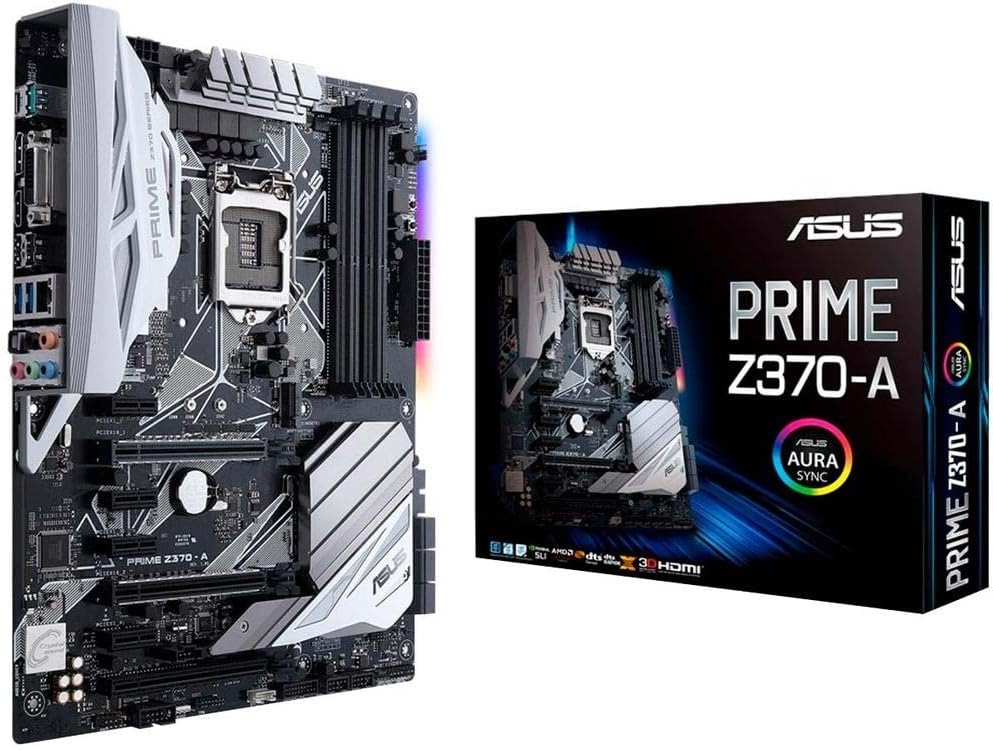
The ASUS Prime Z370-A brings premium features like Thunderbolt 3 support and dual M.2 slots to the mid-range market. It is designed for users who want modern connectivity without a premium gaming board price.
We may earn a commission when you buy through this link, at no additional cost to you.
Its 5-Way Optimization automatically tailors your system for cooling and overclocking, while AURA Sync allows you to match RGB lighting across compatible components in your build.
The Realtek S1220A audio codec ensures warm and immersive sound quality which is ideal for gaming and media consumption. However, the higher price point might stretch budgets for casual users.
This motherboard is recommended for those who value aesthetics and connectivity. It balances high-end features with reliability, making it a strong contender for a custom PC build.
Thunderbolt 3 support allows for rapid data transfer and connects to high-resolution displays or external storage devices.
Japanese capacitors and dedicated audio drivers deliver clear and rich sound for an enhanced multimedia experience.
We may earn a commission when you buy through this link, at no additional cost to you.
The Gigabyte Z370 AORUS Gaming 7 is packed with enthusiast features like triple M.2 slots and Killer E2500 gaming network. It targets serious gamers and power users who want maximum connectivity options.
We may earn a commission when you buy through this link, at no additional cost to you.
RGB FUSION provides multi-zone lighting control, while the front USB 3.1 Gen 2 Type-C header offers modern connectivity for case-mounted devices. The board supports SLI for multi-GPU setups.
The ESS Sabre DAC ensures high-fidelity audio output, making it a strong choice for streamers and audiophiles. However, the extensive features come with a complex BIOS and heavy software requirements.
This board is best for advanced users who need all the bells and whistles. It offers robust hardware quality and extensive customization options for a high-end gaming rig.
Three M.2 slots allow you to install multiple high-speed NVMe SSDs without occupying PCIe slots.
Killer E2500 prioritizes gaming traffic to reduce latency and ensure a smooth online experience.
We may earn a commission when you buy through this link, at no additional cost to you.
The GIGABYTE Z390 UD is built with mining in mind, offering 6 PCIe slots and Above 4G Decoding. It supports both 8th and 9th Gen Intel Core processors for broad compatibility.
We may earn a commission when you buy through this link, at no additional cost to you.
Its 10+2 Phases digital PWM design provides stable power delivery for CPU operations. Smart Fan 5 features multiple sensors to manage temperatures efficiently across the system.
While primarily marketed for mining, its robust build and multiple slots also make it suitable for multi-GPU rendering rigs. The aesthetics are minimal, focusing on function over form.
This board is ideal for users who need extensive GPU support at a reasonable cost. It delivers reliable performance for heavy workloads and parallel processing tasks.
Designed to support multiple GPUs simultaneously, making it a go-to choice for cryptocurrency mining operations.
Smart Fan 5 allows precise control over fan speeds to keep temperatures low without unnecessary noise.
We may earn a commission when you buy through this link, at no additional cost to you.
The ASUS TUF Z370 Plus Gaming emphasizes durability with military-grade components like TUF Chokes and Capacitors. It is built to withstand rigorous conditions and offers a solid foundation for gaming systems.
We may earn a commission when you buy through this link, at no additional cost to you.
With a 5-Year warranty, this board signals confidence in its longevity. TUF LANGuard protects against network surges while dual M.2 slots provide fast storage options for modern systems.
Its design is rugged and stylish with AURA Sync lighting to match your case. While slightly more expensive, the protection and warranty justify the investment for critical builds.
This board is perfect for users who prioritize reliability and long-term value. It combines protection features with gaming aesthetics for a balanced and robust product.
TUF components and LANGuard ensure your system remains stable and protected against hardware stresses and electrical issues.
Dual M.2 slots enable high-speed data transfer for games and applications to load faster.
We may earn a commission when you buy through this link, at no additional cost to you.
The ASUS PRIME Z370-P offers a balanced mix of features and affordability. It supports dual M.2 slots and includes Safe Slot Core to protect your GPU slots from damage during heavy lifting.
We may earn a commission when you buy through this link, at no additional cost to you.
FanXpert 4 Core with AIO Pump Header delivers advanced cooling control to ensure your system stays quiet and cool. The USB 3.1 Gen 2 ports provide fast data transfer for external drives.
While it may lack the flashy RGB of higher-end models, it focuses on functionality and reliability. This makes it a great pick for budget-conscious builders who still need modern features.
This board is recommended for standard builds where performance and durability are key. It delivers the essentials without unnecessary extras, making it a practical and cost-effective choice.
Safe Slot Core prevents bending or breaking of PCIe slots when installing heavy graphics cards.
USB 3.1 Gen 2 ports allow you to move large files quickly between your PC and external storage.
We may earn a commission when you buy through this link, at no additional cost to you.
The Gigabyte Z370 HD3 is a straightforward board that covers all the basics for a Z370 build. It features a PCIE Gen3 x4 M.2 connector for fast SSDs and supports 2 Way Crossfire for dual GPUs.
We may earn a commission when you buy through this link, at no additional cost to you.
With standard HDMI output and reliable Intel LAN, it ensures connectivity without complexity. The Realtek ALC892 Codec provides decent audio for daily use and light gaming scenarios.
This board is an excellent choice for entry-level users or those building office PCs that need slight gaming capabilities. It avoids extra features that might complicate the build or increase cost.
This option is ideal for those who want a no-fuss board that simply works. It is reliable and offers good value for simple system builds without extra frills.
Designed to deliver stable performance for everyday tasks without requiring technical expertise or complex setups.
Standard HDMI and LAN ports ensure easy connection to monitors and wired networks without extra adapters.
We may earn a commission when you buy through this link, at no additional cost to you.
The ASRock Z370 EXTREME4 offers impressive connectivity with both Type-A and Type-C USB 3.1 Gen2 ports. This makes it a versatile choice for users needing rapid data transfer and modern device support.
We may earn a commission when you buy through this link, at no additional cost to you.
With four DDR4 slots and HDMI output, it provides strong memory expansion and video capabilities. It supports 8th Gen Intel Core processors, ensuring compatibility with a wide range of CPUs.
While ASRock is less common than ASUS or MSI, this board delivers solid performance at a competitive price. The extensive USB options are particularly valuable for peripheral-heavy setups.
This board is perfect for users who need a variety of USB ports without spending on a premium motherboard. It combines practical connectivity with standard features well.
Having both Type-C and Type-A Gen2 ports ensures you can connect the latest peripherals without adapters.
Four DDR4 DIMM slots allow you to add up to 64GB of memory for multitasking needs.
We may earn a commission when you buy through this link, at no additional cost to you.
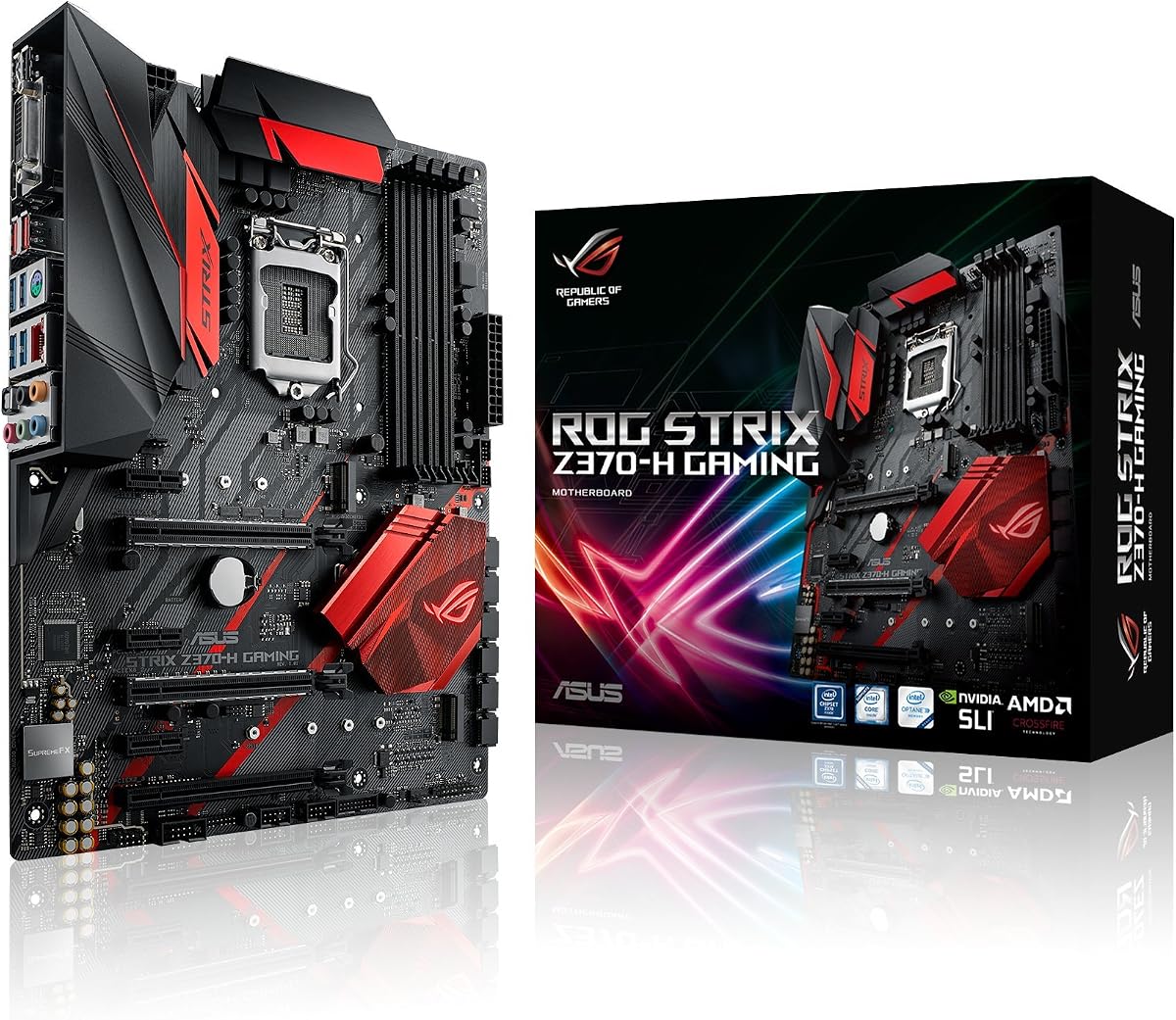
The ASUS ROG Strix Z370-H is a dedicated gaming motherboard with strong power delivery and extensive connectivity. It supports 64GB DDR4 memory and offers multiple USB 3.1 ports for gaming peripherals.
We may earn a commission when you buy through this link, at no additional cost to you.
Its ATX form factor ensures compatibility with standard cases while providing enough slots for expansion. The 3-Year warranty offers peace of mind for those investing in a high-performance gaming rig.
With a focus on gaming aesthetics and performance, this board stands out for streamers and competitive gamers. However, the software suite can be heavy and require updates to run smoothly.
This board is best for users who want a gaming-focused build with reliable support. It balances performance features with durability to deliver a premium experience.
Optimized for gaming with fast connectivity and durable components to handle long sessions.
Backed by a solid 3-year warranty that ensures long-term reliability and manufacturer support.
We may earn a commission when you buy through this link, at no additional cost to you.
Selecting the right Z370 motherboard involves evaluating several critical factors that affect performance, durability, and future upgrades. This guide breaks down the most important aspects to help you make an informed decision.
Ensure the motherboard supports the LGA1151 socket required for 8th and 9th Gen Intel Core processors. Without this, your CPU will not fit or function correctly with the board.
Always verify that the specific Z370 board supports your exact CPU model to avoid compatibility issues during installation.
Z370 motherboards typically support DDR4 RAM. Look for boards with four DIMM slots to allow for up to 64GB of memory which is crucial for multitasking.
Check the maximum supported speed to ensure your RAM modules will perform at their optimal potential without throttling.
Consider the number and type of PCIe slots available. This is important if you plan to add multiple graphics cards or expansion cards like capture cards.
Boards with more PCIe slots offer greater flexibility for future upgrades or specialized hardware additions.
Modern systems rely on M.2 slots for NVMe SSDs which provide significantly faster data transfer rates than SATA drives. Look for boards with at least one or two M.2 slots.
More M.2 slots allow you to install multiple high-speed drives for operating systems and large game libraries.
The VRM (Voltage Regulator Module) determines how much power is delivered to the CPU. A board with a robust VRM design ensures stable performance and better overclocking headroom.
Higher-end boards often have more power phases which reduce heat and improve stability under load.
Look for boards with Gigabit LAN or better for stable internet connectivity. Additionally, ensure there are enough USB ports including Type-C for your peripherals.
USB 3.1 Gen2 ports provide faster transfer speeds for external drives and devices compared to older USB standards.
If you are an audiophile, look for boards with high-quality codecs and dedicated capacitors. Many boards now include RGB lighting which can enhance the aesthetic appeal of your build.
Ensure the motherboard supports synchronization software to control lighting effects across all your compatible components easily.
A board with a long warranty period indicates manufacturer confidence in its build quality. Check for features like Safe Slots and durable capacitors that extend the board's lifespan.
Warranty coverage provides protection against defects and ensures you can replace the board if it fails prematurely.
When installing the motherboard, always ground yourself to avoid static electricity that can damage sensitive components. Follow the layout guide in the manual to connect power cables and front panel wires correctly.
After installation, update the BIOS immediately to ensure compatibility with your CPU and RAM. Download the latest drivers for audio and network from the manufacturer's website for optimal performance.
Regularly clean dust from the fans and slots using compressed air to prevent overheating. Proper airflow and maintenance extend the life of your motherboard and connected hardware.
Z370 motherboards are designed for Intel's 8th Generation Core processors with the LGA1151 socket. Some models may support 9th Gen processors via a BIOS update but compatibility varies by manufacturer and specific board model.
No, Z370 motherboards support DDR4 memory only. DDR5 is supported on much newer platforms like Z690 and Z790 chipsets which are designed for 12th Gen Intel Core processors or later.
Yes, many Z370 boards support mining but specialized boards like the ASUS Prime Z390-P offer more PCIe slots specifically for multi-GPU mining rigs. Ensure your power supply is adequate for multiple graphics cards.
M.2 slots are used for compact storage drives like NVMe SSDs directly on the motherboard. PCIe slots are used for expansion cards such as graphics cards or network cards requiring a physical card insert.
RGB lighting is purely aesthetic and does not affect performance. Choose a board with RGB if you want customizable lighting effects but budget boards without RGB can perform just as well for gaming and work.
A warranty provides protection against manufacturing defects and failures. Most reputable brands offer 3 to 5-year warranties which can save you significant money if the board fails within that period.
Download the latest BIOS file from the manufacturer's website and place it on a USB drive. Enter the BIOS setup during boot and use the EZ Flash tool to update the firmware safely.
Yes, Z370 motherboards support overclocking of both CPU and RAM. However, ensure your cooling system is adequate and use the manufacturer's software to adjust settings safely.
We hope this guide has helped you understand the key differences between the best Z370 motherboards available in the market. Whether you need budget-friendly options or premium features there is a board to suit every need.
Prioritize your specific requirements like memory capacity or connectivity when selecting a board. A well-chosen motherboard ensures stability and performance for your entire PC build.
Prices for these models fluctuate regularly so check current offers before purchasing. This guide serves as a foundation for your decision but always verify current specs before buying.