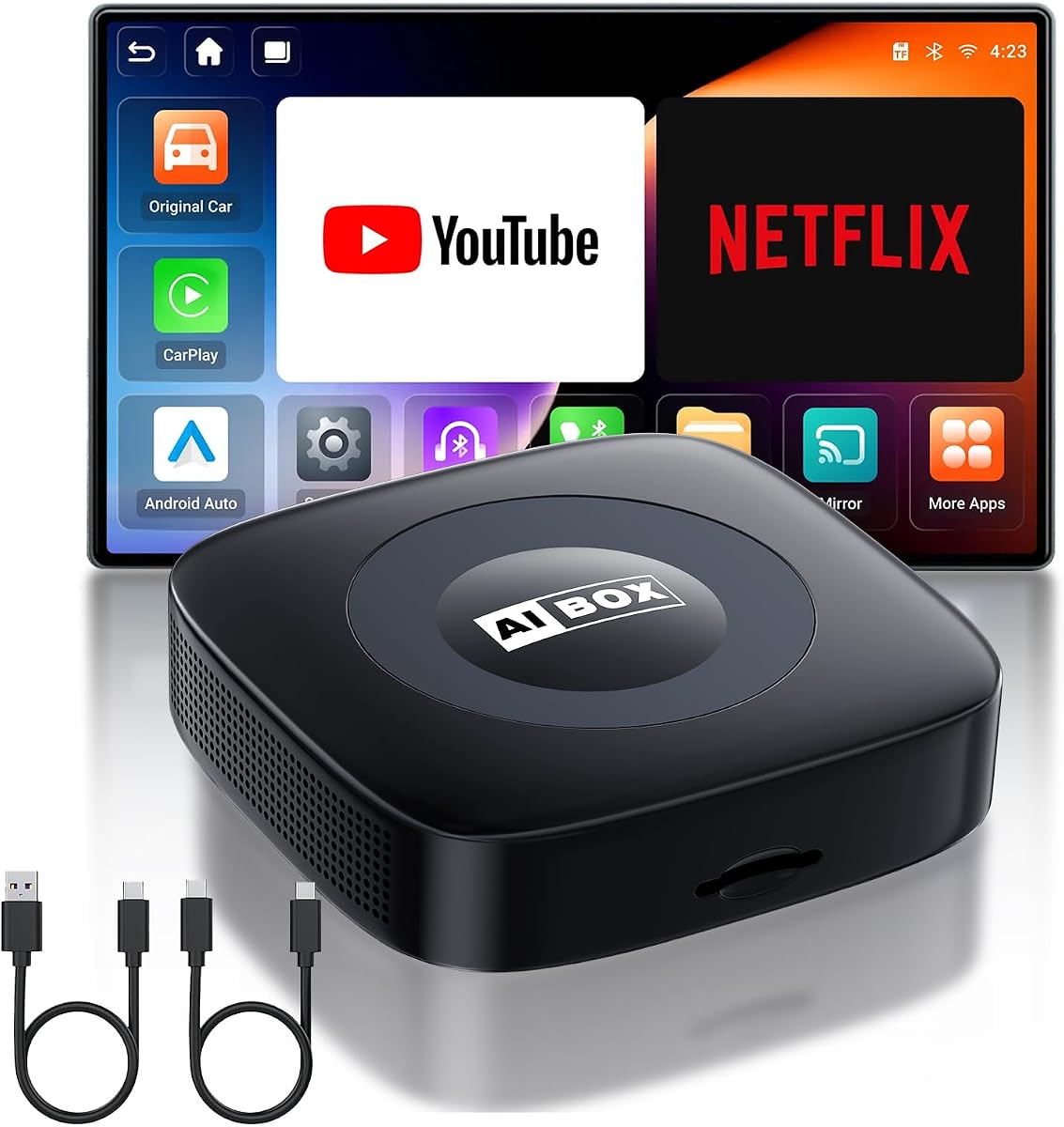
AI Box Carplay 2026
5.0Editor score
WiFi 6 Support
Quad-Core Chip
Affordable Price
This expert guide compares the top ten Carplay Box with Google Play devices for 2026, evaluating performance, connectivity, and entertainment features to help
Transform your vehicle into a smart entertainment hub with a Carplay Box with Google Play. These devices convert wired systems into wireless hubs, allowing seamless access to apps like Netflix and YouTube. Choosing the right one enhances safety and convenience while driving.
We evaluated ten top-rated adapters based on connection stability, app availability, and build quality. Each model was assessed for compatibility with factory wired CarPlay systems and its ability to support Android Auto as well. Our analysis highlights the strengths of every option available.
Each selection in this list showcases unique features tailored to different driving needs. From budget-friendly models to premium options with AI assistants, there is a solution for every driver. Please note that product availability and pricing may change frequently on retail platforms.
5.0Editor score

4.7Editor score

5.0Editor score
This side-by-side comparison outlines the key specifications and capabilities of the ten leading Carplay Box with Google Play devices currently on the market. Use this table to quickly identify which model aligns best with your vehicle requirements and entertainment preferences.


This AI Box Wireless CarPlay Adapter transforms your factory wired system into a fully wireless entertainment hub. It features a complete Android system with access to the Google Play Store, allowing you to download any app you prefer. Users praise its ability to mirror phone screens seamlessly for presentations or photos.
We may earn a commission when you buy through this link, at no additional cost to you.
The standout feature is the built-in Play Store which gives you unlimited app options beyond pre-loaded choices. It supports YouTube and TikTok directly on the car screen. The screen mirroring capability works with minimal latency ensuring a smooth experience when sharing content with passengers.
While video playback is restricted to when the car is parked to comply with laws, this is a standard safety feature. The device does not support BMW or Tesla models which limits some users. However for most Toyota and Honda owners will find it perfectly compatible.
This device is ideal for drivers who want maximum flexibility with app selection. It is recommended for those who value a genuine Android experience over limited proprietary systems. The auto-connect feature ensures you start every drive without hassle.
Access the full Google Play Store to download any navigation music or entertainment app directly on your car screen.
Cast photos videos or documents from your phone to the car display with one tap for easy sharing.
We may earn a commission when you buy through this link, at no additional cost to you.
The LAMTTO adapter stands out with its Gemini AI integration allowing hands-free interaction for trips and reminders. It offers 4GB of RAM which provides ample room for multitasking between navigation and streaming. The HDMI output lets you connect external displays for back-seat entertainment.
We may earn a commission when you buy through this link, at no additional cost to you.
Its dual-band WiFi setup allows you to run CarPlay and streaming apps simultaneously without interference. This makes it possible to navigate while passengers watch videos on a separate screen. The 32GB storage ensures you have space for multiple apps and downloads.
However the user rating is lower than competitors which suggests some stability issues. Periodic cache clearing is recommended to maintain smooth performance. It is best for users who prioritize AI features and rear-seat entertainment options.
This device is suitable for families who need robust multitasking capabilities. The AI co-pilot feature adds a unique layer of convenience for road trips. Ensure you have a strong hotspot connection for best results.
Use voice commands to plan trips and find stations without taking your hands off the wheel.
Keep navigation connected while streaming on a second channel for uninterrupted driving and entertainment.
We may earn a commission when you buy through this link, at no additional cost to you.
The AI Box Carplay 2026 offers incredible value with its affordable price and modern specs. It runs on Android 13 and includes WiFi 6 for faster transmission. The compact size keeps your dashboard clean without adding clutter to your space.
We may earn a commission when you buy through this link, at no additional cost to you.
Despite its lower cost it features a quad-core processor that handles daily tasks efficiently. The three-year warranty provides peace of mind for long-term use. It supports both iPhone and Android devices with easy switching between systems.
The main trade-off is the 2GB RAM which may limit heavy multitasking compared to premium models. It is still sufficient for most streaming and navigation needs. This model is perfect for budget-conscious drivers who want modern tech.
Choose this if you want a reliable wireless upgrade without a high price tag. The stability and speed exceed standard wireless adapters. It is a safe choice for first-time AI box buyers.
Enjoy stronger signal and faster transmission speeds with the latest WiFi 6 protocol.
Get protected with a comprehensive three-year warranty and reliable after-sales support.
We may earn a commission when you buy through this link, at no additional cost to you.
This premium adapter delivers a high-end experience with an 8-core Qualcomm platform and Android 13. It includes a 4G Nano SIM card allowing offline connectivity without a hotspot. The ScenePilot ecosystem adds unique features like trip logging and privacy locks.
We may earn a commission when you buy through this link, at no additional cost to you.
It unlocks a full Android AI Box experience beyond standard CarPlay. The SSRadio app gives access to thousands of online stations for variety. The privacy features are excellent for shared vehicles where security matters.
The higher price point may be prohibitive for some buyers. Setup can be complex compared to plug-and-play alternatives. It is best for tech enthusiasts who want the absolute best performance.
Select this for a smart hub that feels like a dedicated device. The LTE connectivity ensures you are never without data. It justifies the cost with advanced features.
Connect via 4G Nano SIM to stream without relying on your phone hotspot.
Use Bluetooth Lock to protect personal accounts when leaving the vehicle.
We may earn a commission when you buy through this link, at no additional cost to you.
The AI Box CarPlay 3-in-1 is built with a durable aluminum alloy that dissipates heat efficiently. It uses dual-band WiFi for stable connections without lag. The box comes pre-loaded with popular streaming apps for immediate use.
We may earn a commission when you buy through this link, at no additional cost to you.
Its compact design withstands extreme temperatures ranging from -20 to 60 degrees. The zero latency feature ensures audio and video stay perfectly synced. USB playback allows offline media via TF cards for weak signal areas.
It lacks HDMI output which limits external display options. The apps are pre-installed but can be expanded with storage. This is a solid choice for those needing reliable connectivity.
This unit is ideal for daily drivers seeking stability and durability. The build quality ensures longevity compared to plastic alternatives. It is a trustworthy option for OEM systems.
The aluminum build keeps the device cool even during long streaming sessions.
Use USB drives or TF cards to play videos when internet is unavailable.
We may earn a commission when you buy through this link, at no additional cost to you.
This 2026 upgraded Magic Box 3.0 is incredibly compact yet powerful. It supports 5G WiFi and Bluetooth 5.0 for fast pairing. The HDMI output lets you connect projectors or outdoor screens easily.
We may earn a commission when you buy through this link, at no additional cost to you.
It combines wireless CarPlay and Android Auto in one sleek device. The refined exterior design looks neat and takes up minimal space. It is a modern choice for those wanting the latest tech.
As a newer model it has fewer user reviews to reference. The warranty covers two years which is standard. It is great for outdoor entertainment setups.
Pick this for a neat setup that handles multiple video outputs. The 5G WiFi ensures smooth streaming. It is a versatile box for various scenarios.
Connect to projectors or monitors via HDMI for camping or backyard shows.
Benefit from 5G WiFi and Bluetooth 5.0 for the fastest connections.
We may earn a commission when you buy through this link, at no additional cost to you.
This LAMTTO adapter offers a 4-in-1 smart AI box experience. It includes Gemini AI for hands-free stories and reminders. The dual-band WiFi ensures smooth multitasking for navigation and videos.
We may earn a commission when you buy through this link, at no additional cost to you.
USB offline playback allows music and videos even without internet. It works well with steering wheel buttons for seamless control. The box transforms older cars into modern cockpits.
The AI features are best when parked or in safe conditions. It requires a hotspot for online streaming. It is a great option for commuters.
Choose this for hands-free convenience and reliable offline capabilities. The integration with car controls is smooth. It is a practical daily drive tool.
Wake the AI to play stories or jokes while driving hands-free.
Use USB drives to play media when there is no mobile signal.
We may earn a commission when you buy through this link, at no additional cost to you.
This 5-in-1 adapter supports wired and wireless CarPlay and Auto modes. It features built-in Netflix and YouTube for instant entertainment. The TF card slot supports up to 256GB for offline content.
We may earn a commission when you buy through this link, at no additional cost to you.
The 4.2GHz processor guarantees lag-free streaming for daily use. It works with over 800 car models after 2016. Easy setup ensures you start enjoying it quickly.
Note that you cannot run CarPlay and streaming simultaneously. Ensure Bluetooth is off when setting up hotspots. It is a versatile choice for families.
Select this for maximum compatibility and offline media options. The processor speed is impressive for the price. It is a solid upgrade for many cars.
Switch between wired and wireless CarPlay and Auto as needed.
Expand storage up to 256GB for movies and music offline.
We may earn a commission when you buy through this link, at no additional cost to you.
This Magic Video Box focuses on streaming with built-in Netflix and YouTube. It uses a 4.2GHz processor for smooth playback. The TF card slot supports up to 256GB for offline movies.
We may earn a commission when you buy through this link, at no additional cost to you.
It converts your wired CarPlay to wireless for cable-free convenience. The auto-connect feature reconnects your phone instantly on start. It works with over 800 car models.
You cannot download other apps but the built-in ones work well. The rating is lower but functional for basic needs. It is a good value for video watchers.
Choose this for simple and direct streaming access. The TF card support is key for travelers. It is an affordable option.
Connect to hotspot and start watching movies immediately.
Store movies on TF cards for no-signal zones.
We may earn a commission when you buy through this link, at no additional cost to you.
The CarlinKit box supports SIM card insertion for direct internet. It runs Android 13 with 64GB storage for apps. The 8-core system ensures fast performance.
We may earn a commission when you buy through this link, at no additional cost to you.
It supports voice input and Bluetooth phone functions for safety. The Bluetooth improvements ensure seamless connections. It is an intelligent travel experience.
You must insert a SIM card for full features which adds cost. It works only with touchscreen cars. It is a premium choice for connectivity.
Select this for independent internet access without hotspots. The storage is ample for many apps. It is a powerful device.
Insert a SIM card for data access without phone tethering.
Use voice input for safer navigation and app control.
We may earn a commission when you buy through this link, at no additional cost to you.
Selecting the right Carplay Box with Google Play requires careful consideration of your vehicle and needs. This guide helps you evaluate key factors to ensure optimal performance.
Ensure your car has a factory wired CarPlay or Android Auto system. Most boxes work with models from 2016 onwards. Check specifically for BMW or Tesla exclusions.
Verify your car system before purchasing to avoid return issues.
Look for dual-band WiFi and Bluetooth 5.0 for stable connections. Higher WiFi versions like WiFi 6 offer faster speeds.
Dual WiFi channels allow navigation and streaming simultaneously.
Modern boxes run Android 13 for better app support and security. Newer OS versions ensure compatibility with current apps.
Android 13 is the standard for 2026 models.
Aim for at least 4GB RAM for smooth multitasking. 32GB or 64GB storage allows more apps and downloads.
Higher specs reduce lag when switching apps.
Some boxes include a SIM slot for independent data. This removes reliance on phone hotspots.
Useful for long trips or remote areas.
Aluminum builds dissipate heat better than plastic. Ensure the box is compact for dashboard placement.
Durable materials ensure longevity in varying temperatures.
Check for TF card or USB slots for offline media. Essential for areas with poor signal.
Allows entertainment without internet connection.
Look for at least a one-year warranty. Some offer three years for added security.
Good warranty ensures support for any connection issues.
Begin by plugging the box into your car's USB port. Follow the on-screen setup instructions to pair via Bluetooth. Ensure your car settings have CarPlay enabled.
Connect to a mobile hotspot or insert a SIM card for internet. Download apps from the Play Store. Avoid using video while driving to stay safe.
Clean the device with a soft cloth. Ensure vents are clear for heat dissipation. Restart the box if you experience lag or glitches.
Yes, most models require a hotspot or internet connection. Some premium boxes support SIM cards for standalone data. Ensure your carrier plan supports tethering.
No, video playback is restricted to when the car is parked. This complies with safety laws. Always prioritize safe driving practices.
Most boxes do not support Tesla vehicles. Check compatibility before purchase. Some models explicitly state Tesla is not supported.
Use the OTA updates provided in the settings. Ensure the box is connected to WiFi. Automatic updates keep apps current.
4GB RAM is ideal for smooth performance. It allows switching between navigation and apps easily. Higher RAM reduces lag significantly.
Yes, many boxes support TF cards up to 256GB. This allows offline media storage. Check the specific model specs for limits.
These boxes convert wired systems to wireless. You still plug the box into the USB port. It eliminates the need for a phone cable.
Most models support both CarPlay and Android Auto. Check the specs to ensure it works with Android. Some support both seamlessly.
We have reviewed ten top options for Carplay Box with Google Play. From the AI Box Wireless CarPlay Adapter to the 2026 Upgraded models, each offers unique benefits.
Prioritize compatibility and connectivity when making your choice. Ensure the device matches your car system and needs.
Please check current availability and details before purchasing. Product offerings may change frequently on retailer sites.